14
17
15
18
14
15
16
17
18
19
20
21
22
23
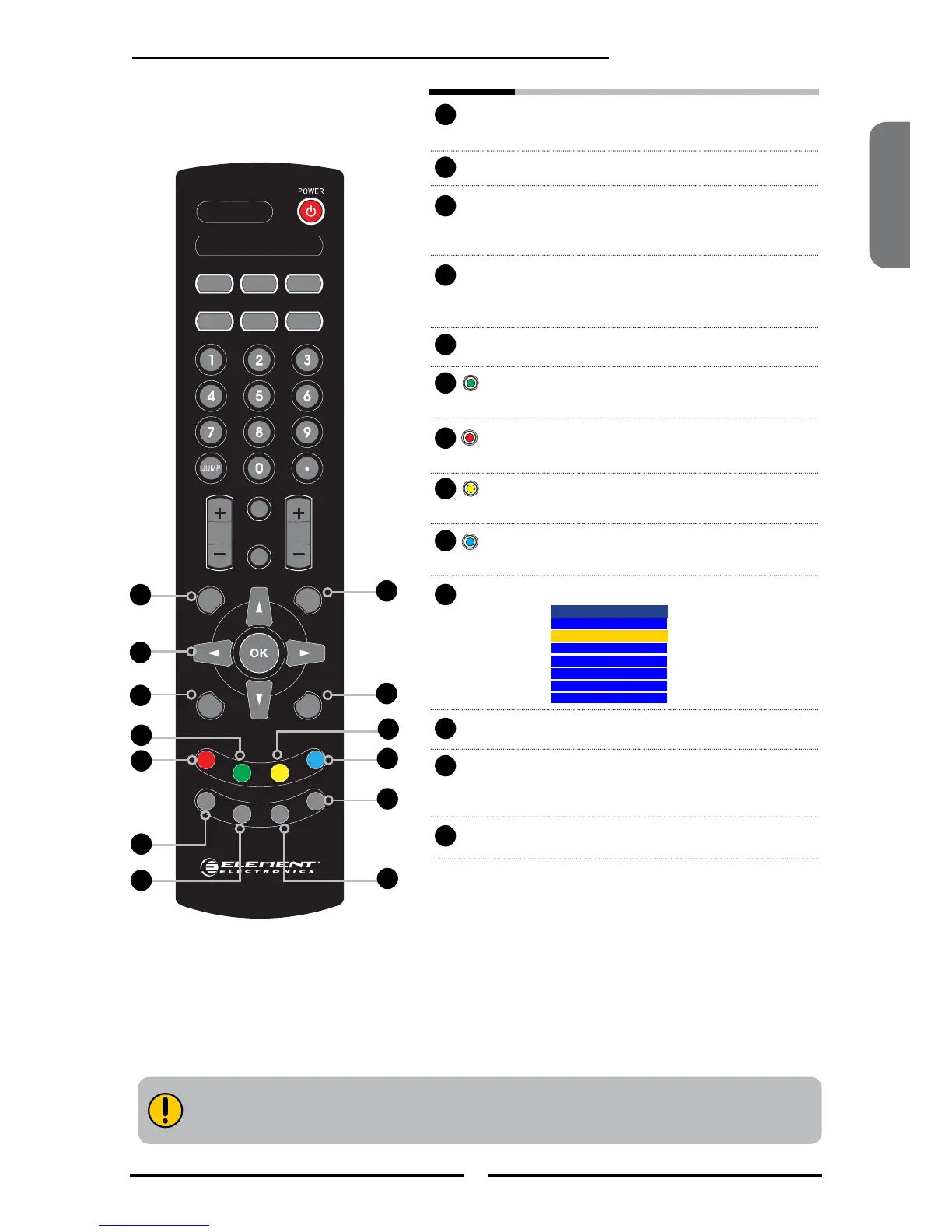
GUIDE Displays the Program Guide on the screen.
Pressing again to turn GUIDE off.
EXIT Exits the OSD menu.
▲▼►◄
Cycles through OSD options and
OK selects individual menu items.
OK conrms option settings.
INFO Pressing repeatedly displays a variety
of information such as the current
channel and the input source.
MENU Displays the OSD menu on the screen.
GREEN In Program Guide, press to select
rst program of next day.
RED In Program Guide, press to select rst
program of previous day.
YELLOW
In Program Guide, press to view previous page
of detailed program description.
BLUE In Program Guide, press to view next page of
detailed program description.
LIST Displays the received channel list
Channel List
7-1 KABC-DT
9-1 KQED-HD
9-2 KOED-SD
8 CCT
12
13
15
FAV.CH Pressing FAV.CH display favorite channels.
FREEZE In TV mode, pressing FREEZE to
freeze the current picture,
press again to restore the picture.
TIMER Displays the current time on the screen.
24
25
26
22
25
24
20
19
26
23
21
16



 To Next Page