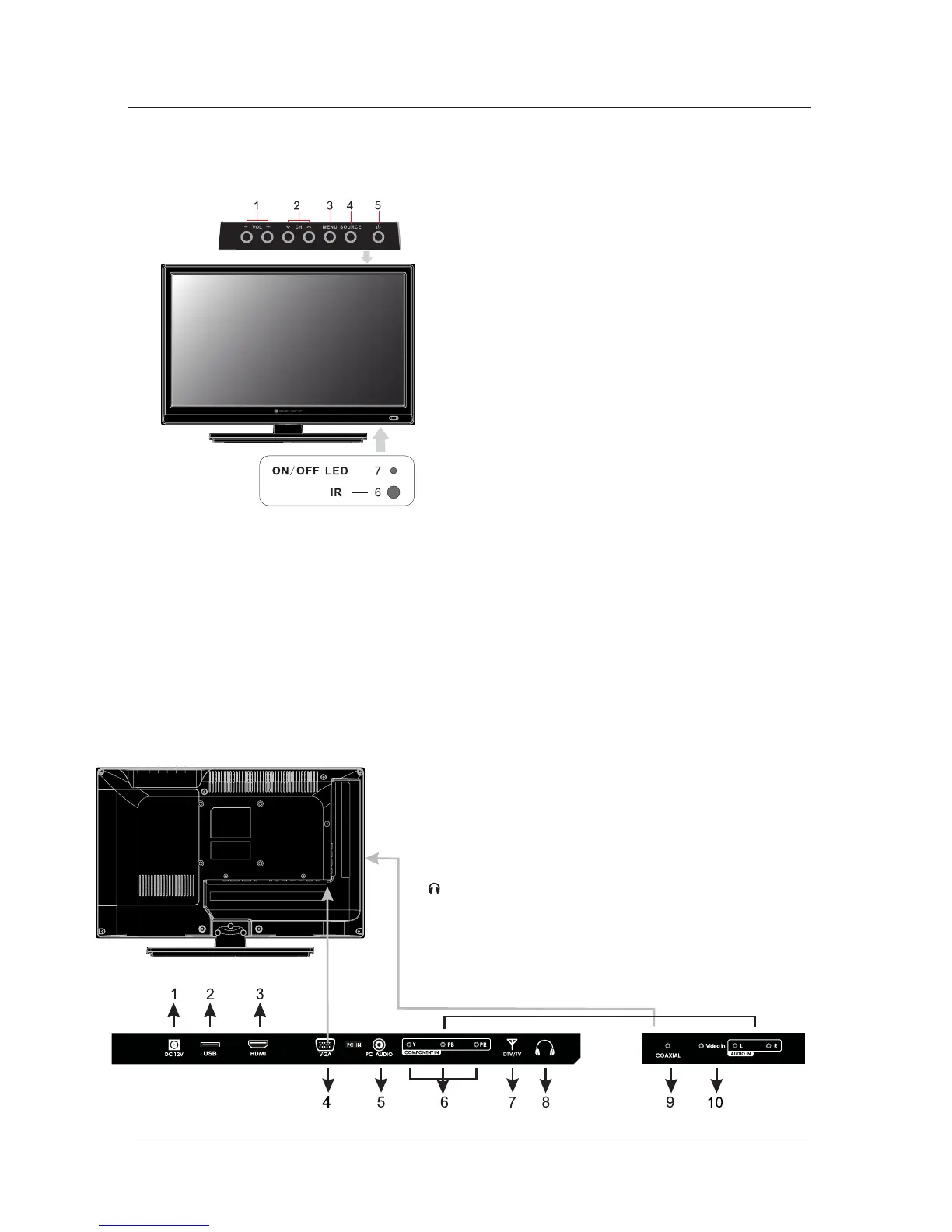
Front View
5.FRONT/BACK CONNECTIONS OF TV
Back View and Control Connections
1.Press“VOL+”or“VOL-”toincreaseordecrease
thevolume.
3.Press“MENU ” tobringupthemainmenuon
the screen.
4. Pres “SOURCE”to select the input source.
6. REMOTE SENSOR: Infrared sensor for the
remote control.
7. POWER INDICATOR: red in standby mode
blue when your TV is turned on.
.
5. Pres“POWER”button to turn the TV on or off.
Shows
Shows
FRONT / BACK CONNECTIONS OF TV
7
10. VIDEO/AUDIO(L/R):Connect the Video Audio output
.jack of DVD or VCR
6. YPbPr/AUDIO/(L/R):Connect the YPbPr/Audio output jack
of DVD or VCR.
7. DTV/TV
:RFinputthatconnectstoyourcableor
VHF/UHF antenna.
4 VGA(PC):Connectstoapersonalcomputer'svideo.
output connector.
5.
AUDIO:(PC)Connectstoapersonalcomputer'saudio
output connector.
9. Coaxial : Connects to the coaxial audio input
of your digital
stereo equipment.
1.DC 12V:12V adapter input.
2.Press“CH ”or“CH ”toscanthroughchannels.
<
<
3. HDMI: HDMI (High-Definition Multimedia Interface)
Provides an uncompressed, all-digital audio/video
Interface between this TV and any HDMI-equipped
A/V equipment. HDMI supports enhanced, or high-
definition video, plus digital audio.
2.USB Port:Update firm wareonly,cannotplay
multimedia files.
8. : Connect to the
.headphone



 To Next Page