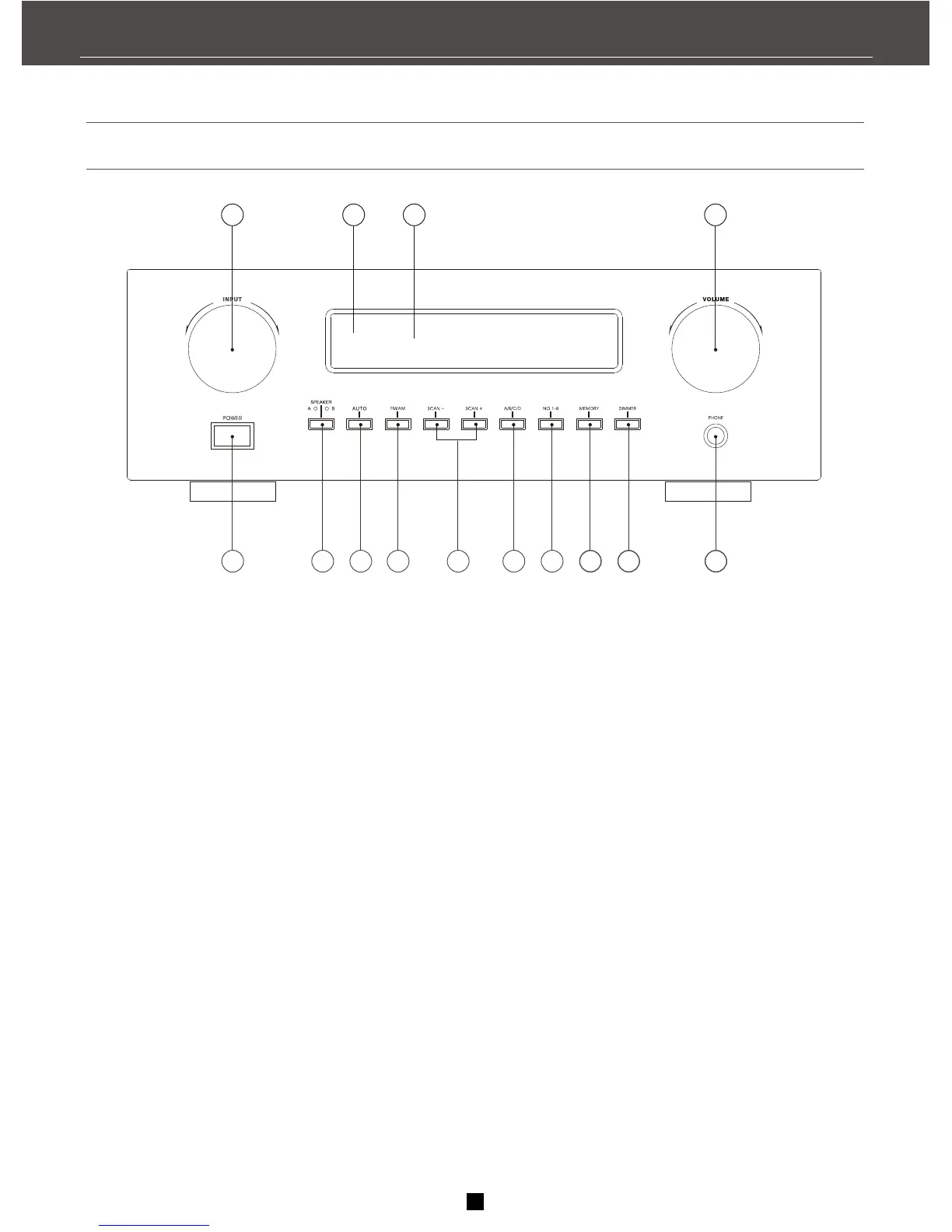
Front panel
1.Input selector
Select the input source you want to listen or watch.
2.Remote control sensor
Shows information about the operational status of
this unit
3.Front panel display
Display a variety of information. e.g. source etc.
4.Volum
Controls the outputs level of all audio channels.
5.Power switch
Press this switch to turn on the power. Press the
switch again to turn off the power.
6. Speaker A/B
7.Auto tuner tuning
Stores a station in the memory. Hold down this
button for more than 3 seconds to start automatic
preset tuning.
8.FM/AM
Switches the reception band between FM and AM
9.Tuning SCAN+,SCAN-
Press the SCAN+ slide the tune to higher
Frequency. Press the SCAN- slide the tune to
lower frequency.
10.A/B/C/D button
Press the button to select a group of preset
stations on the tuning status.
11.Number 1-8 button
Press the button to look for preset station number
on the tuning status.
12.MEMORY button
Use the button to memory stations.
13.DIMMER button
Press the button repeatedly to change
brightness of the display.
14.PHONE jack
Private listening with headphones. When
connect headphones, no signals output from
the speakers.
8
5
6
7
9 10 11
12 13
14
4
3
2
1
8
RECEIVER CONTROLS & FUNCTIONS


 To Next Page