Basic connections
The following steps helps you quickly set up your new receiver. If you have
more electronic devices, consult the table of contents to find the
connecting method.
The wires and color-lighted jacks can assist you.
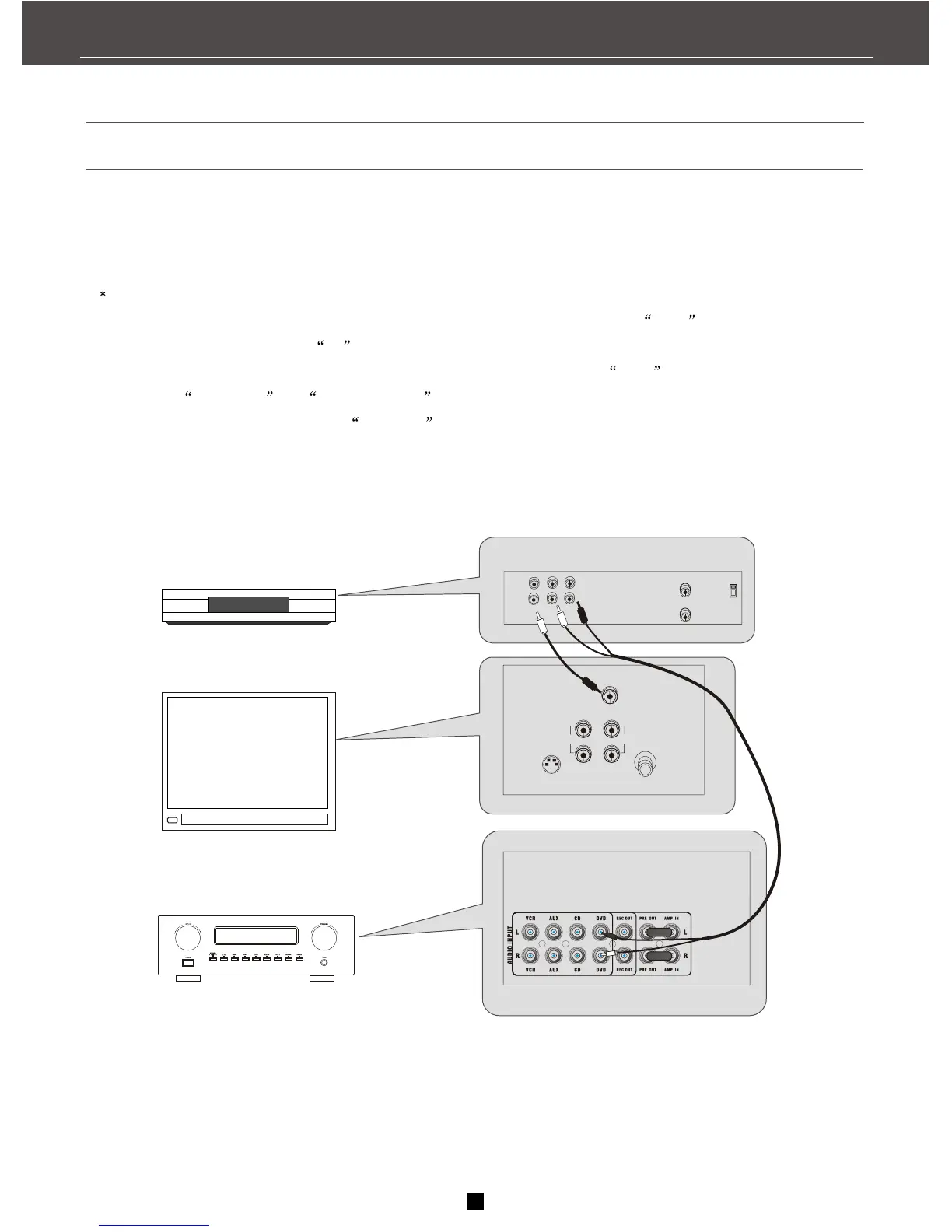
1.Using an audio wire with red and white connectors, connect the audio OUT jack on the back of
your stereo DVD to the audio IN on the back of this unit..
2.Using the video cable with yellow connectors, connect the video OUT on the back of your
DVD to the VIDEO IN or VIDEO INPUT on the back of your TV. If there are multiple video jacks
on the back of your TV, please use VIDEO 1 .
L/
MONO
OUT AUDIO
RIGHT
IN
CABLE/
ANTENNA
VIDEO
INPUT
S-VIDEO
DVD
VIDEO
OUT
IN
R L
IN FROM ANT
OUT TO TV
Ch3
Ch4
AUDIO
RECEIVER
TV
199
4
FIRST THINGS
Correct


 To Next Page