18
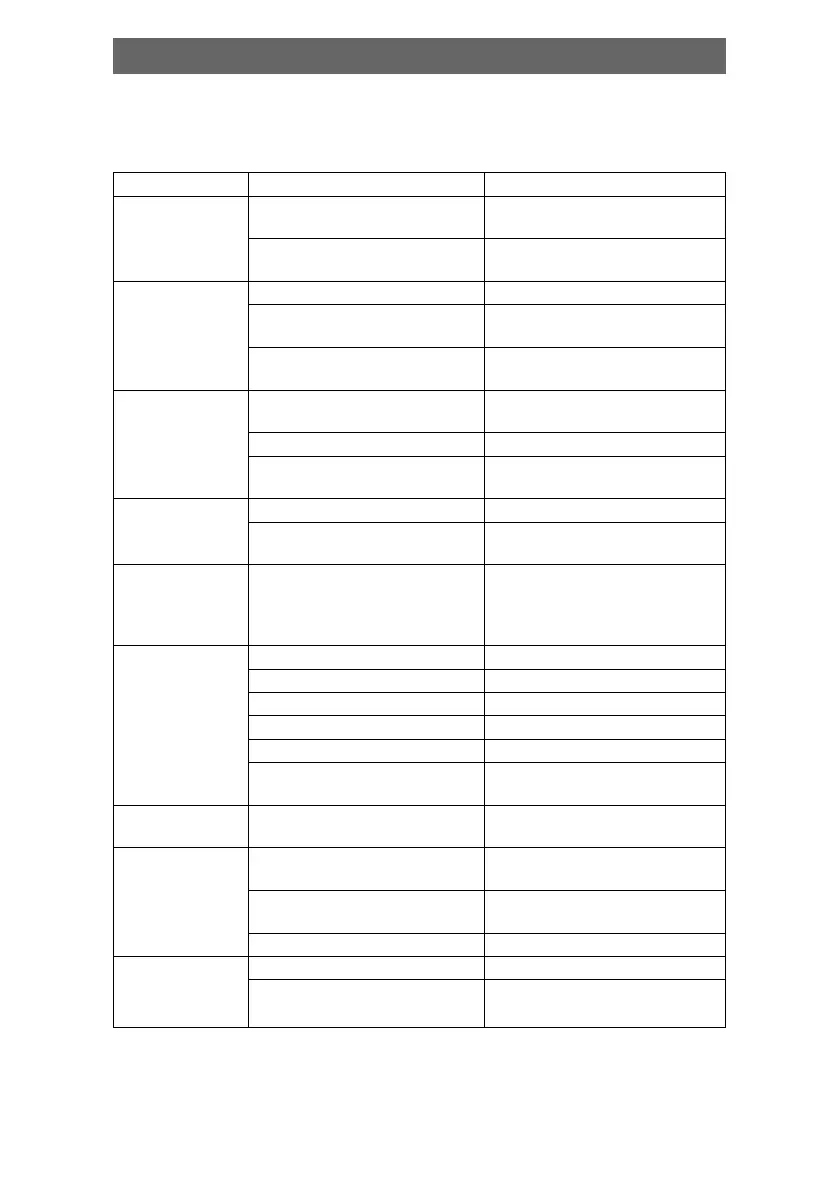
Before resorting to maintenance service, please kindly check by yourself
with the following chart.
Symptom Cause(s) Remedy
No power • The power cord isn’t • Connect the power cord
connected properly
• Fuse melting • Replace a same
specification fuse!
No picture • TV video setup isn’t correct • Select the suitable setup
• The setup mismatch the • Press [V-MODE] until the
real connection picture appear again
• Video cable isn’t • Connect the cable properly
connected well
No sound • Audio cable isn’t • Connect the cable properly
connected well
• Source select incorrect • Switch to the proper source
• Audio setup isn’t correct • Select the suitable audio
setup
Distorted • Dirty disc • Clean the disc
picture
• In fast forward or • Sometimes, the tiny distortion
fast rewind mode appears. It’s normal
Luminance • Anti-copy circuit • Connect the DVD unit to TV
unsteady or influence directly
picture with
noise
Unable to play • Without disc • Put in the disc
• Disc is bad • Clean or replace the disc
• Disc is put upside down • Put the disc properly
• Dirty disc • Clean the disc
• There are menu on TV screen • Use SETUP to turn off menu
• Parental control is working • Set up parental off or
change the setup
Key malfunction • Power wave or other static • Turn on/off the power and
interference. try again.
Remote control • Doesn't work • Point the remote control
Doesn't work at the sensor
• Remote control is too • Operate the remote
far from DVD unit control within 7m
• Batteries are exhausted. • Replace the batteries
Can't locate any • Antenna is not connected • Connect antenna
channels
• Source mode is not • Switch to tuner mode
in tuner mode
in tuner mode
Troubleshooting



 To Next Page