-56-
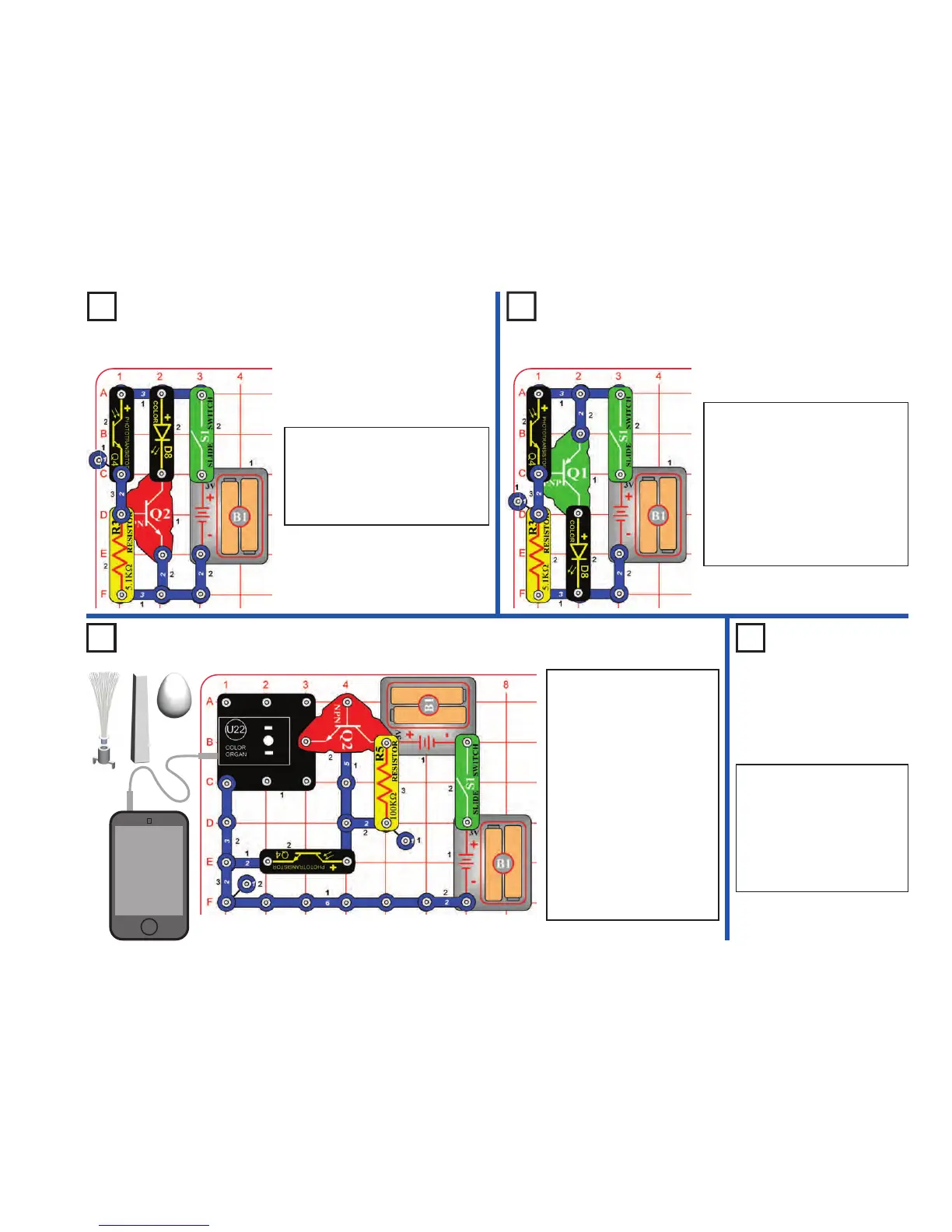
Project 113
Night Blinker
Project 112
Day Blinker
Night Light Show
Project 115
Daylight
Light Show
Use the preceding circuit, but
swap the locations of the
phototransistor (Q4) and the
100kΩ resistor (R5), put the
“+” side of Q4 towards the
NPN transistor (Q2). Now
covering the phototransistor
turns off the light show.
Project 114
MP3
player
Build the circuit as shown and turn
on the switch (S1). The color LED
(D8) is on when there is light on the
phototransistor (Q4). Shine light on
or cover the phototransistor to turn
the color LED on or off.
Build the circuit as shown and turn
on the switch (S1). The color LED
(D8) is off when there is light on the
phototransistor (Q4). Cover or shine
light on the phototransistor to turn
the color LED on or off.
If the color LED comes on too
easily, reduce the sensitivity by
replacing the 5.1kΩ resistor (R3)
with the 100kΩ resistor (R5).
Build the circuit as shown.
Connect a music device (not
included) to the color organ
(U22) as shown, and start
music on it. Place one of the
LED attachments over the
light on the color organ. Turn
on the switch (S1), then cover
the phototransistor (Q4) to
see a light show. Adjust the
volume on your music device
for best light effects.
Replace the 100kΩ resistor
(R5) with the 5.1kΩ resistor
(R3) to make the light
brighter.
LED Attachments












 To Next Page