eClip Full User Guide 12
Settings
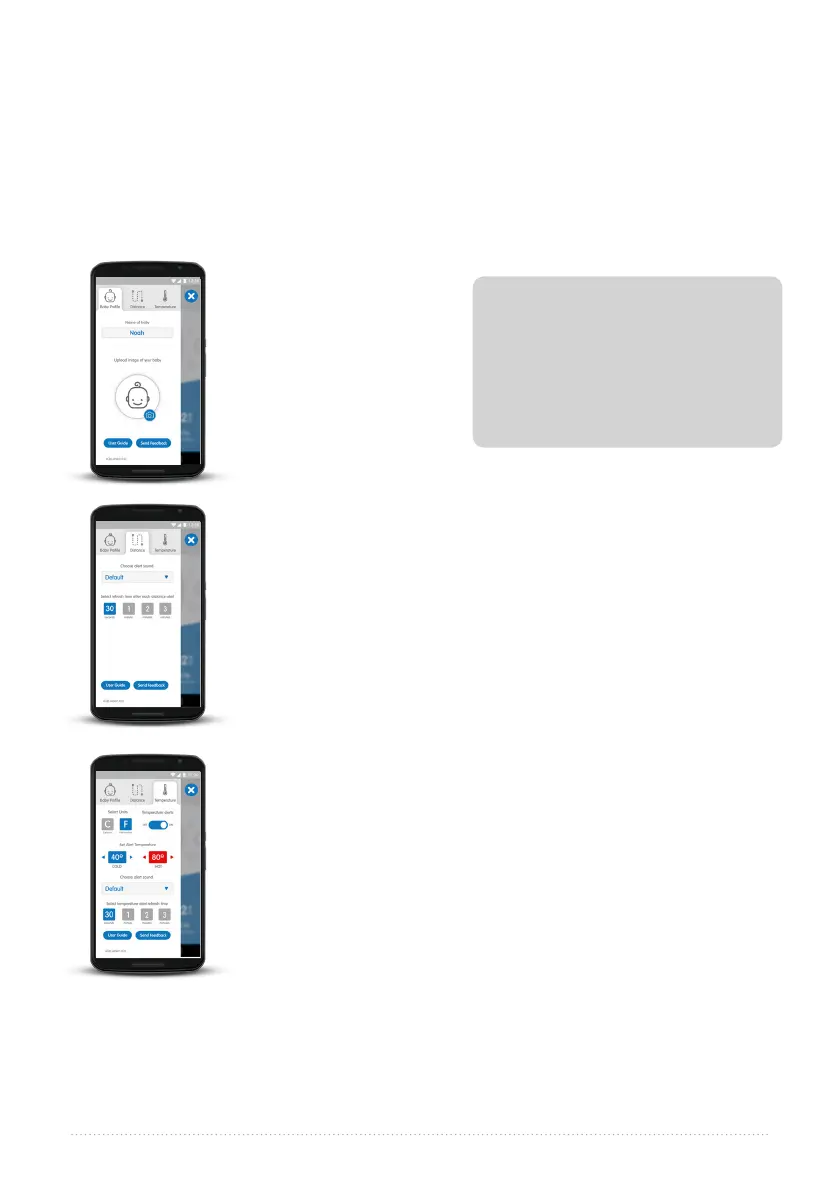
Baby Profile Tab
Distance Alert Tab
Temperature Alert Tab
User Guide:
Feedback:
You can make a number of changes to customize your eClip experience.
Use the Baby Profile
tab to add your
baby’s picture and
name to the eClip
app. It will appear
in every monitoring
screen and alert
screen.
In the Distance Alert tab you can change the default values.
By default, the eClip temperature alerts are disabled. You will,
however, see the temperature on the eClip monitoring screen.
The following temperature alert settings can be changed:
·
Baby Profile Tab
·
Distance Alert Tab
·
Temperature Alert Tab
·
The default eClip alert sound is a voice saying “Did you
forget your baby?” You can change this to any other ring tone
already available on your device.
·
Change the refresh time, between alerts, from thirty seconds
to one, two, or three minutes.
·
Change the default temperature units from ºF to ºC
·
Toggle Temperature Alerts to On to enable audible and visual
temperature alerts
·
Change the low and high temperature alert threshholds
·
Change the alert sound from your smartphone’s default
·
Change the temperature alert refresh time from the default
three minutes to 30 seconds, one minute, or two minutes.
Click the Settings gear icon from any eClip Monitoring screen to see the following tabs:
If the temperature of the
eClip drops below 31ºF / 0ºC then
the app will display <30ºF or <0ºC.
If the temperature of the eClip
increases above 176ºF or 80ºC then
the app will display >176ºF or >80ºC.
Note:
Tap eClip User Guide in any setting screen to view the user guide.
We welcome your comments; please tap the Feedback button at the bottom
of any Settings screen to communicate with us.



 To Next Page