eClip Full User Guide 9
The eClip alert should sound at full volume even if you
have muted your phone. Once you have dismissed the alert the
volume returns to its previous sound setting.
The alert will also sound on full volume even with
ear/headphones
Note:
Note:
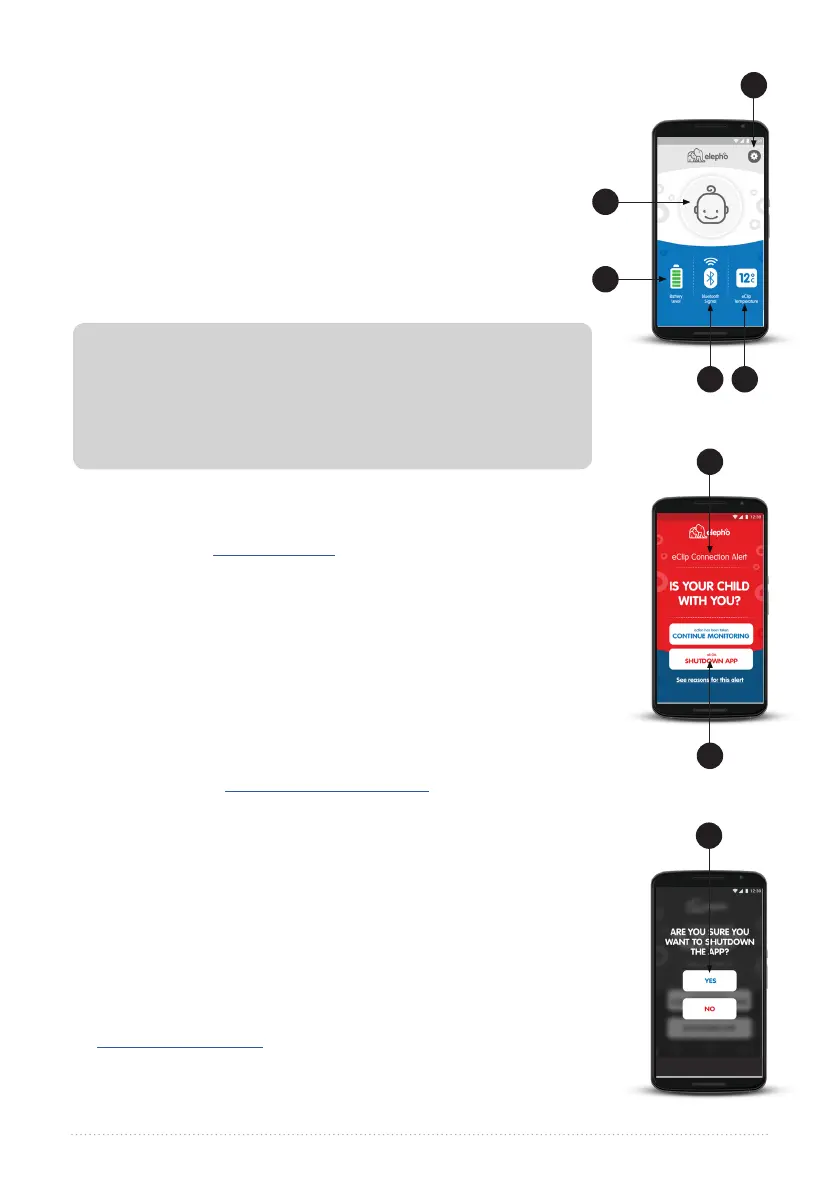
A. Your Baby.
A1. If you take your baby out of the car and walk away, you
should receive a visible and audible alert after about 25 feet
(8 meters) if you didn’t turn off the eClip. Just tap SHUTDOWN
APP and confirm by tapping YES. The eClip automatically turns
off three minutes later.
A2. Just in case you forget your baby you should receive a
visual and audible alert when you go beyond about 25 feet
(8 meters) from the car. Go back to your car and get your baby.
B. Settings. Of course, our baby icon has much less personality than
your baby. See Baby Profile Tab on page 12 for more information
about how to upload a picture and type in your baby’s name to
add another reminder that your baby is onboard with you.
C. Battery Level. Five green bars in the Battery Level icon indicates a
good strong power supply for your eClip. The battery should be
good for about 500 hours of continuous use. Good battery health
is very important, so we recommend that you replace it at least
twice a year: at the start of summer and the start of winter. Always
replace the battery when the Battery Level icon drops to two red
bars, since this low level indicates that power can drain completely
at any time. See Changing the eClip Battery on page 14 for more
information about how to change the battery.
D. Bluetooth Signal. This shows the strength of your communication
signal by the number of green waves. If the signal is lost the radio
waves disappear, the icon turns red and the color of your eClip
LED changes from blue to red. Correct the Bluetooth settings on
your smartphone and tap CONTINUE MONITORING to renew the
connection.
E. Temperature. The eClip app checks the temperature every
few seconds. By default temperature alerts are disabled. See
Temperature Alert Tab on page 12 for information about how to
enable alerts, change the measurement unit, modify the checking
frequency, or define your temperature threshholds.
A
C
E
B
D
A1
A2
A1



 To Next Page