© elero GmbH 10 | EN © elero GmbH EN | 11
Group control unit
A group is understood to mean the control of several receivers
at the same time. The selected group is controlled by a travel
command.
Any number of receivers can be programmed and controlled in the
channel.
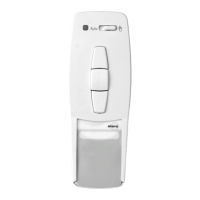
Selection button
Pressing the selection button briey allows you to query the
current mode (automatic/manual) of the programmed receivers
(bidirectional receivers only) and the handheld transmitter channel.
Pressing and holding (for approximately 1 second) the selection
button switches automatic mode o. The operating mode indicator
lights up red. → The receiver now only carries out manual travel
commands and does not respond to automatic travel commands.
Note
Upward travel of the receiver is initiated when the automatic
system is activated.
Pressing and holding (for approximately 1 second) the selection
button switches automatic mode back on. The operating mode
indicator lights up green. → The receivers now execute automatic
and manual travel commands.
Programming the transmitter
Requirement
The receiver is installed. Check whether the channel has been
deleted or is in the correct mode according to the status display.
Stand in front of the curtain to be programmed while programming.
1. Where electrical receivers have already been installed, switch
the circuit breaker o and on again after a few seconds.
The receiver is now in programming mode for about 5 minutes.
2. Press the programming button P on the rear of the device briey
(approximately 1 second) until the status display lights up briey.
The curtain moves up and down for approximately two minutes,
showing that the receiver is in programming mode.
3. Press the UP button as soon as the curtain starts moving in
Open direction (within 1 second at the most). The status display
lights briey.
The curtain stops briey, travels further, stops and then travels in
the downwards direction.
4. Immediately (no more than 1 second) the curtain starts moving
downwards, press the DOWN button. The status display
lights up briey. The curtain stops. The transmitter channel is
programmed.
Note
Programming will have to be repeated if the curtain does not
stop.
A bidirectional programming process in the handheld
transmitter can be cancelled by pressing the STOP button for
6 seconds.
Programming additional transmitters
Note
Where multiple receivers are connected to the same
supply, they are all simultaneously ready for programming for
approximately 5 minutes after connection to the mains.
If the P button is now pressed on the transmitter, all receivers
start the programming mode simultaneously (ascents/
descents). An oset is created between the receivers by
randomly dierent pauses between the ascentsdescents. The
longer programming is delayed, the greater the oset will be.
The brief ascents/descents can be stopped by pressing the
STOP button briey on a transmitter that has already been
programmed. The programming mode in the receiver is
interrupted.


 To Next Page