Page 5 of 13
2.4 IP address
The SMART METER can be operated via dipswitch 1 with a static address 192.168.1.100 (dipswitch 1
ON when switched on). If you are not familiar with IP addresses, then set dipswitch 1 to OFF and
switch on the SMART METER (apply voltage between L1 and N). You can now query the current IP
address via your router.
Please note that the IP address can only be set when the module is without power. The
current settings are only requested once when starting up.
2.5 Current sensors (CT)
Current transformers are required for the SMART METER; direct measurement is not possible!
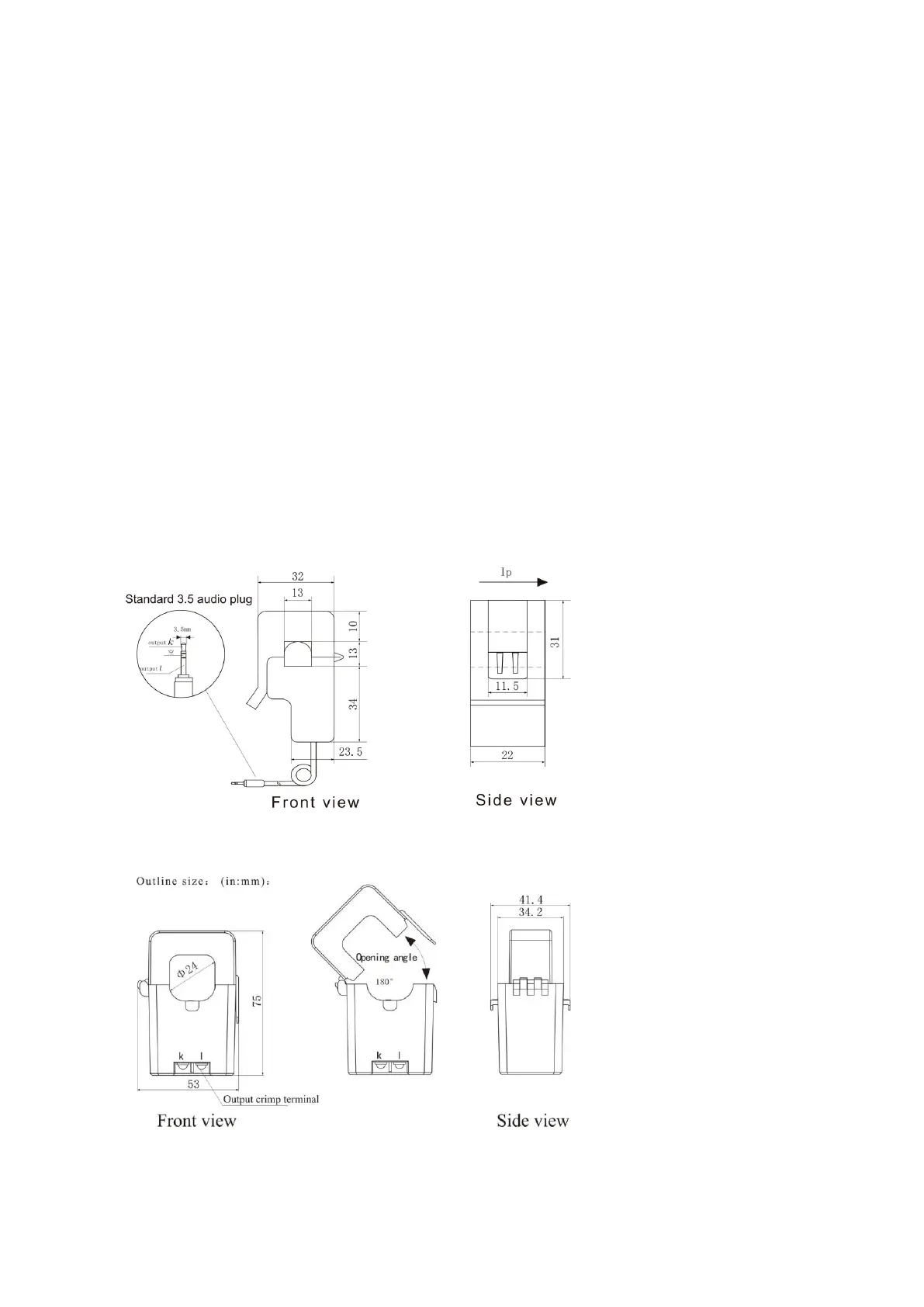
Depending on your SMART METER version, elgris folding converters with 100 A or 400 A can be used,
which have an integrated cable of around 1 meter in length and a 3.5 mm plug.
By default, the arrow on the blue 100 A folding converter must point to the network for a positive
value (consumption). If the arrow points to the consumer, the feed-in is positive and the
consumption is negative.
2.5.1 Current sensor 100 A dimensions
2.5.2 Current sensor 400 A dimensions


 To Next Page