Page 7 of 13
The default password for the settings is “12345678”
On the Settings Menu select Meter to adjust the CT ratio. The CT ratio is defined as 1: value.
For example, when you have a CT 5:200 the custom CT value is 40.
The CT ratio for the SMART METER with 100 A and 400 A select the right value.
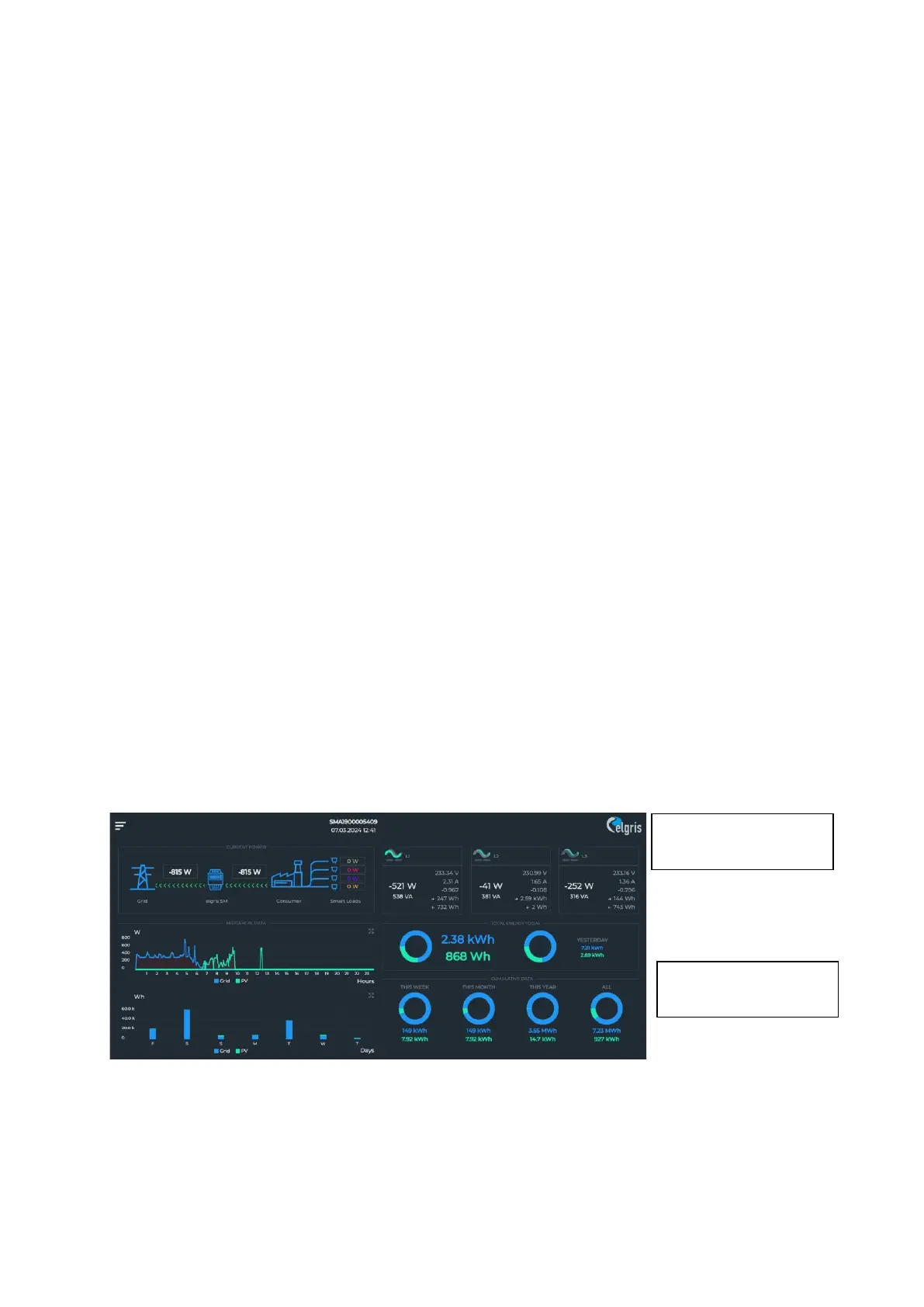
When the CT ratio is changed the power readings on the overview page should match the
actual power. A positive value is consumption from the grid, a negative value means
exporting to the grid. When this is not correct, check the wiring of K and L of the CT.
For current clamps, swap the direction.
Further settings can be changed depending on the application.
To ensure all settings are stored properly, perform a reset.
4 Graphical User Interface
The SMART METER contains a web server to adjust the system parameters and display the status of
the system.
The integrated web server can be accessed via a normal browser. Supported web browsers are
Microsoft Edge, Google Chrome and Mozilla Firefox.
The current address at which you can reach the SMART METER depends on dipswitch 1.
If dipswitch 1 is up (ON), then you can reach the SMART METER at the static address 192.168.1.100.
When the static address is changed, use the new address instead.
If dipswitch 1 is down, then the SMART METER receives an automatic address (DHCP).
You can read the current address on the router interface.
4.1 Overview


 To Next Page