Joan Oró, 27 Pol. Ind. Sesrovires- St. Esteve Sesrovires, BCN, España– +34 932 935 178 – ! info@elite.es
6.USER INSTRUCTIONS
6.1.Grinding operation
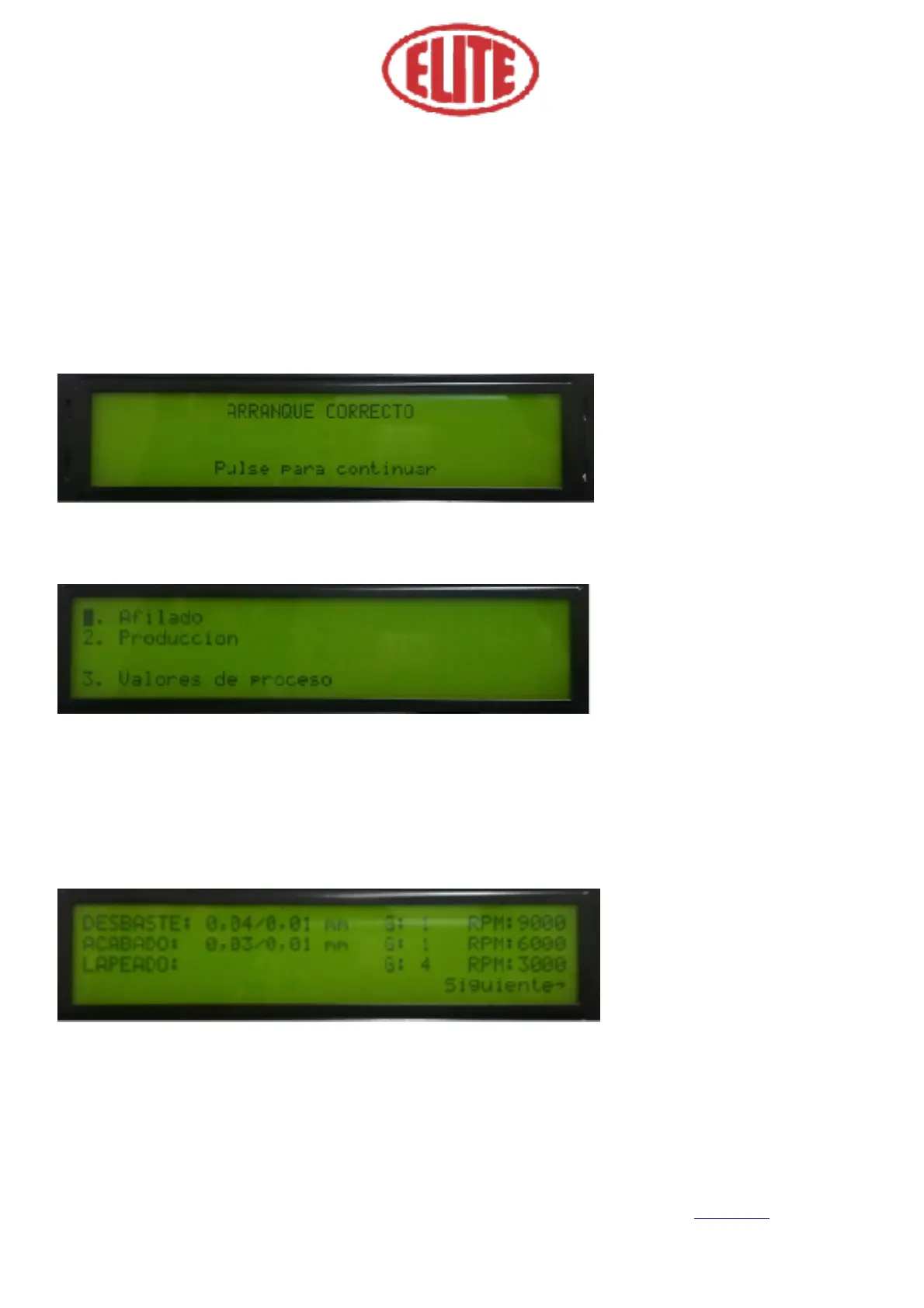
Once the machine has been switched on, the message "Correct start up” (Arranque Correcto) (fig.1) will ap-
pear in case the system is OK. Pressing the menu button to continue will give power to the electrical cabi-
net.
After pressing the menu selector, the following screen appears (see fig.2)
In this screen, you can select the following operations: 1. Sharpening (Afilado), 2. Production (Producción)
and 3. Process values (Valores de proceso).
Select the program: 1. Adjust (see fig. 2), to set parameters of the sharpening operation by pressing the
menu selector. Then the following screen will appear (see Figure 3).
1. Roughing (Desbaste): is the start-up process. The first numerical value indicates the total roughing (Fig.
3 See eg 0.04) and the second; The roughing by pass or partial thinning (Fig. 3 See ex. 0,01). Then, the ap-
plication of the partial roughness by number of turns appears (Fig. 3 See G 1) and grind speed option for
roughing expressed in RPM (Fig. 3 See RPM 9000). Select the parameters required for the program desired
by the operator.



 To Next Page