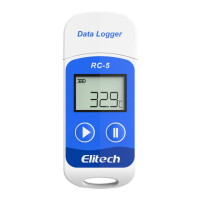
User Manual for default parameters)
Note: New configuration will initialize previous recorded data. Please make sure to back up all necessary data
before you apply new configurations.
Refer to “Help” for more advanced functions. More product information are available on the company website
www.elitechlog.com.
3
Troubleshooting
If… Please…
only a few data was logged.
check whether the battery is installed; or check if it
was installed correctly.
the logger does not log after start up
check whether start delay is enabled in the software
configuration.
the logger cannot stop logging by pressing the button
.
check parameter settings to see if button
customization is enabled (default configuration is
disabled.)
4
Technical Specifications
Recording Options Multi-Use
Temperature Range -30°C to 70°C
Temperature Accuracy ±0.5(-20°C/+40°C);±1.0(other range)
Temperature Resolution 0.1°C
Data Storage Capacity 32,000 readings
Shelf Life/Battery Six months¹/CR2032 button cell
Recording Interval 10s~24hour adjustable
Startup Mode Button
Stop Mode Button, software or stop when full
Protection Class IP67
Weight 35g
5
Certifications EN12830, CE, RoHS
Validation Certificate Hardcopy
Software ElitechLog Win or Mac (latest version)
Report Generation PDF /Word/Excel/Txt report
Password Protection Optional on request
Connection Interface USB 2.0, A-Type


 To Next Page