© 1999 ELKA-Torantriebe GmbH & Co. Betriebs KG page ES 25, ES 30, ES 40
4
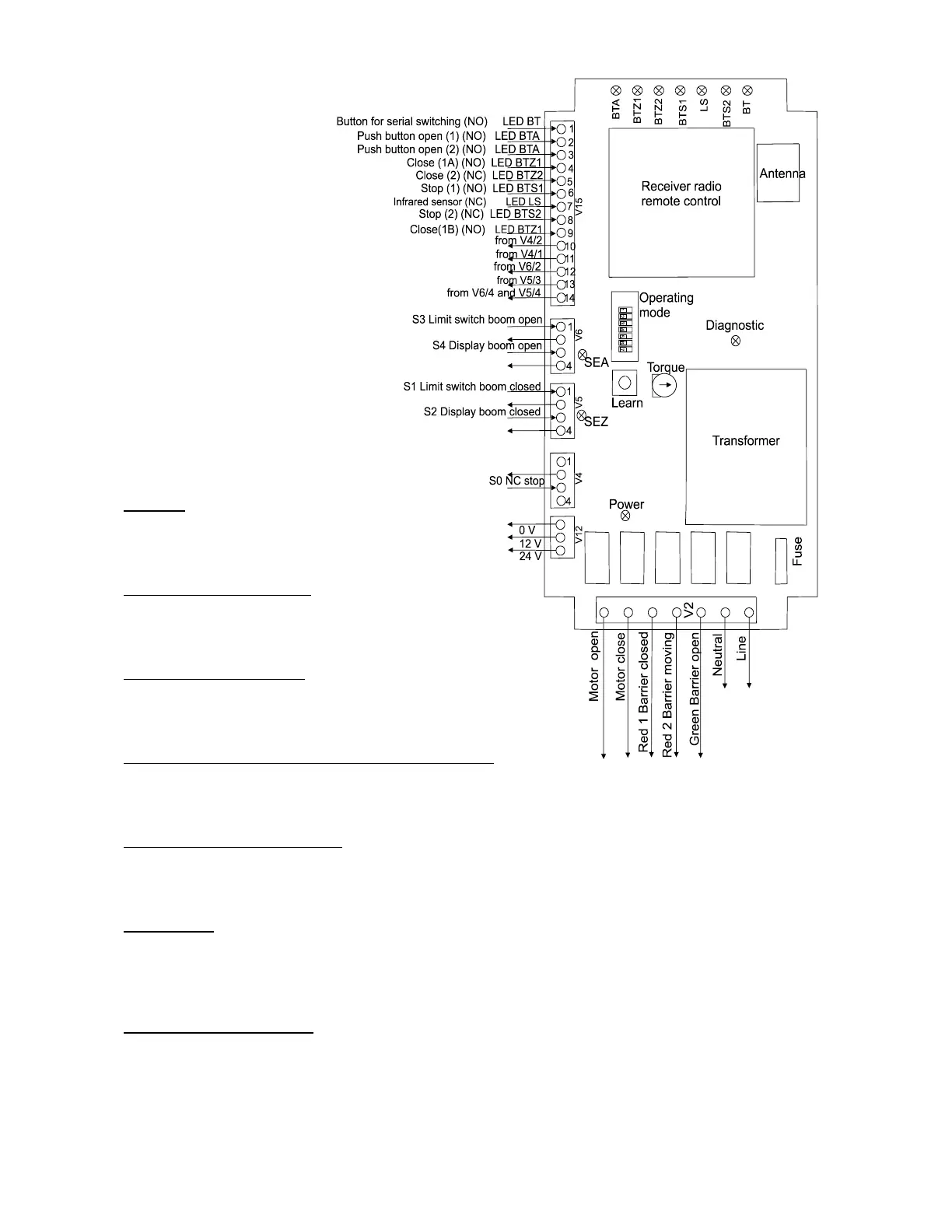
4.1. Operating mode
Switch off the mains supply before
altering the dip switches for operating mode.
S1 (Stop)
S1 on: Logic is switched off.
S1 off: Logic is working.
S2 (Warning before opening)
S2 on: Four seconds warning before opening.
S2 off: No warning before opening.
S3 (Warning before closing)
S3 on: Four seconds warning before closing.
S3 off: No warning before closing.
S4 (Automatic closure when the stored time has elapsed)
S4 on: The barrier closes after the time which was learned (from 5 secs. up to 10 mins.).
S4 off: No automatic closure.
S5 (Reversal on hitting obstacles)
S5 on: The closing boom stops when it hits an obstacle and only moves when a new order is received.
S5 off: The closing boom stops when it hits an obstacle and re-opens immediately.
S6 (Counting)
S6 off: No counting. The barrier closes after one signal to close, even after two signals to open.
S6 on: Counting activated. The barrier closes after two signals to close if there were two consecutive
opening signals.
S7 (Reversal during opening)
S7 off: The barrier always opens completely before reacting to a signal to close.
S7 on: The opening barrier reverses immediately when it receives a signal to close.
4.2. Programming the controller



 To Next Page