EasyManua.ls Logo

Elmo 16-CL Optical - Maintenance; Cover Removal and Installation; Projection Lens Cover Maintenance; Front Cover Maintenance

Elmo 16-CL Optical
28 pages
Print Icon
To Next Page IconTo Next Page
To Previous Page IconTo Previous Page
Loading...
(,I
Maintenance
Clean
the
film
channel and lens
prior
to
projection;
accumulation
of
dust
and
film
particles in
the
film
channel gate
will
scratct"l
the
film
and de-
crease
the
projected image
quality
.
How
to
remove and install covers
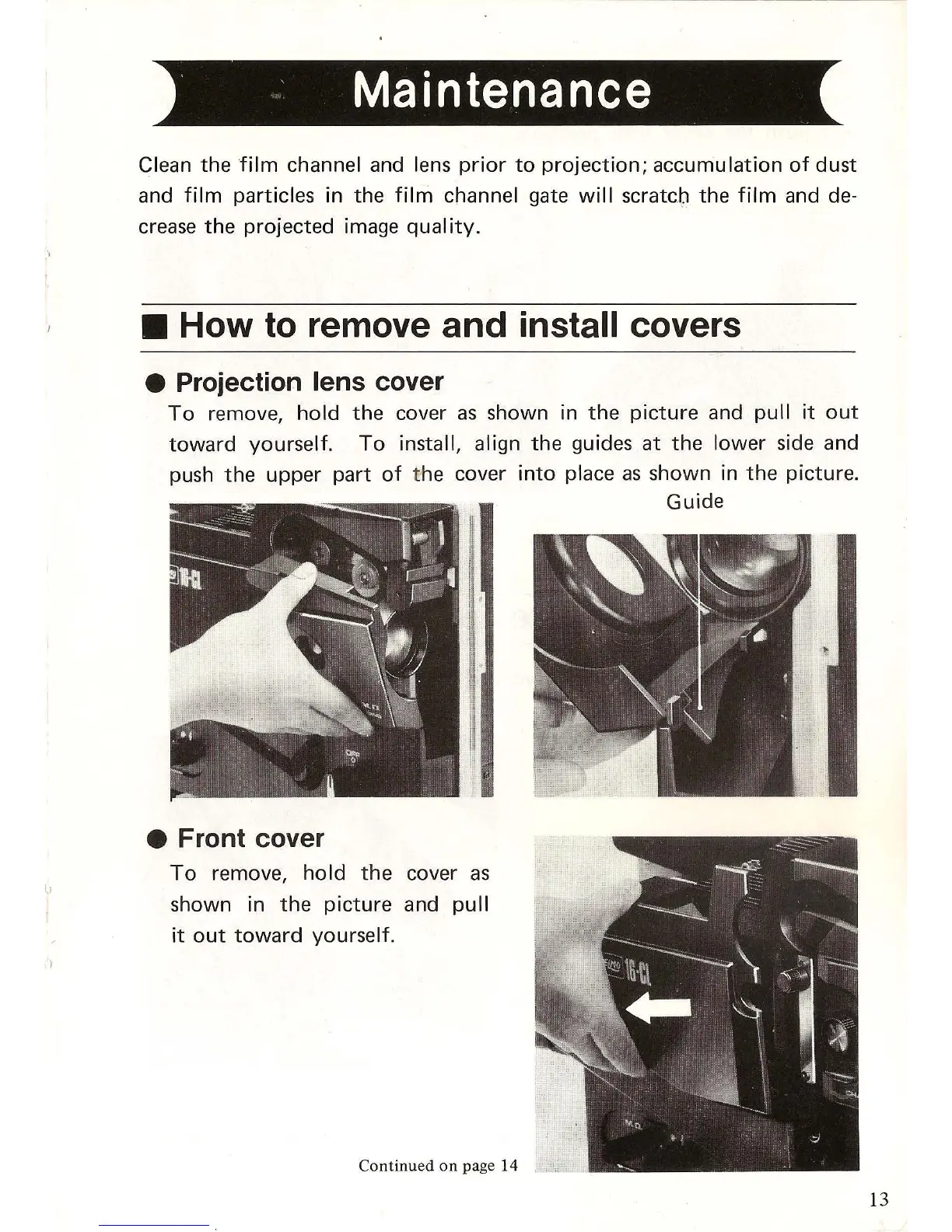
Projection lens cover
To
remove,
hold
the
cover
as
shown in
the
picture
and
pull
it
out
toward
yourself.
To
install, align
the
guides
at
the
lower
side and
push
the
upper
part
of
t
he
cover
into
place
as
shown in
the
picture.
Front cover
To
remove,
hold
the
cover
as
shown in
the
picture
and
pull
it
out
toward
yourself.
Continued
on
page 14
Guide
13

Related product manuals