15
5.3 Finding the right in-bra fit
Elvie Stride 2 needs to be firmly pressed against your breast. There should be no gaps
between the Cups and your breasts.
Every bra has a dierent level of support, so make sure to get the pressure and fit right
before each session. This is important because it can have an impact on milk volumes.
5.4 Starting your session
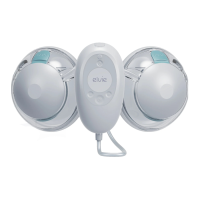
Once the Hub is turned on and the Cups are positioned in your bra, press Play/Pause
to start pumping. If you need to pause pumping for any reason, press Play/Pause again.
5.5 Modes and intensity settings
Modes
Elvie Stride 2 has two modes: Stimulation and Expression. Elvie Stride 2 will always start
in Stimulation mode. This is a faster pumping rhythm to stimulate milk let-down.
Elvie Stride 2 will automatically switch to Expression mode after approximately two
minutes. You can also change modes in the app or on the Hub using the Mode button.
When the Mode Light is illuminated, the pump is in Expression mode. This is a slower,
stronger pumping rhythm for ecient milk expression.
Intensity settings
Elvie Stride 2 has ten intensity settings in Stimulation mode and ten intensity
settings in Expression mode. This means you can adjust the pump to find a setting
that feels comfortable and works eciently in both Stimulation and Expression modes.
Once you can feel the suction on your nipples, use the increase intensity and decrease
intensity buttons to adjust the intensity to find your preferred setting in both modes.
The Intensity Lights will illuminate to show your chosen setting.
You can save the intensity settings that you would like your pump to start in for both
Stimulation and Expression mode by using the Personalize feature in the Pump with
Elvie app. The app is free to download from the Apple App Store or Google Play Store.
Tip: A higher intensity setting does not always mean a higher volume of milk.
Putting your nipple under excess stress or pumping if you are in pain can
reduce milkproduction.
Tip: Make sure the Tubes are not kinked or pinched flat.
5.6 Automatic functions
• The Hub will automatically switch from Stimulation mode to Expression
mode after two minutes.
• When the Hub is pumping, it will automatically pause after 40 minutes.
It is recommended that you leave Elvie Stride 2 for 60 minutes before
using it again.
• When the Hub is paused, it will automatically turn o if a button
has not been pressed for five minutes.
• The Hub will automatically turn o if the battery is empty.
• The Hub will automatically turn o if a technical error occurs.
5.7 Ending your session
1. While leaning forward, press Play/Pause to stop pumping.
Turn o the pump by pressing and holding Power.
2. Unclip your bra and use your finger to break the seal
around your nipple to avoid nipple damage.
3. Remove the Cap from the Cup.
4. Remove the entire Cup from your bra.
5. Keep the Cup upright.
6. Unplug the Stopper to decant your milk.
7. Pour milk out as shown below, sideways through the PourHole.


 To Next Page