START. START.
14 15
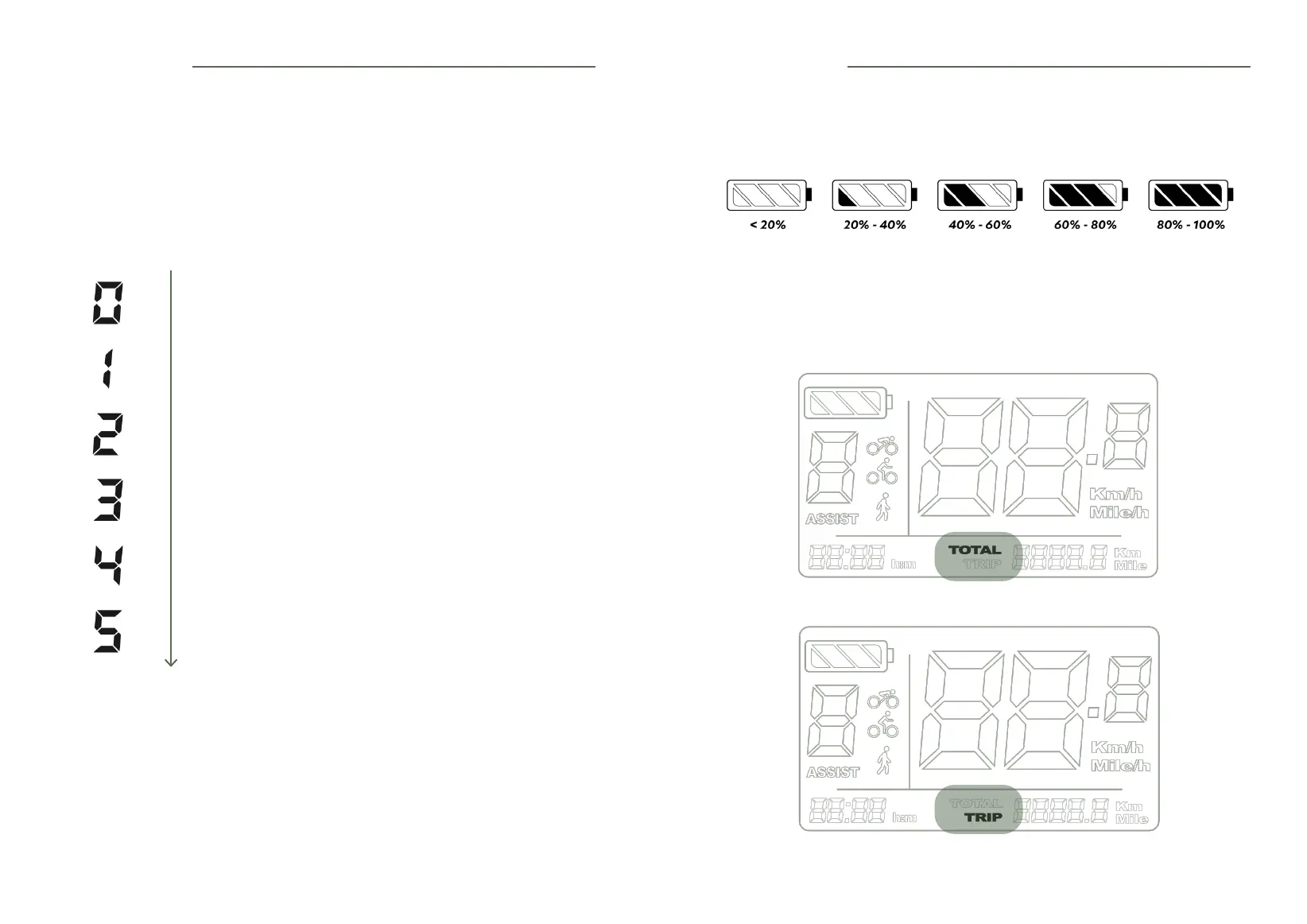
The display shows the selected level of power assistance.
NOTES
During the break-in period or on long climbs (>5min), you should not exceed level 3 with the bike
to avoid damaging the motor and the battery.
The throttle ONLY meters the speed. You will have 100% power available immediately. And this
is true regardless of the level of assistance you have selected on the LCD screen (Level 1 to 5).
LEVEL 1
10% assistance (up to 13 km/h)
LEVEL 2
20% assistance (up to 17 km/h)
LEVEL 3
40% assistance (up to 20 km/h)
LEVEL 4
75% assistance (up to 23 km/h)
LEVEL 5
100% assistance (up to 25 km/h)
LEVEL 0
No assistance, only the accelerator works if it is connected.
5.1 Level of assistance
• Press [+] to increase the level of
assistance or [-] to decrease it.
• Level 1 is selected by default when you
switch on the bike.
5.2 Battery life
5.3 Distance travelled
• To switch between the total distance travelled («TOTAL») and the partial distance
(«TRIP»), press [ON/OFF].
The following symbols give you information about your battery life:
5. The screen 5. The screen



 To Next Page