21
“Centurio PRO” main menu: settings.
Main menu, Options are: Flow, Label, PASSWORD (see page 10), Flow meter, Log Setup and International (see page 35).
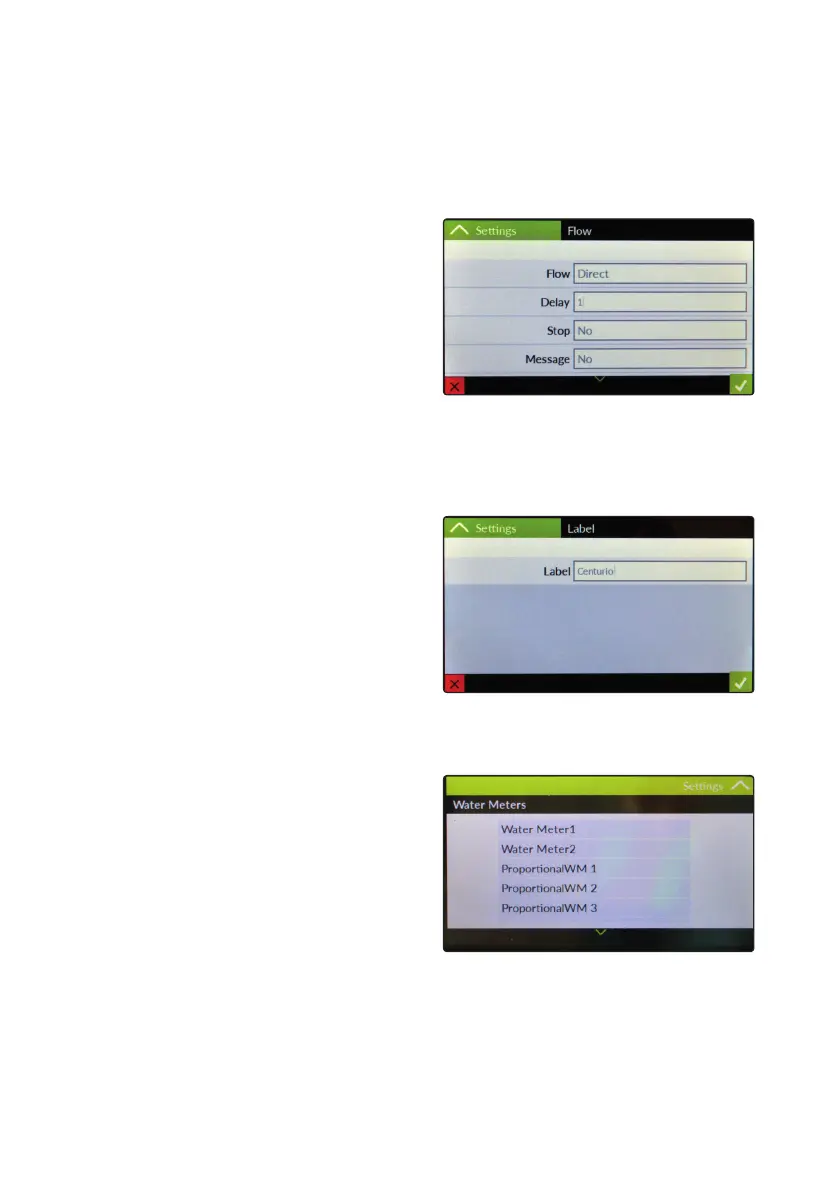
“Flow Sensor”.
This menu allows to congure ow sensor contact (5 - 6 - 7/8).
Options are:
Mode: Direct (N.O.), Reverse (N.C.), Disabled
Delay: starting delay time.
Stop: if enabled it stops controller when contact status changes.
Message: send alert message through message system.
Log: save status activity on logbook.
Delay Send MSG: Introduces a delay before sending a ow alarm message (0 disabled, max delay 999 minutes).
“Label”.
This menu allows to name the controller to better
identify it within a network / alerts messages.
Default name: “Centurio PRO”.
“Water Meters”.
This menu allows to congure WM1 and WM2 pulse sender
water meters. Options are:
WM1 / WM2: working mode conguraion (see page 22)
Proportional WM 1, 2, 3: analog output conguration.
The proportional water meter menu allows to setup the ow
meter to operate for dosing required PPM (parts per million) of
product with a congurable % of product’s concentration.
Based on CC/ST (cc per strokes) of connected pump is possible to achieve dosing results of extreme precision.
Reset Counter: reset all water meters counters



 To Next Page