22
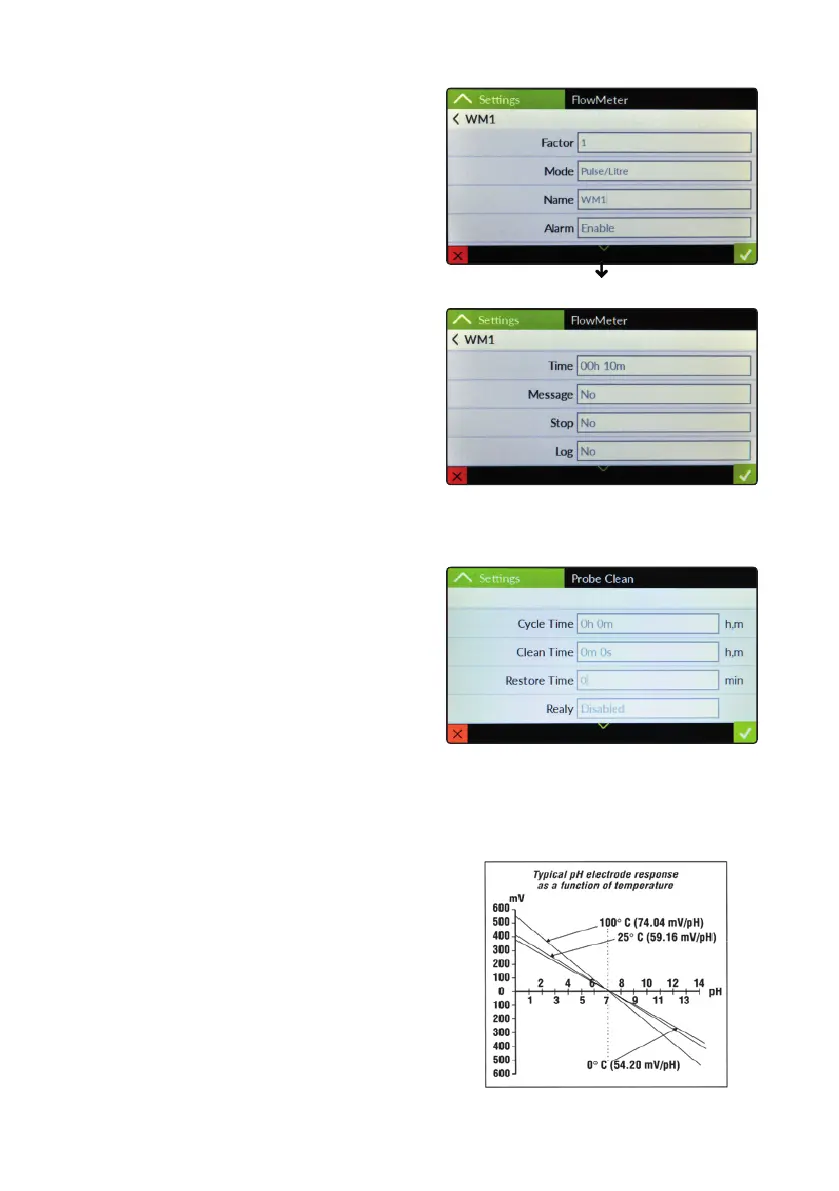
“Water Meters” settings.
This menu allows to congure WM1 and WM2 pulse sender
water working modes. Options are:
Factor: based on mode “pulse / litre” or “litre / pulse”
this option denes how many pulses made a liter or
how many liters made a pulse.
Mode: Pulse / Litre or Litre / Pulse ratio setup
Name: Water Meter Name
Alarm: enable / disable controller’s alarm in main screen
Time: no ow time before to generate alarm
Message: send alert message through message system.
Stop: halt controller when chages status or not.
Log: save status activity on logbook.
“Probe Clean” settings.
This menu allows to congure the cleaning mode
of probes with built in cleaning sensor. By assigning the relay
to which the cleaning motor is connected you can set:
Cycle Time: time between one cleaning activity and the next
Clean Time: cleaning duration time
Restore Time: time to restore the probe reading functionality
Relay: relay connected to probe sensor cleaning motor
Temperature compensation for pH channel curve.
pH measurements are temperature dependent. The degree to which
temperature affects mV readings varies from solution to solution
and can be calculated using the following graphic.
Controller has either fixed or adjustable automatic temperature
compensation referenced to a standard temperature of 25°C.



 To Next Page