28
“CORROSION” Proporional Mode
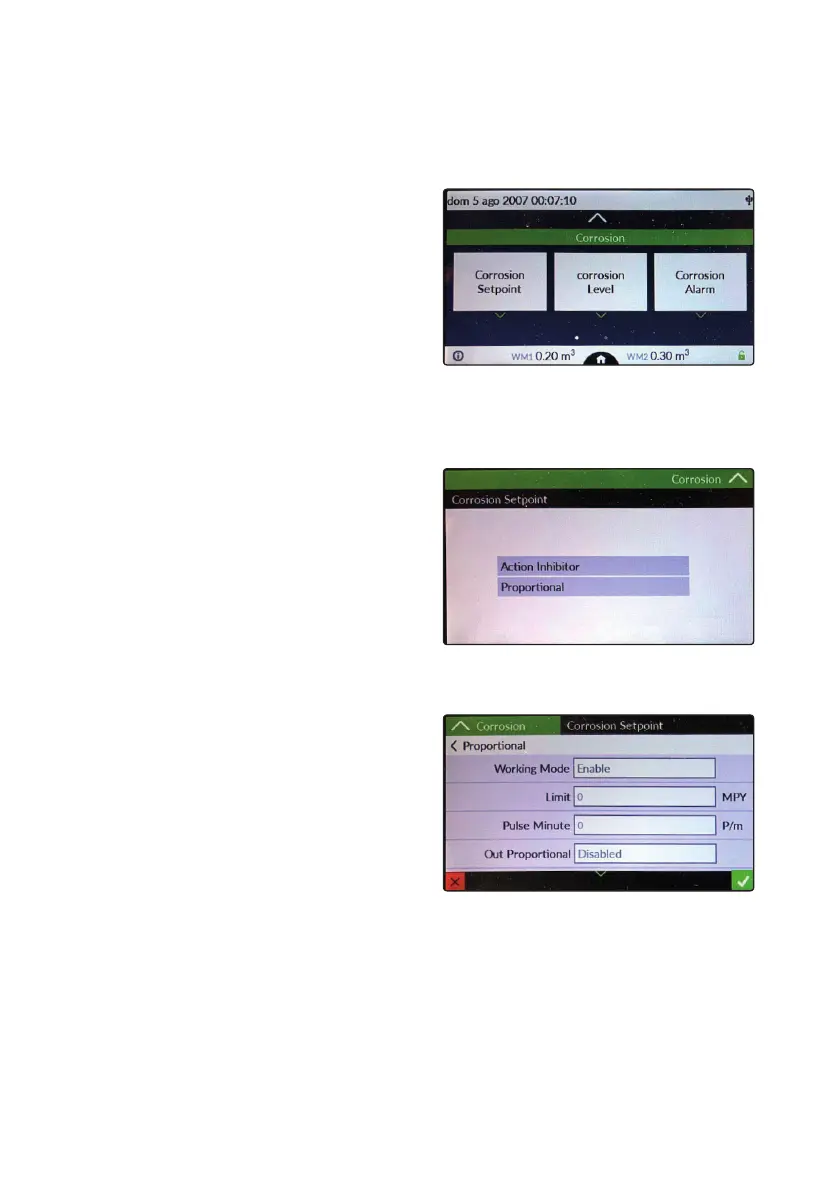
When the ECORR probe is installed, the instrument can be congured to read and control the corrosion rate in the pipes
of a plant. In the main menu, touch the corrosion icon to access the main options.
Setpoint: enable / disable control on inhibitor dosage
Corrosion Level: tank level of anti-corrosion product
Corrosion Alarm: alarm management for high corrosion values
Settings: selection of alloy factor for type of pipes
“CORROSION SETPOINT”
This setpoint acts on the operating activity
of the inhibitor if the instrument is set in
WaterMeter PPM or CC / ST mode. For inhibitor control mode
it is necessary to congure “Action Inhibitor”. For proportional
mode operation congure the “Proportional” item.
Proportional (mode)
Working Mode: enable / disable proportional setpoint mode
Limit: MPY limit threshold after which the output is activated
Pulse Minute: activity in pulses / minute of the “IS” pump if
the set limit is exceeded
Out Proportional: choice of the analogue output on which the
pump is connected to restore corrosion values
Name: name of the activity



 To Next Page