
 Need help?
Do you have a question about the Emerson CC200 and is the answer not in the manual?
Details the CC200 Expansion Module's purpose for modular coil case designs and multi-evaporator walk-in boxes.
Lists key operational and physical specifications including temperature, humidity, power, and dimensions.
Guidance on adding an Expansion Module for second or third coils, requiring temp sensors and transducers.
Instructions to set the module's address using the ON/OFF dip switch bank on the hardware.
Procedure for installing the Expansion Module adjacent to the CC200 Main Controller, ensuring port alignment.
Connect sensors and restore 24VDC power to the CC200 Main Controller; PWR ON LED indicates supply presence.
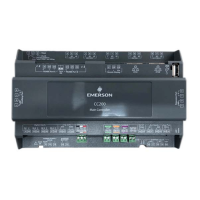
The CC200 Expansion Module is designed to extend the I/O capabilities of the CC200 Main Controller, making it suitable for modular coil case designs or multi-evaporator walk-in boxes. This module provides additional control and monitoring points, integrating seamlessly with the main controller to enhance system flexibility and scalability.
The primary function of the CC200 Expansion Module is to provide supplementary I/O for refrigeration systems. Each module is equipped with a TRIAC output for controlling pulse width modulation (PWM) electronic expansion valves (EEV) or stepper motors for electronic evaporator pressure regulators (EEPR) or EEV stepper applications. It includes a digital input, which is user-configurable for various purposes, allowing for flexible integration with different system components or sensors. A dedicated pressure input is provided for a suction pressure transducer, enabling precise monitoring of system pressures. Furthermore, the module features three color-coded temperature inputs designed for specific applications: discharge air, return air, and defrost termination, along with a coil out temperature sensor. This comprehensive set of inputs allows for detailed environmental and operational monitoring within the refrigeration system. The module connects to the CC200 Main Controller via an expansion port connector, ensuring easy and reliable communication and power delivery.
The CC200 Expansion Module operates within an ambient temperature range of 14°F to 122°F (-10°C to 50°C) and can be stored in temperatures ranging from -40°F to 185°F (-40°C to 85°C). It is designed for non-condensing environments with a relative humidity of 20-85% RH. The module is powered from the expansion port of the CC200 Main Controller, requiring 24VDC with a maximum power consumption of 20W, classified as a PELV (Class 2 Source).
The enclosure is designed for DIN rail mounting, rated UL 94V-0, and measures 110mm x 183mm (4 5/16" x 7 3/16"). It is intended for use as an operating control and its construction allows for DIN rail mounting within Class I or Class II appliances. The rated impulse voltage is 2500V, with a pollution degree of 2 and an over-voltage category of II. The type of action is 1.C.
For output control, the Pulse Valve TRIAC supports 24/120/230VAC with a maximum of 20W. The module also provides outputs for unipolar valves (12VDC, max 330mA/Phase, Class 2 circuit) and bipolar valves (12VDC, max 800mA, Class 2 circuit), offering versatility for different valve types.
The CC200 Expansion Module is designed for straightforward integration and operation. When determining the need for an expansion module, it is recommended to add one for each additional coil (second or third) in a system, with each coil having its own temperature sensors and transducer wired to the respective expansion module.
Addressing each expansion module is crucial for proper communication within the system. This is achieved using an ON/OFF DIP switch bank located on the top left corner of the hardware. Expansion Module one should be set to address 1 (Position 1 up), Expansion Module two to address 2 (Position 2 up), and Expansion Module three to address 3 (Positions 1 and 2 up).
Installation involves ensuring the CC200 Main Controller is powered OFF before mounting. Expansion Module 1 is installed on the DIN rail adjacent to the CC200's right side, aligning its expansion port terminals (V+, V-, LAN+, and LAN-) with those of the CC200 Main Controller. The module slides into the CC200 Expansion port, ensuring both device's expansion port connectors fasten together. If additional expansion modules (2 and 3) are present, they connect to the preceding expansion module's expansion port in the same manner. No external wiring is needed between the CC200 Main Controller and the expansion modules, as power and communication are sourced and passed through the expansion ports.
Once all sensor terminations are complete and the expansion module is securely plugged into the CC200 Expansion port, restoring the 24VDC supply power to the CC200 Main Controller will illuminate the Expansion Module PWR ON LED green, indicating proper power supply.
While the document does not explicitly detail maintenance features, the design of the CC200 Expansion Module suggests ease of service and troubleshooting. The modular nature, with DIN rail mounting and simple expansion port connections, allows for quick installation and replacement if necessary. The clear indication of power status via the PWR ON LED aids in initial setup verification and basic troubleshooting. The robust design, with specified operating and storage temperatures, relative humidity, and impulse voltage ratings, indicates a durable device built for demanding industrial environments, minimizing the need for frequent maintenance. For detailed maintenance procedures and troubleshooting, users are directed to refer to the CC200 manual and scan the provided QR code for the full user manual. Technical support is available via phone and email for further assistance.
 General
| Brand | Emerson |
|---|---|
| Model | CC200 |
| Category | Industrial Equipment |
| Language | English |









 To Next Page