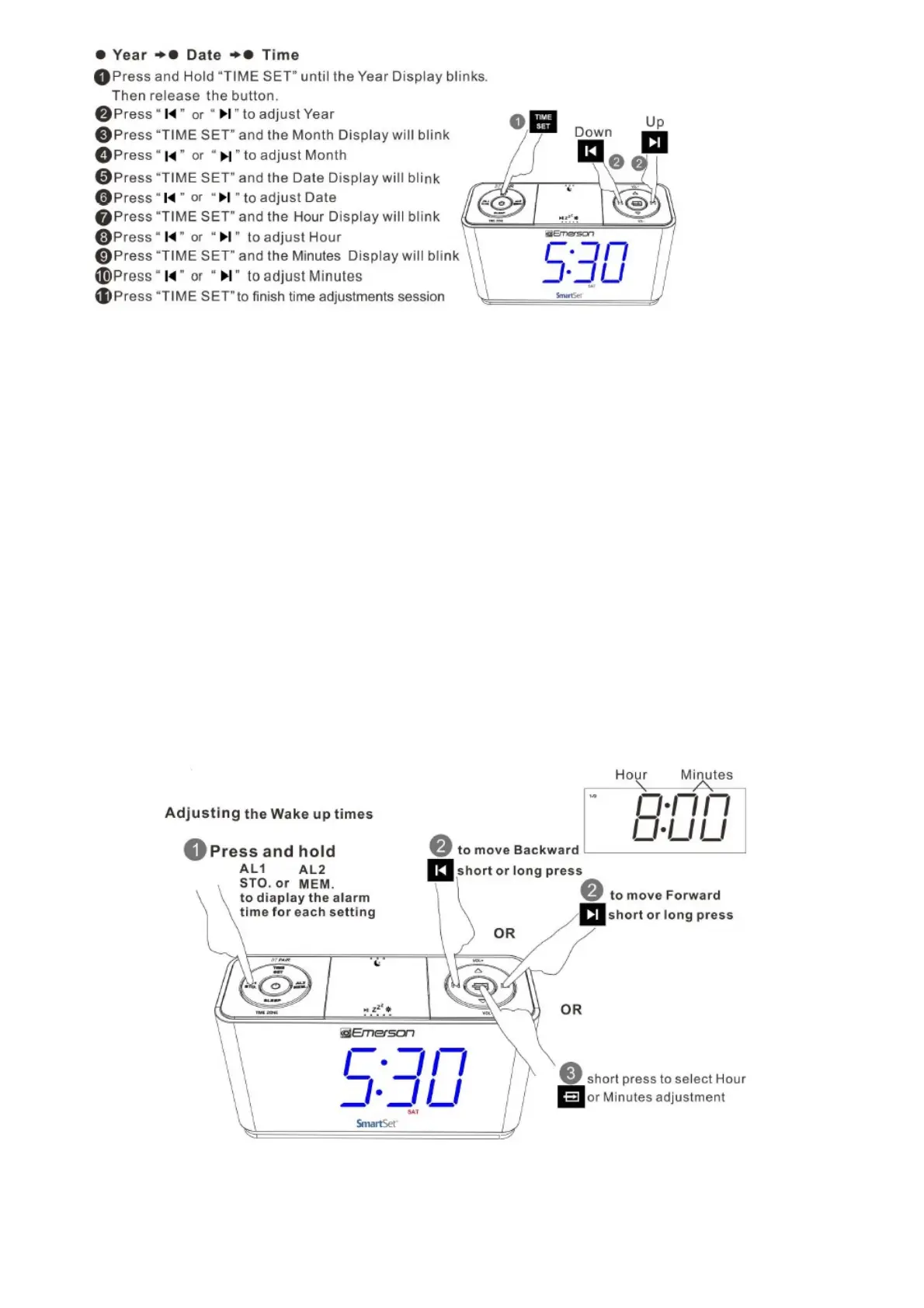
Note: To skip manual adjustments, keep it idle for 5 seconds to resume to clock display
mode.
9. Daylight Saving and Leap Year Adjustments
All Daylight Saving and Leap Year adjustment are made automatically by the SmartSet
internal computer as follow:
Start of Daylight Saving time:
At 2:00 AM on the 2nd Sunday in March, the clock will automatically advance to 3:00 AM
End of Daylight Saving time:
At 3:00 AM on the 1st Sunday in November, the clock will automatically reset to 2:00 AM
Leap Year:
At 12:00 Midnight on February 28th , the calendar display will change to”2 29″ .
10. Setting the Alarm
Alarm can only be set in standby mode where the function of Radio , Bluetooth, and AUX are disabled
(i.e. indicators of “MHz “,” BT” ,and “AUX” are OFF)
Adjusting Alarm Week Mode
Press and Hold “AL 1″ or”AL2”,then press “DOWN” or “UP” to adjust: Weekdays (Monday to Friday),
Weekends (Saturday and Sunday) or Everydays (Monday to Sunday)



 To Next Page