EasyManua.ls Logo

Emerson EM2646 - User Manual

Emerson EM2646
13 pages
Print Icon
To Next Page IconTo Next Page
Loading...
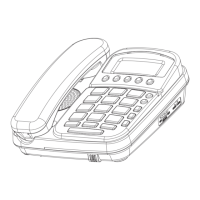
13 MEMORY CALLER ID SPEAKERPHONE
MODEL EM2646
OPERATING INSTRUCTIONS
* 3 Line LCD Display
* 3 Languages (English, Spanish, French)
* 60 Name / Number Caller ID Memory
* 3 One-touch Speed Dial Memory
* 10 Two-touch Speed Dial Memory
* Last Number Redial
* Flash / Phone Book Function
* Speakerphone with Volume control
* Ringer Volume control (HI / LOW / OFF)
* Handset Volume control
* Desk or wall mountable
* Electronic Hold
TO USE THE CALLER ID FEATURE OF THIS PHONE, YOU MUST
SUBSCRIBE TO CALLER ID SERVICE FROM YOUR PHONE COMPANY,
AND REMEMBER TO INSTALL BATTERIES
NOTE: READ AND FOLLOW THESE INSTRUCTIONS BEFORE USING YOUR TELEPHONE

Questions and Answers

  • M
    Mrs. Linda HendersonJul 30, 2025
    Why is there feedback when using the Emerson EM2646 Telephone speakerphone?
    • L
      levyjanetJul 30, 2025
      The speakerphone may produce feedback or squealing if the volume is set too high. Try reducing the speakerphone volume to resolve this issue.
  • M
    mbaileyAug 3, 2025
    How to fix Emerson EM2646 memory dialing?
    • K
      kingevanAug 3, 2025
      If memory dialing isn't working, verify that you have stored the numbers correctly by pressing the appropriate memory location button(s). Also, ensure fresh batteries are properly installed, as numbers can only be stored with functional batteries.
  • M
    Michaela CarterAug 7, 2025
    Why does my Emerson EM2646 caller ID display foreign words?
    • A
      Amy BrownAug 7, 2025
      If your caller ID displays words in another language, like French or Spanish, your language setting is likely incorrect. Change the language setting to English.
  • A
    andrewschaeferAug 12, 2025
    How to fix the redial on my Emerson Telephone?
    • S
      Samuel SullivanAug 12, 2025
      If the LINE REDIAL function isn't working, check the display for a 'P'. This indicates the phone may be paused because the redial button has a combined function (pause). Press the HOOK switch to resolve this.
  • M
    Mr. Alex LewisAug 15, 2025
    What to do if pressing a memory button on my Emerson EM2646 does not display the number?
    • R
      Rebecca MayAug 15, 2025
      If pressing a memory button doesn't display a number, it's likely that no number is stored in that memory location. Store the number again by pressing the store button, dialing the number, and then pressing the desired memory location.
  • N
    nelsonjamieAug 20, 2025
    What to do if I cannot erase all records in the Emerson EM2646 Telephone memory?
    • T
      Tina FischerAug 20, 2025
      To erase all call records, ensure the phone is not in use. Press and hold the delete button for 3 seconds until the display shows “DELETE ALL?”. Then, press the delete button again.
  • A
    alexis50Aug 25, 2025
    Why isn't the message waiting indicator working on my Emerson Telephone?
    • G
      gvanceAug 25, 2025
      Check with your telephone company to see if this service is available and if you have subscribed to it.

Summary

Emerson 13 Memory Caller ID Speakerphone Operating Instructions

Important Safety Instructions

Battery Safety Instructions

Telephone Company & FCC Information

Notification to the Local Telephone Company

Details regarding US number, REN, and connection to the telephone network.

Caller ID System

Viewing and Managing Caller ID

Browsing, calling back, storing, and deleting Caller ID records.

Troubleshooting - Part 1

Caller ID and Display Issues

Solutions for no caller information, dim, or blank display.

Connectivity and Dialing Problems

Resolving no dial tone, phone not working, or cannot dial issues.

Ringing and Audio Issues

How to fix phone not ringing or static noise during calls.

Memory and Caller ID Functionality

Troubleshooting for memory storage and Caller ID not operating.

Troubleshooting - Part 2

Emerson EM2646 Specifications

General IconGeneral
BrandEmerson
ModelEM2646
CategoryTelephone
LanguageEnglish

Related product manuals