Need help?
Do you have a question about the Emerson GO NFC Logger and is the answer not in the manual?
General introduction to GO NFC Loggers and their purpose in monitoring perishables.
Unique number for reordering loggers with same specs.
Defines upper/lower temp limits, alerts if exceeded.
Logger encased in waterproof IP67 compliant plastic pouch.
Visual indication of product temp status and logger activity.
Button to activate loggers, requires minimum 2-second press.
Scan to access the Emerson GO NFC Reader App.
Indicates how long the logger will record time and temperature.
Unique identifier for each logger, used for data identification.
Step-by-step guide for activating the GO NFC logger.
Explanation of how to understand the logger's LED status signals.
Lists compatible Android and iOS devices for the NFC app.
Step-by-step guide on how to download data from loggers using the app.
How to access logger data anytime via a secure online portal.
Explanation of the data displayed in the app, including summary, alerts, graph, and table views.
Steps for downloading software, connecting the reader, and scanning loggers.
Instructions on how to view logger details and export data in CSV or PDF format.
Applying loggers to the side of a pallet for temperature monitoring.
Using loggers on individual cartons within a master case.
Placing loggers directly on or next to the product for accurate reads.
Information on recycling, common troubleshooting, and lithium battery exemption.
Detailed technical specifications including alarm, calibration, certifications, and operating environment.
Contact information and availability for technical support services.
The GO NFC Logger is a compact, innovative temperature monitoring device designed for tracking perishable products during distribution and storage. Utilizing Near Field Communication (NFC) technology, these loggers offer a convenient and efficient way to access temperature data using standard smartphones and tablets, eliminating the need for proprietary readers.
The primary function of the GO NFC Logger is to monitor and record time and temperature data for perishable goods. Each logger is equipped with an innovative temperature sensor that takes a surface reading of the object it's attached to, providing a more accurate approximation of actual product temperature compared to ambient readings from bulkier devices. Loggers sample temperature every minute, ensuring highly accurate data collection. Encased in waterproof packaging (IP67 compliant IEC 60259 Standard), they are designed to withstand various environmental conditions. Each logger is NIST traceable, and due to the unique physical characteristics of its sensor, ongoing calibration is not required to maintain accuracy. All loggers are manufactured in ISO-9001 registered facilities, ensuring high quality and reliability.
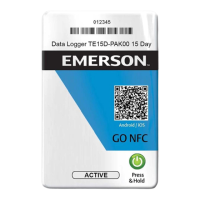
The logger's design includes several key components for user interaction and information display. A unique part number helps customers reorder loggers with specific profiles. Temperature alert parameters, displayed on the logger, indicate the upper and lower temperature thresholds. If these ranges are exceeded, the logger's LEDs will flash to signal an alert. An "In Use Life" indicator specifies how long the logger will actively record data. Each logger has a unique serial number and barcode representation, which serves to identify it when data is downloaded.
Activating the GO NFC Logger is a straightforward process: users press and hold the power button for a minimum of two seconds. Upon successful activation, the logger's LEDs will flash in a rotating sequence five times. Loggers should be activated when the product is ready for shipment. After activation, a clear plastic glue dot on the back allows the logger to be attached to a "Find It" sign or directly to product packaging. Once active, the LEDs will flash every four seconds to indicate ongoing monitoring.
Interpreting the LED alert indicators provides quick visual feedback on temperature compliance. LEDs flash in four-second sequences. A flashing "OK" indicates that the product remained within acceptable temperature parameters. Flashing amber "Over/Under" symbols signify that the product drifted outside the acceptable range, prompting further examination of the data. The upper and lower temperature parameters are pre-programmed by Emerson. By default, each logger includes a 30-minute delay before a visual alert is triggered if the temperature goes out of range. Additionally, a 30-minute "cool down" phase allows the logger to reach equilibrium with the product's environment, helping to eliminate false alerts. These cool-down periods are not reflected in the mobile app's graph and are not factored into trip temperature statistics. Custom orders can modify both the cool-down period and the alert delay.
Data from the GO NFC Loggers can be downloaded using the GO NFC Logger Reader Mobile App, available for Android (4.1 or newer with NFC reader) and iOS (iPhones 7 or newer; iOS 9 or newer). To download data, users open the app, ensure their mobile phone's NFC capabilities are turned on, and place their device within one inch (2.5 cm) of the logger. The app offers a short tutorial video for iOS users. Turning on phone notifications provides audible indications of data transfer. Once downloaded, data is saved to the device.
The app provides a comprehensive view of the logger data. The "Summary Tab" displays general information, including status and temperature statistics. The "Alerts Tab" shows detailed information about any alerts triggered. The "Graph Tab" presents temperature readings in a graph format, highlighting alerts. The "Table Tab" displays temperature readings in a table format, with important temperatures color-coded for excursions. Read history displays a list of labels by device, and a label reading will show detailed information. For Android, a long press, and for iOS, a swipe left, allows users to delete a single reading. Settings can be adjusted to change the displayed temperature units and clear all logger reads.
For an alternative to mobile app reading, the GO NFC Pad Reader and desktop software are available. Users download the software (compatible with Windows and Mac OS), plug in the HID OMNIKEY Pad Reader, and place the GO NFC Logger on top of the pad reader. The desktop software can be used with a username, password account, or in offline mode. After clicking "Scan Logger," high-level information (serial number, part number, activation and read timestamp, trip duration) is displayed. Temperature alerts are indicated by icons: a snowflake for lower limits and a sun for upper limits. Clicking the "Details" button provides access to Alert Statistics, Alert Details, Temperature data, and a Temperature Graph for individual loggers. Reports can be exported as CSV or PDF files.
The GO NFC Logger is designed for ease of use and minimal maintenance. As mentioned, ongoing calibration is not required. For end-of-life management, Emerson offers the GO GreenSense™ Recycling Program. This program facilitates the proper recycling of logger batteries and components by providing customers with eco-friendly return boxes and pre-paid postage labels free of charge. This allows for convenient and responsible disposal of hundreds of loggers in a medium-sized box, addressing environmental concerns and simplifying the return process for users.
Technical support is available 24 hours a day, 7 days a week, via toll-free phone, email, or live chat, ensuring users have assistance whenever needed. The loggers contain lithium metal batteries that are individually wrapped and contain less than 0.1 grams of lithium metal per cell, making them acceptable for air transport. Supporting documentation for this is available upon request from Emerson Support.
 General
| Temperature Accuracy | ±0.5°C |
|---|---|
| Shelf Life | 2 years |
| Battery Life | Up to 1 year |
| Communication | NFC |
| Start Delay | Configurable |
| Ingress Protection | IP67 |
| Resolution | 0.1°C |
| Temperature Range | -20°C to +70°C (-4°F to +158°F) |
| Data Storage Capacity | 16, 000 readings |
| Operating Temperature | -20°C to +70°C (-4°F to +158°F) |

 To Next Page