4
Understanding the GO NFC Logger
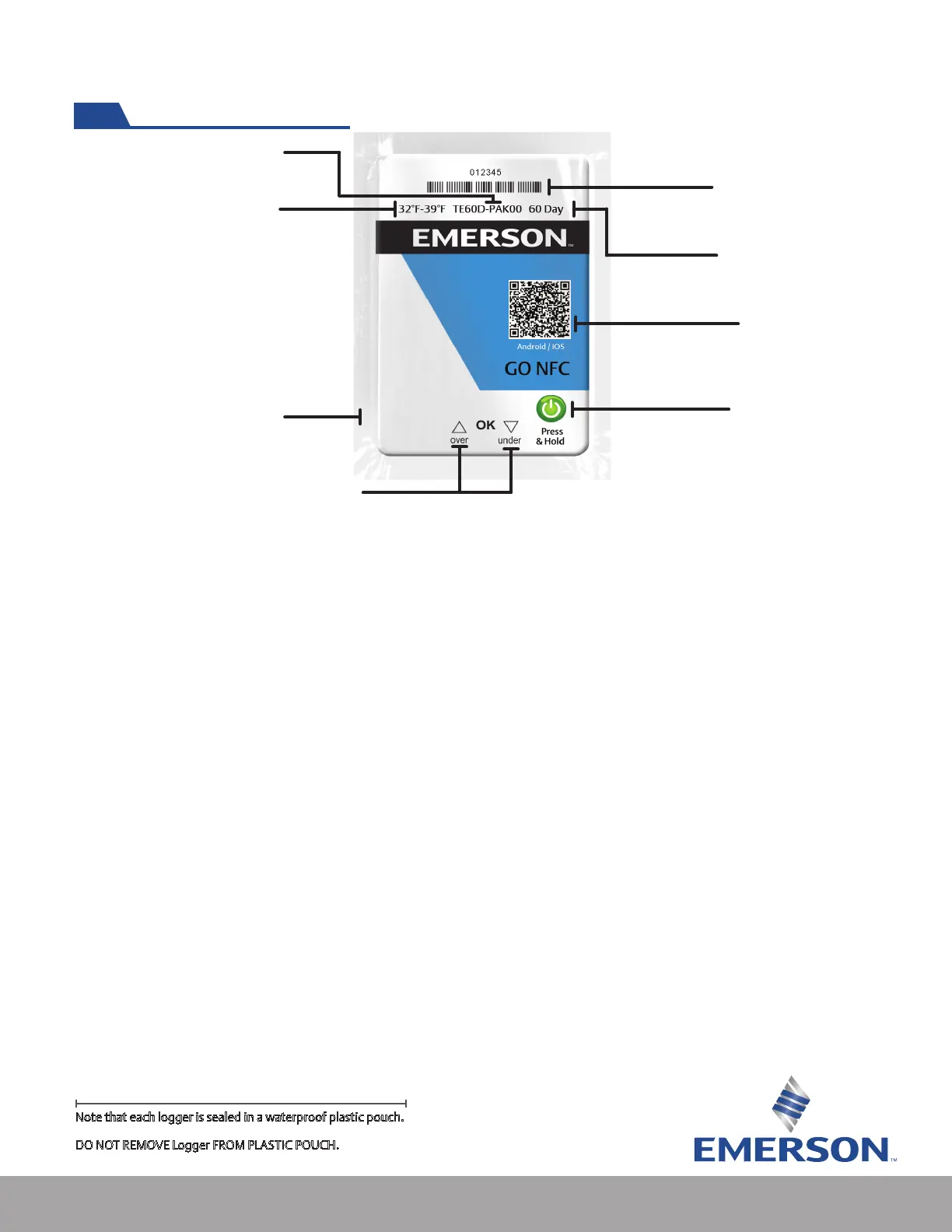
1. Product Part Number – A unique number that customers use to reorder additional loggers with the
same specication prole.
2. Temperature Alert Parameters – Signies the logger’s upper and lower temperature parameters.
Alerts will ash if these ranges are exceeded according to the logger’s programming.
3. Plastic Pouch – each logger is encased in a waterproof IP67 compliant IEC 60259 Standard, plastic
pouch.
4. LED Indicators – Give a quick visual indication if a product remained within t
emperature
parameters. “Ok” LED will ash to indicate the logger is on. Single LED ashes indicate the logger is
actively recording time and temperature
. Two ashes in quick succession means that the logger’s
memory is full.
5. Press+Hold Button – To start push the button a minimum of 2 seconds to activate the loggers.
Once logger is started, LEDs will ash in a sequence to indicate successful activation. Loggers should
be activated when the product is ready for shipment.
6. QR Code – Scan the QR code of the logger to gain access to the Emerson GO NFC Reader App.
7. In Use Life – Use life indicates how long the logger will log time and temperature.
8. Logger Serial Number and Barcode Representation – Each logger has a unique serial number
which differentiates it from other Emerson loggers. When information is downloaded from the
logger, it will be identied by this serial number.
8. Serial Number &
Barcode Representation
6. QR Code for app
download
5. Press + Hold Button
to start
4. LED Indicator
3. Plastic Pouch
2. Temperature Alert Parameters
1. Part Number
7. In-Use Life
Note that each logger is sealed in a waterproof plastic pouch.
DO NOT REMOVE Logger FROM PLASTIC POUCH.


 To Next Page