9
3. PARENTAL CONTROL PASSWORD SETTINGS
If the user forgets the password, set the Parental Control Password as follows.
1) CHANGE THE PASSWORD.
• Turn the set on.
• Direct the remote control to the Remote Sensor of the TV.
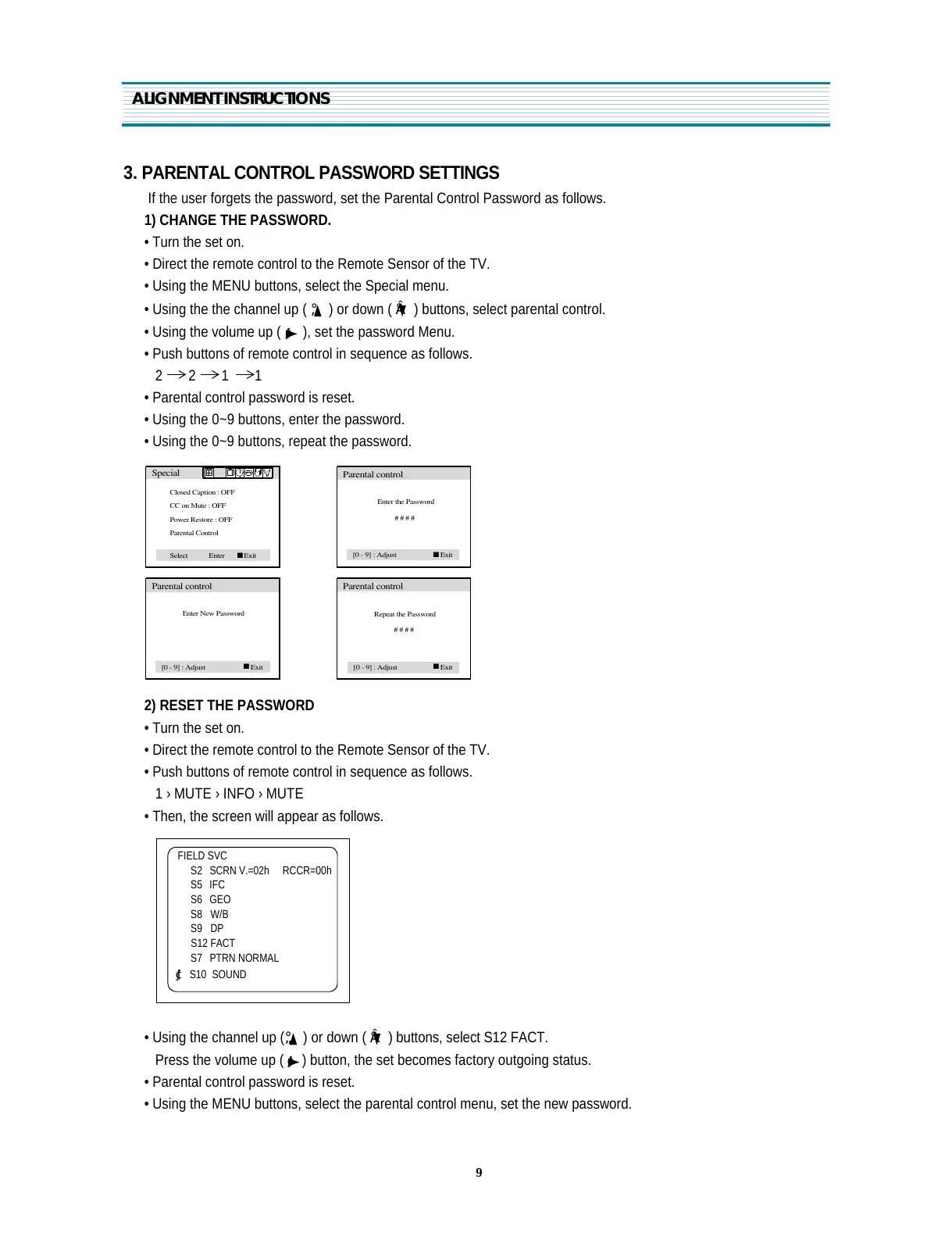
• Using the MENU buttons, select the Special menu.
• Using the the channel up (
¡ã
) or down (
¡å
) buttons, select parental control.
• Using the volume up (
¢º
), set the password Menu.
• Push buttons of remote control in sequence as follows.
2 2 1 1
• Parental control password is reset.
• Using the 0~9 buttons, enter the password.
• Using the 0~9 buttons, repeat the password.
2) RESET THE PASSWORD
• Turn the set on.
• Direct the remote control to the Remote Sensor of the TV.
• Push buttons of remote control in sequence as follows.
1 › MUTE › INFO › MUTE
• Then, the screen will appear as follows.
• Using the channel up (
¡ã
) or down (
¡å
) buttons, select S12 FACT.
Press the volume up (
¢º
) button, the set becomes factory outgoing status.
• Parental control password is reset.
• Using the MENU buttons, select the parental control menu, set the new password.
ALIGNMENT INSTRUCTIONS
FIELD SVC
S2 SCRN V.=02h RCCR=00h
S5 IFC
S6 GEO
S8 W/B
S9 DP
S12 FACT
S7 PTRN NORMAL
¢º S10 SOUND
Closed Caption : OFF
CC on Mute : OFF
Power Restore : OFF
Parental Control
Special
Select
Enter
n
Exit
Enter the Password
# # # #
Parental control
[0 - 9] : Adjust
n
Exit
Enter New Password
Parental control
[0 - 9] : Adjust
n
Exit
Repeat the Password
# # # #
Parental control
[0 - 9] : Adjust
n
Exit


 To Next Page