Document Part # 026-4176 Rev 1 Page 10 of 16
©2022 Emerson Digital Cold Chain, Inc. This document may be photocopied for personal use.
Visit our website at www.climate.emerson.com for the latest technical documentation and updates.
STEP 4: Adding the Device to the Supervisory Controller
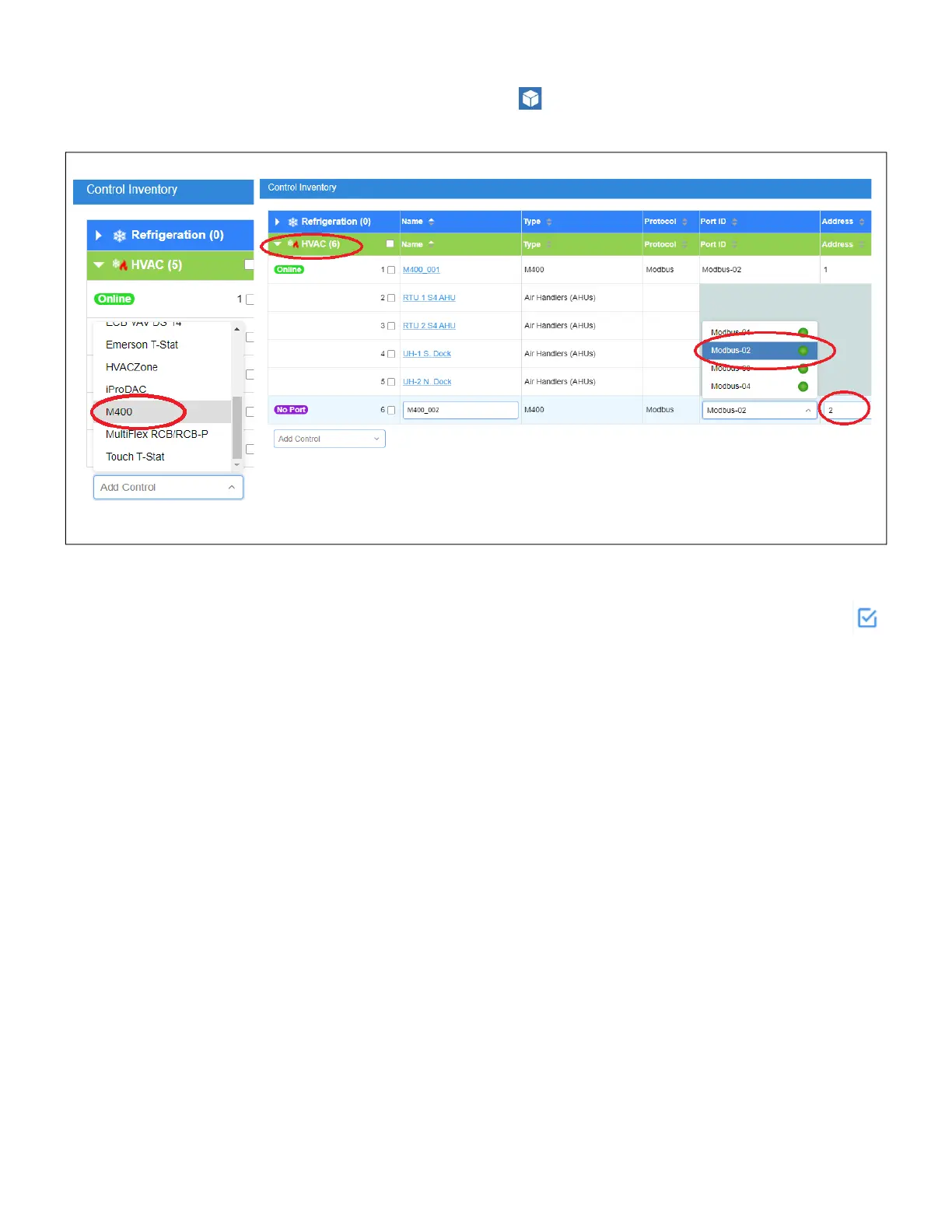
1. From the home page click the control inventory icon to go to the Control Inventory page.
2. From the HVAC drop-down list, select M400 from the list.
STEP 5: Commissioning the Device to the Supervisory Controller
From the Control Inventory screen select the Modbus address for the M400 and click the checkmark
to save and start commissioning. (Best practices tip: set the Modbus number to match the connected
Com Port and the Address to match the M400 addressing in STEP 1).
Drive Setup:
1. Click the M400 to go to the M400 setup page.
2. Go to the General tab.
3. Set CfgSyncAction on the to Write to Device.
4. On the Inputs tab, set DIRECTION to Forward or Reverse. This verifies that the drive should run
correctly.
5. Set RUN to OFF. This verifies that the drive should inhibit.
Figure 11 - Adding M400 and Addressing






 To Next Page