Document Part # 026-4176 Rev 1 Page 15 of 16
©2022 Emerson Digital Cold Chain, Inc. This document may be photocopied for personal use.
Visit our website at www.climate.emerson.com for the latest technical documentation and updates.
2. Use Table 1- Menu 0 Guide to verify values set in the M400 drive.
Note: Table 1- Menu 0 Guide gives diagnostic information about the system. It allows you to double check
to make sure that the E2 controller sent the correct parameters.
Menu 0 Pr Description Value to Write Comments Parameter Type
1 Drive Configuration Preset Sets drive mode to Preset 11.034 Mode
2 Serial Baud Rate 19200 Sets baud to 19200 11.025 Mode
3 Serial Address 2 Set the address for each drive on network. 11.023 Mode
4 Serial Mode 8 1 NP Set to match mode of E2E 11.024 Mode
5
Reset Serial
Communications
Toggle ON/
Set this to ON / OFF to reset communications.
Connects
11.02 Mode
6 Motor Rated Current See Motor Set from motor nameplate. 5.007 Motor
7 Motor Rated Speed See Motor Set from motor nameplate. 5.008 Motor
8 Motor Rated Voltage See Motor Set from motor nameplate. 5.009 Motor
9 Motor Power Factor See Motor
Set from motor nameplate. (Use 0.85 if
absent.)
5.010 Motor
10
Security / Parameter
Access
Set to All Menus Set to all Menus to see access Menu 1 to 22
11.044
Access
12 STO 1 State RO 0=disabled, 1=enabled 8.039 Info
13 STO 2 State RO 0=disabled, 1=enabled 8.040 Info
Table 1 - Menu 0 Guide
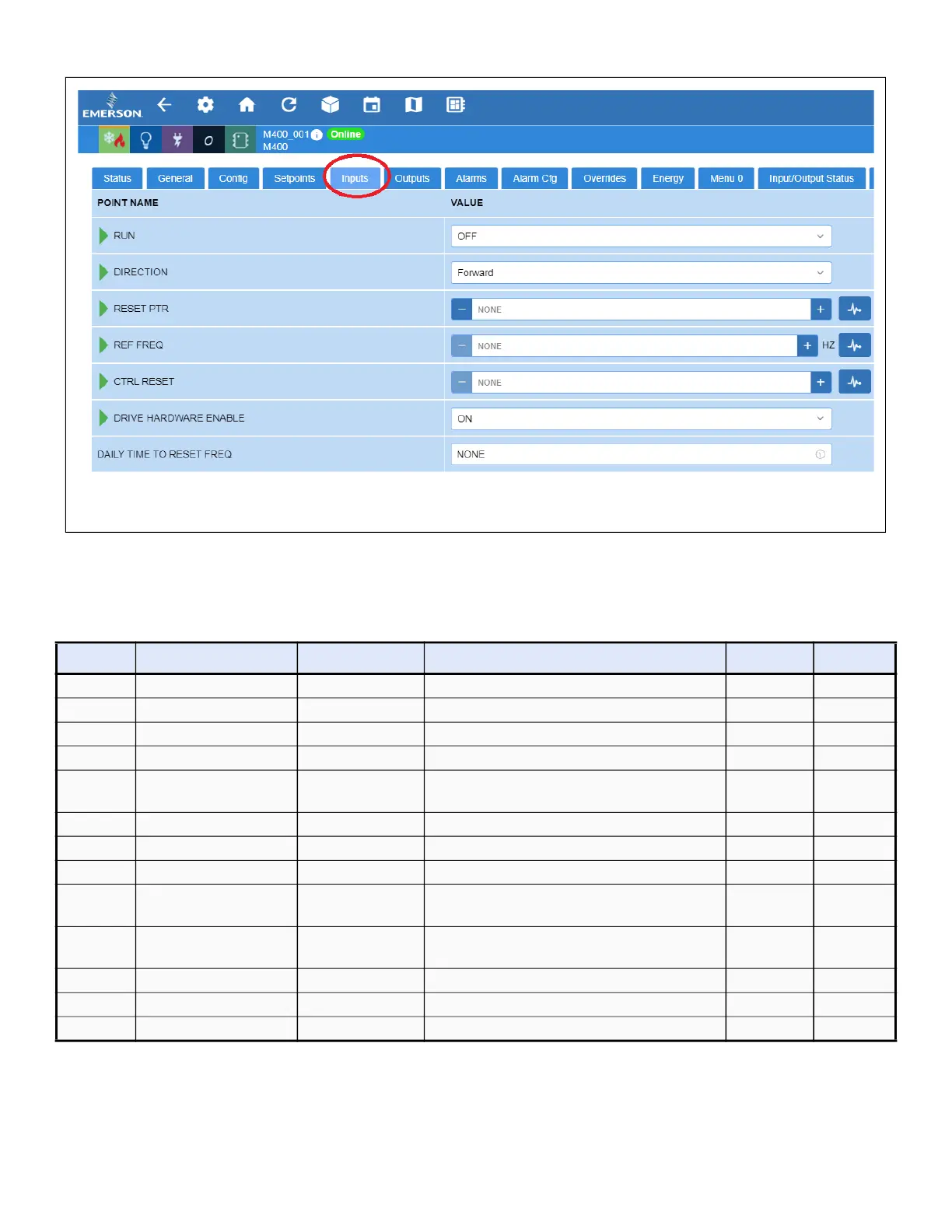
Figure 19 - Setting Up Inputs Tab






 To Next Page