20
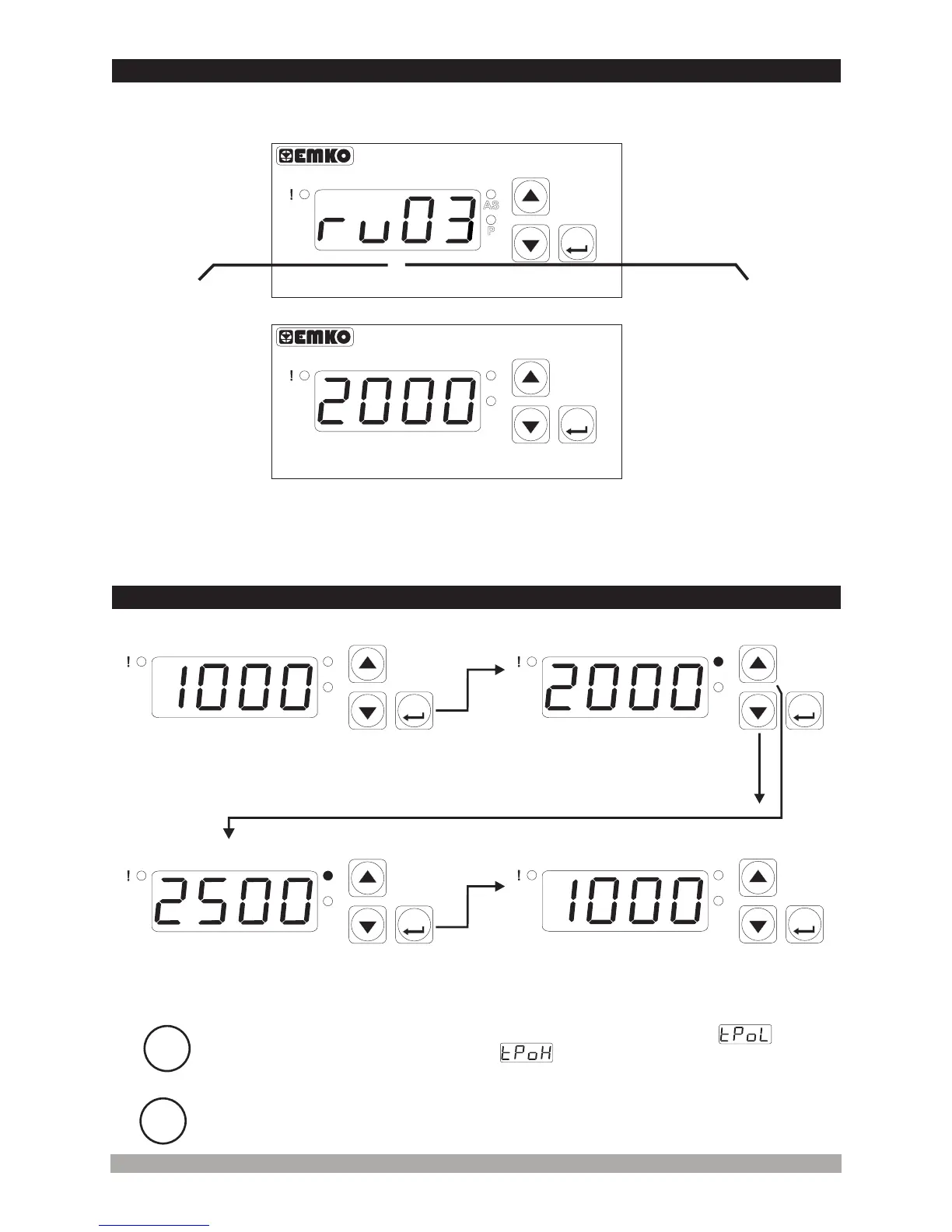
MainOperationScreen
AlarmSetValueScreen
Changethealarmsetvalue
withincrementanddecrement
buttons.
Press ASET/ENTERbuttonfor
savingthealarmsetvalue
ASledlightsoffandmainoperation
screenisshown.
If no operation is performed in Alarm set value changing mode for 20 seconds,
device turns to main operation screen automatically.
i
i
4.4ChangingandSaving AlarmSetValue
P
AS
ASET
P
AS
ASET
P
AS
ASET
P
AS
ASET
MainOperationScreen
AlarmSetValueScreen
When ASET/ENTERbuttonis
pressed, ASledlightsonandalarm
setvalueisshownonthedisplay.
Alarm set value can be adjusted from low reading adjustment value
parameter to up reading adjustment value parameter.
(Alarm set value changing mode is active in devices with alarm output.)
When power is first applied to the digital process indicator, software revision number is shown on
the display.
4.3ObservationofSoftwareRevisionontheDisplay
Software
revision
number
MainOperationScreenisshown
If there is an unexpected situation while opening the device, power off the
device and inform a qualified personnel.
c
ProcessIndicator
ESM-3700
P
AS
ASET
ProcessIndicator
ESM-3700
P
AS
ASET
“rv” RevisionÞ


 To Next Page