29
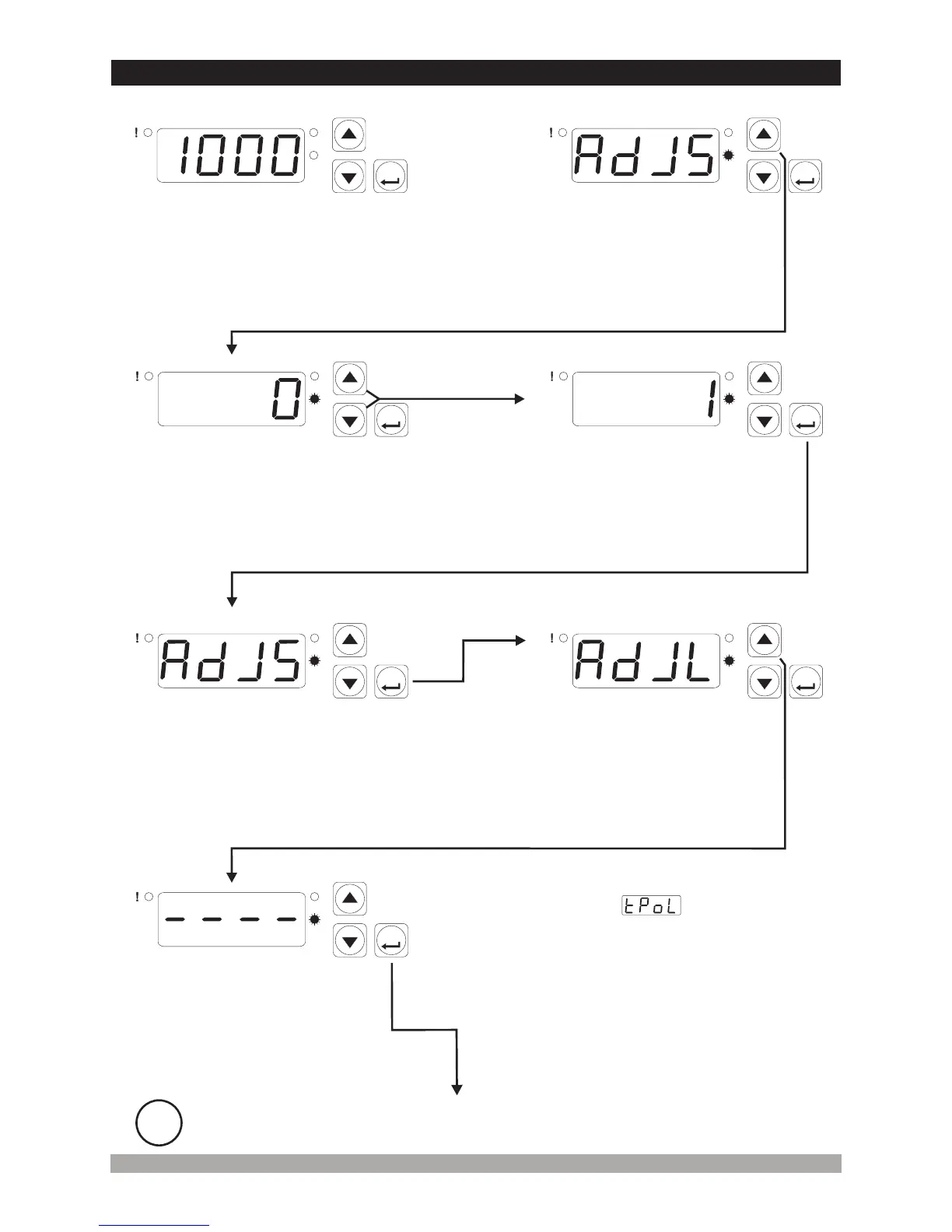
6.UniversalInputUserReading AdjustmentOperation
Accesstothereadingadjustment
selectionparameterasexplainedin
section4.7.1and4.7.2
P
AS
ASET
P
AS
ASET
Reading Adjustment
SelectionValue (Standard
readingadjusmentisselected)
Pressincrementbuttonforaccessing
totheparametervalue.PressENTER
buttonforaccessingtothenext
parameter
P
AS
ASET
P
AS
ASET
Reading Adjustment
SelectionValue (User
readingadjusmentisselected)
Changethevaluewithincrement
anddecrementbuttons
PressENTERbuttonfor
savingtheparametervalue
ProgrammingScreen
Reading Adjustment
SelectionParameter
P
AS
ASET
P
AS
ASET
UserReading Adjustment
LowLimit Analogue
ValueParameter
Reading Adjustment
SelectionParameter
Pressincrementbuttonforaccessingtothe
userreadingadjustmentlowlimitanalogue
valueenteringscreen.PressENTERbutton
foraccessingtothenextparameter
PressENTERbuttonfor
accessingtothenext
parameter
UserReading Adjustment
LowLimit Analogue
ValueEnteringScreen
P
AS
ASET
At this state, the equivalent voltage or current for low
reading adjustment value parameter is applied
to process input of the devices. When decrement button
is press, display starts to blink. It means, the analogue
value at process input is saved as a user reading
adjustment low limit analogue value
i
If no operation is performed in Programming mode for 20 seconds, device turns to
main operation screen automatically.
PressENTERbuttonfor
accessingtoprogramming
screen
MainOperationScreen
ProgrammingScreenProgrammingScreen


 To Next Page