EasyManua.ls Logo

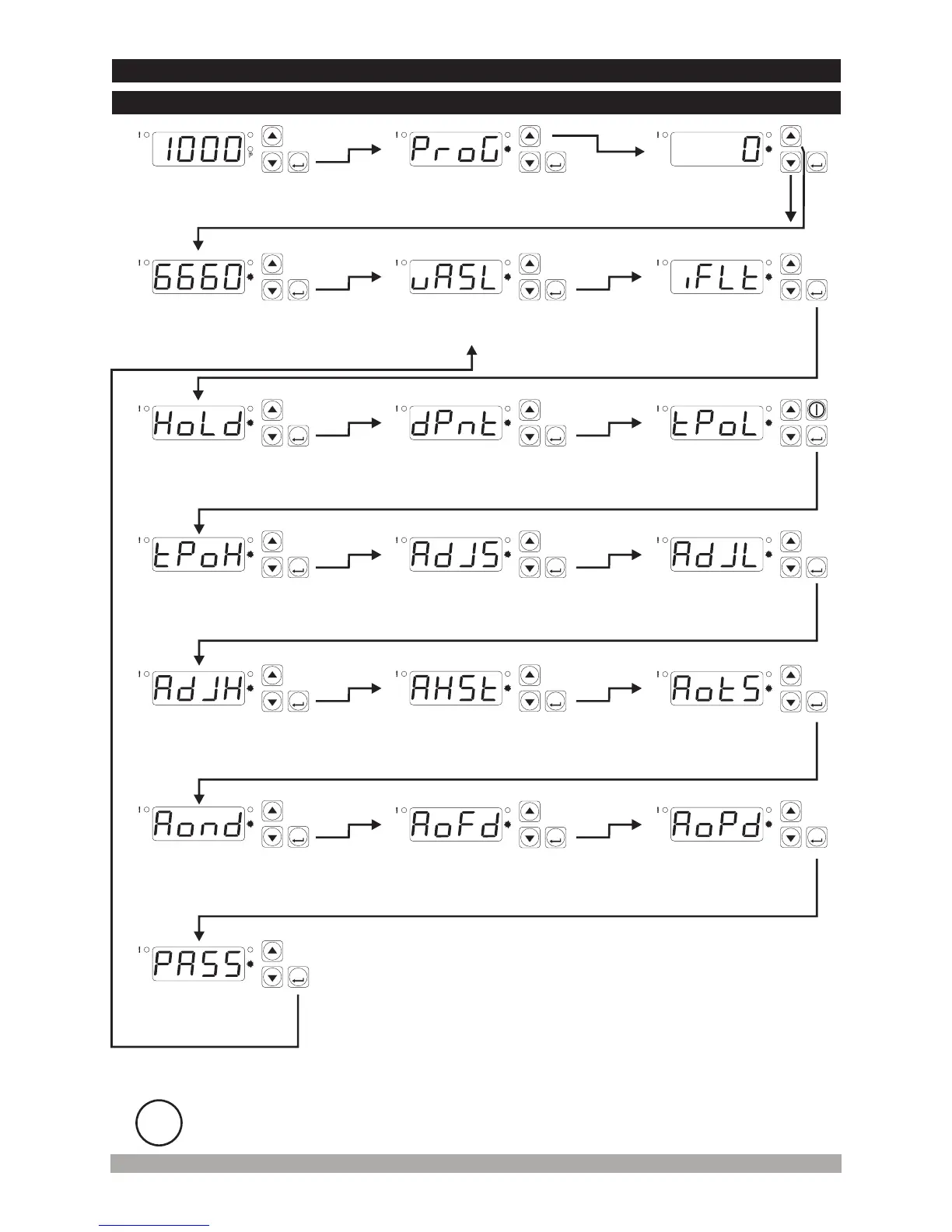
EMKO ESM-3700 - Programming Mode Access Diagram (Alarm Output)

EMKO ESM-3700
33 pages
Print Icon
To Next Page IconTo Next Page
To Previous Page IconTo Previous Page
Loading...
24
5secs
MainOperationScreen
PasswordEntering
Screen
ProgrammingMode
EnteringScreen
ProcessInputFilter
SelectionParameter
ProcessInputType
SelectionParameter
PasswordEntering
Screen
LowReading
AdjustmentValue
Parameter
DecimalPoint
PositionParameter
DisplayFunction
Selectionparameter
UserReading Adjustment
LowLimit AnalogueValue
Parameter
UpReading
AdjustmentValue
Parameter
AlarmTypeSelection
Parameter
AlarmHysteresis
Parameter
AlarmDelayParameter
AfterPowerOn
AlarmOffDelay
TimeParameter
AlarmOnDelay
TimeParameter
Reading Adjustment
SelectionParameter
i
If no operation is performed in Programming mode for 20 seconds, device turns to
main operation screen automatically.
P
AS
ASET
P
AS
ASET
P
AS
ASET
P
AS
ASET
P
AS
ASET
P
AS
ASET
P
AS
ASET
P
AS
ASET
P
AS
ASET
P
AS
ASET
P
AS
ASET
P
AS
ASET
P
AS
ASET
P
AS
ASET
P
AS
ASET
UserReading Adjustment
UpLimit AnalogueValue
Parameter
P
AS
ASET
P
AS
ASET
P
AS
ASET
ProgrammingMode
AccessingPassword
P
AS
ASET
PressENTERbuttonfor
accessingparameter
Enterpasswordwithincrementanddecrementbuttons
4.7Easy AccessingDiagramofProgrammingModeParameters
4.7.1DevicesWith AlarmOutput

Table of Contents