26
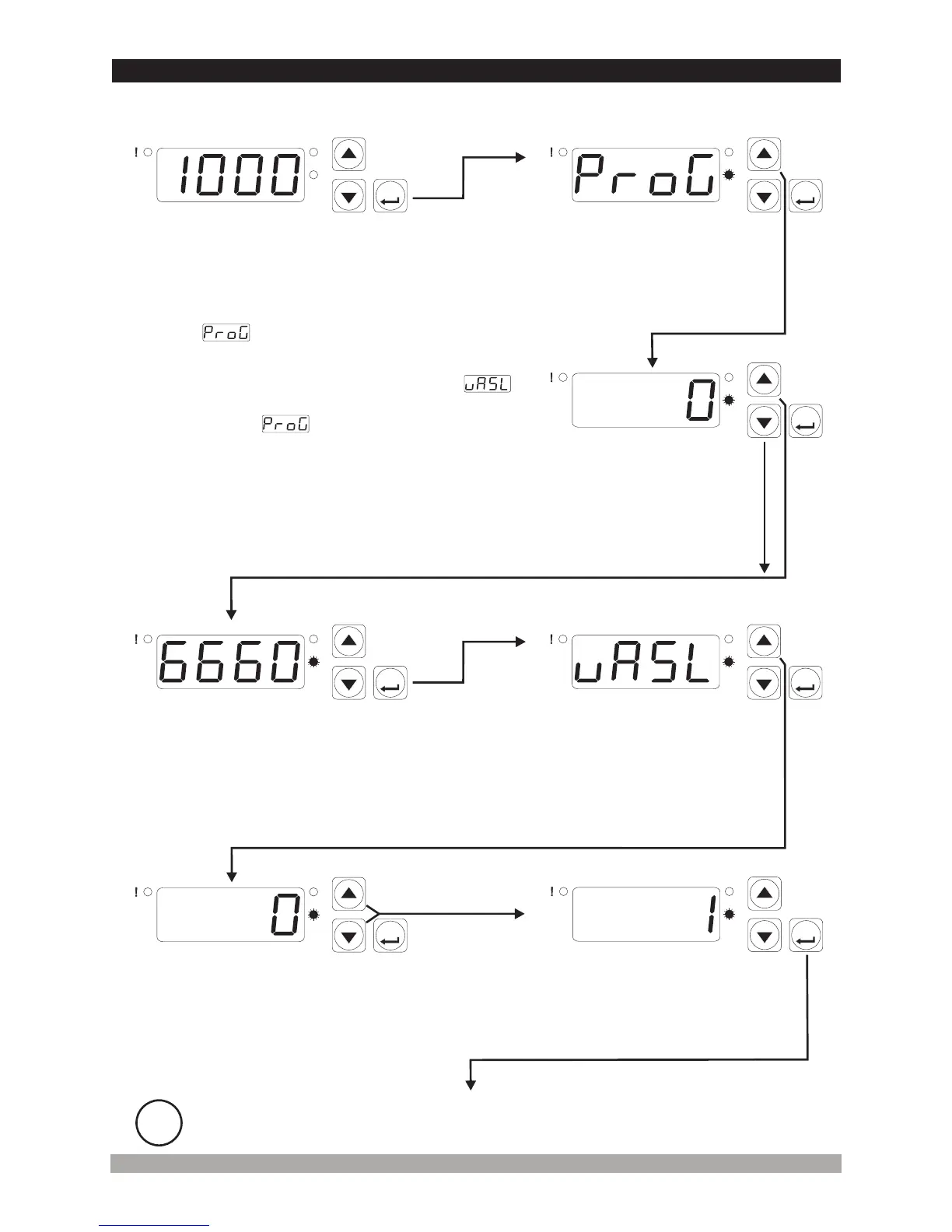
WhenENTERbuttonispressed
for5seconds.“P”ledstartsto
blink.Ifprogrammingmode
enteringpasswordisdifferentfrom
0,programmingmodeentering
screenisobserved.
MainOperationScreen
ProgrammingMode
AccessingScreen
Enterprogrammingmode
accessingpasswordwith
incrementanddecrement
buttons
PasswordEnteringScreen
4.8EnteringtotheProgrammingMode,ChangingandSavingParameters
ProcessInputType
SelectionParameter
Pressincrementbuttonforaccessing
totheparametervalue.PressENTER
buttonforaccessingtothenext
parameter
Note-1: Ifprogrammingmodeaccessingpassword
is0,processinputtypeselectionparameter
screenisobservedinsteadofprogrammingmode
accessingscreen
Changethevaluewithincrement
anddecrementbuttons
PressENTERbuttonforsaving
theparametervalue
ProcessInputType
SelectionValue
ProcessInputType
SelectionValue
Note-2: Parameters can be observed by
pressing ENTER button in programming mode
a c c essing s c r e e n w i t h o u t e n t e r ing
programming mode accessing password. But
parameters can not be changed.
ProgrammingScreen
P
AS
ASET
P
AS
ASET
P
AS
ASET
P
AS
ASET
P
AS
ASET
P
AS
ASET
P
AS
ASET
i
If no operation is performed in Programming mode for 20 seconds, device turns to
main operation screen automatically.
ProgrammingScreen
PasswordEnteringScreen
Pressincrement
buttonforaccessing
tothepassword
enteringscreen.
PressENTERbuttonfor
accessingtotheparameters


 To Next Page