27
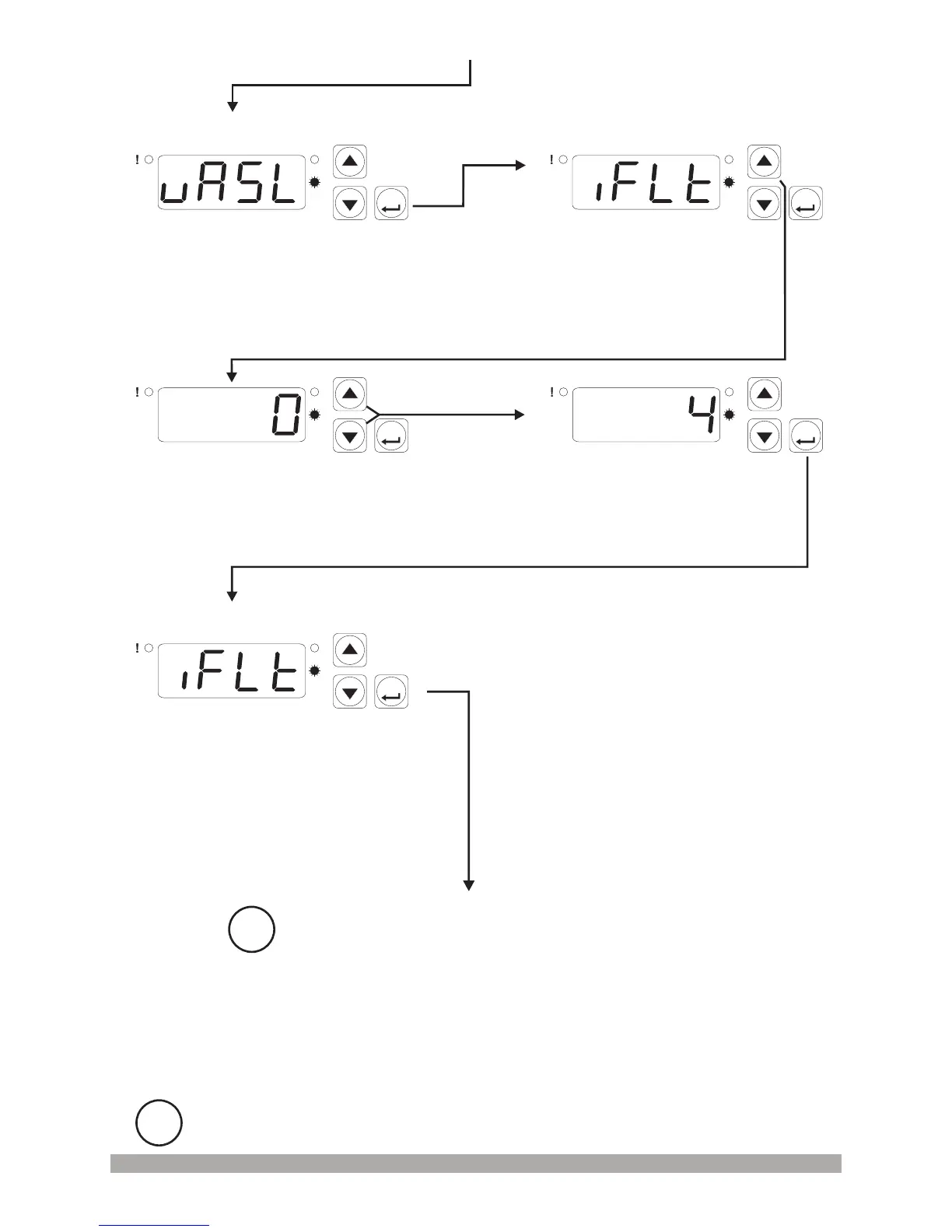
Changethevaluewithincrement
anddecrementbuttons
ProcessInputFilter
SelectionValue
Pressincrementbuttonforaccessing
totheparametervalue.PressENTER
buttonforaccessingtothenext
parameter
PressENTERbuttonfor
accessingtothenextparameter
ProcessInputFilter
SelectionValue
PressENTERbuttonfor
savingtheparametervalue
ProcessInputFilter
SelectionParameter
PressENTERbuttonfor
accessingtothenextparameter
ProcessInputType
SelectionParameter
P
AS
ASET
P
AS
ASET
ProcessInputFilter
SelectionParameter
P
AS
ASET
P
AS
ASET
i
Other programming mode parameters can be accessed
with same method explained above, observed and
changed
i
If no operation is performed in Programming mode for 20 seconds, device turns to
main operation screen automatically.
P
AS
ASET
ProgrammingScreenProgrammingScreen
ProgrammingScreen


 To Next Page