© 2024 EMM Labs, All Rights Reserved. EMM Labs reserves the right to amend specifications & design without notice.
020
Network & Streaming
DA2i STEREO D/A CONVERTER OWNER’S MANUAL
Network & Streaming
mConnect Control App
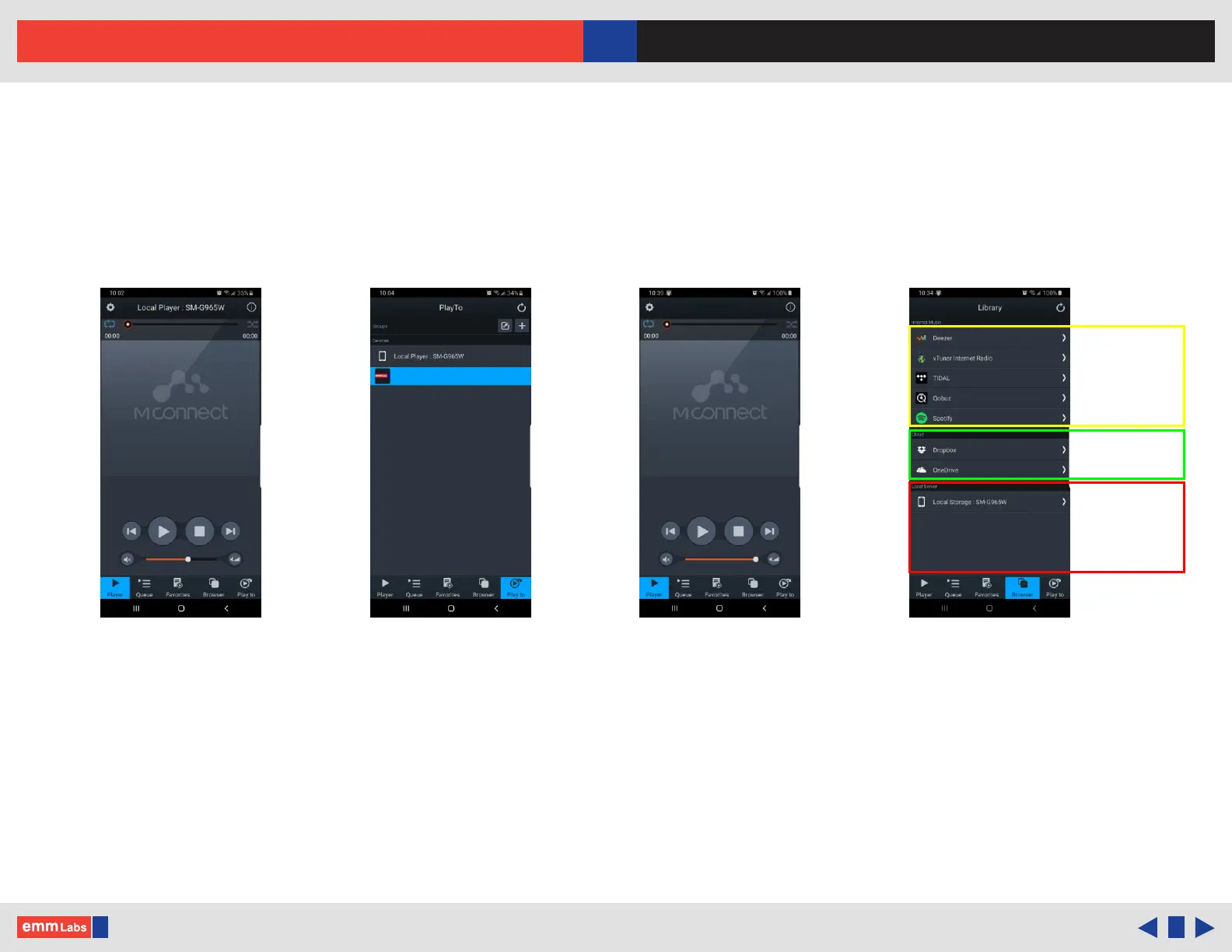
1. Start the mConnect Control app from your mobile phone or tablet. Mobile or
tablet must be connected to the same network as the DA2i.
2. Start the mConnect Control app, press the “Play to” button on the bottom right.
Select the device with the EMM icon or named “EMM_DA2i”.
3. Select and press the “Browser” button. You can then then select:
• “Internet Music” streaming music services eg. Tidal, Qobuz and Spotify
• “Cloud” play les from online storage services eg. Dropbox or OneDrive
• “Local Server” play les from local storage (mobile/tablet), USB drive
connected to the DA2i, detected DLNA/UPnP enabled network storage
Select DA2i from “Play to” DA2i selectedmConnect startup Browser Page
Internet
Streaming
Services
Cloud
Storage
Local phone
tablet storage,
USB Media,
UPNP/DLNA
network storage
EMM-DA2i
EMM-DA2i



 To Next Page