© 2024 EMM Labs, All Rights Reserved. EMM Labs reserves the right to amend specifications & design without notice.
019
Network & Streaming
DA2i STEREO D/A CONVERTER OWNER’S MANUAL
Network & Streaming
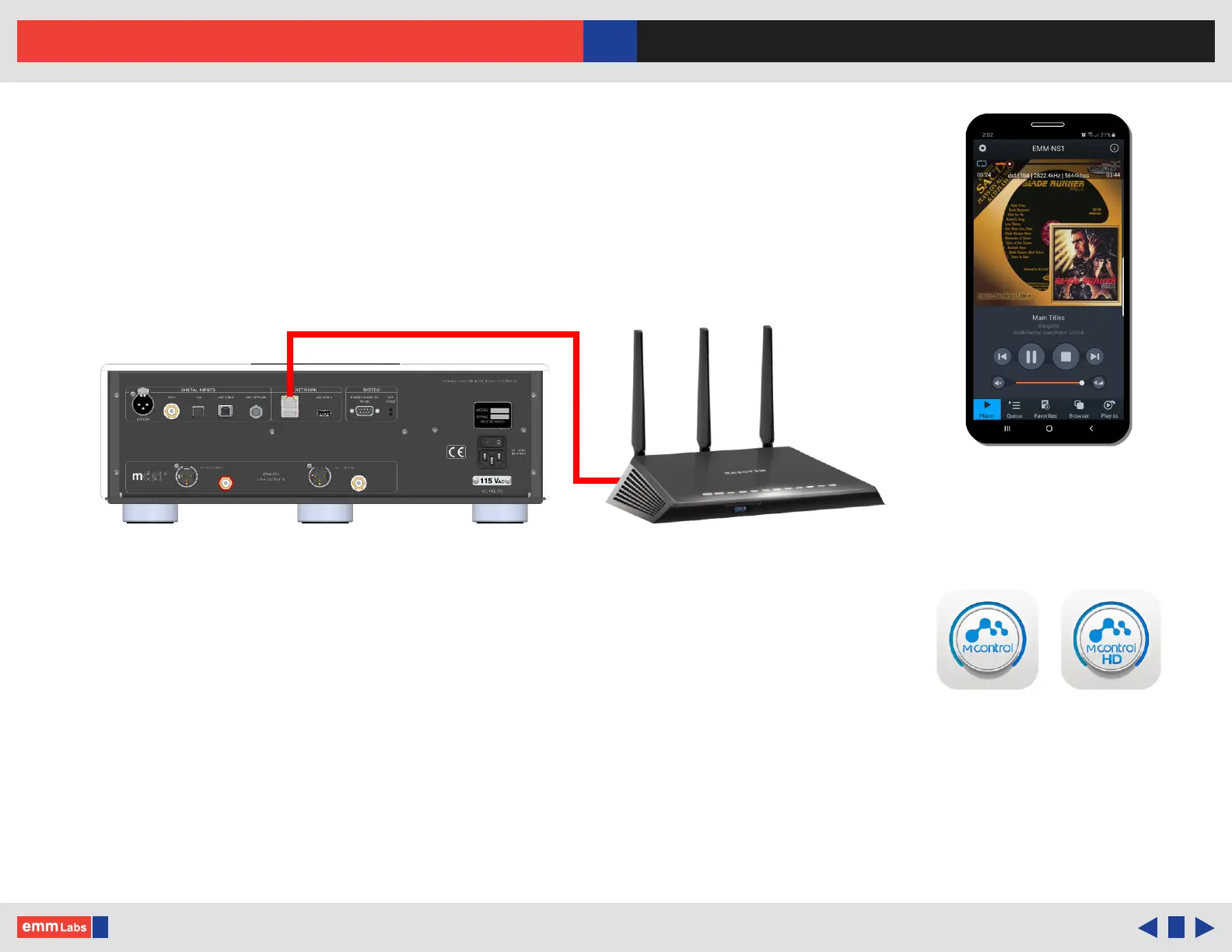
Connecting to the Network
1. Connect the DA2i via the ethernet/network (RJ45) port to a network router or
switch using a suitable ethernet cable. Make sure network is working and
enabled.
2. Select the “NET” input on the DA2i either using the remote or the front panel
input touch buttons.
3. You can also install a USB ash drive (FAT32 or NTFS formatted) by
attaching it to the DA2i’s USB Media input port for direct audio le playback.
4. Download and install mConnect Control app for mobile Android or IOS. For
tablets and to use the landscape interface install the mConnect Control HD
app. e mobile device or tablet must be connected on the same network as the
DA2i. Do not install the mConnect Player Lite, mConnect Player (paid app) or
mConnect Player HD.
Network Cable
Network Switch/Router
mConnect Control
app Mobile/Tablet for
Playback and Control
mConnect Control
Mobile and tablet/iPad app



 To Next Page