10
10. SHOCKWAVE BOARD SETTINGS AND FUNCTIONS
The electronic board features several modes and functions that are listed below.
The board is located inside the front foregrip of the marker. Before changing or
adjusting any of the board functions, remove the propellant source from the MINI
and install a barrel blocking device. The board inside your MINI features 4 fi ring
modes and 6 adjustable functions. It uses a 3 color LED indicator on the backside
of the front foregrip to indicate functions and modes during programming.
TOURNAMENT LOCK
Tournament lock is a feature that
prevents the marker from entering
the Settings Mode while in the fi eld,
to allow the marker to be tournament
legal. See your tournament’s rule book
for an explanation on what is required
to lock your marker. Tournament Lock
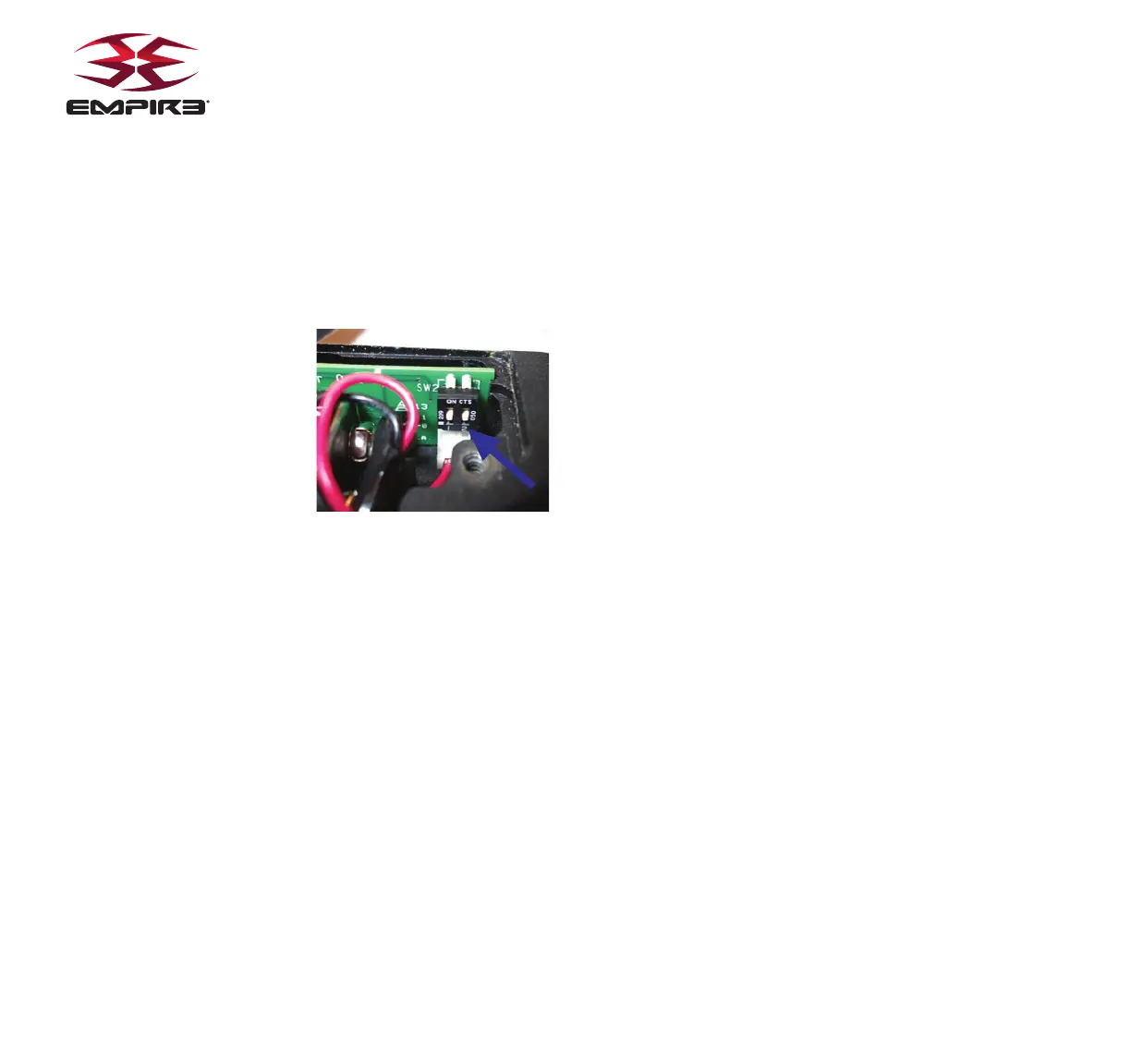
can be turned on/off by using the dip
switch 1 located on the inside of the fore grip near the bottom of the circuit board.
The battery door must be removed to access the switch. Flip dip switch #1 to
the ON (UP when laying fl at) position to activate the Tournament Lock. When
tournament lock is ON, Settings Mode cannot be activated
SETTINGS MODE
The MINI must be Off and the Tournament Lock must be Off to begin managing
the settings and functions. To activate the marker in Settings Mode, press and
hold the Trigger, then press and hold the button on the back side of the fore
grip. The LED will cycle through an array of colors to indicate the Settings
mode is active. You may now release the trigger and the button. Once the
LED is done cycling you are ready to navigate through settings mode.
NAVIGATING THROUGH SETTINGS
Once in Settings Mode, use the trigger is used to navigate to the next
setting, where the LED indicates which setting as listed in the chart above.
Pressing and releasing the trigger quickly will navigate to the next setting.
The LED color/status will change accordingly.
Example:
If currently in Firing Mode (solid Red), press and release the trigger 3 times to get to
De-Bounce (fl ashing Red).
LED Setting
Solid Red Firing Mode
Solid Green Max ROF
Solid Amber Dwell
Flashing Red De-Bounce
Flashing Green Ball In Place
Flashing Amber Ramp Start
Fast Flashing Red Ramp Sustain
CHANGING SETTINGS
To change a setting, fi rst navigate to the setting you would like to change by using
the trigger as described above. Once at the desired function, press and hold the
trigger for 2 seconds. The LED will then begin blinking to indicate the setting’s
current value. Once the blinking stops, the LED will turn off and you have a 3
second window to begin entering a new value. Press and release the trigger the
number of times corresponding to the desired new setting value. After the desired
number is reached, release the trigger and after 3 seconds the LED will cycle
through an array of colors to indicate the setting is saved. If you do not enter any
trigger pulls to modify a setting, the value remains the same. If you enter more
than maximum amount of trigger pulls for any setting, the value will become the
maximum value for that setting. Power off the marker to exit the Settings Mode.
Any setting that was modifi ed will be stored and ready to use upon startup.
FIRING MODES
-WILL BE INDICATED BY SOLID RED LED
You must be in the Settings Mode to change Firing Modes, see above for instructions
on how to enter Settings Mode. After choosing Firing Modes (Solid Red), hold the
Trigger, the LED will fl ash Red LED blinks equal to the current setting, followed by a
pause. Pull the trigger the number of times equal to your new desired setting (see
chart below). Once done, the LED will cycle through an array of colors to indicate the
setting is saved and return to the Settings Mode. There are 4 fi ring modes available:
NPPL/Semi Auto, PSP/Burst, Millennium/Ramp, and NXL Style Full Auto.
IMPORTANT:
When the Firing Mode is changed it will also automatically modify the
corresponding Max Rate of Fire and ramping parameters that correspond to that mode. These
settings may be changed after Firing Mode is selected
# of Blinks Mode
1 NPPL/Semi
2 PSP/Burst
3 Mill/Ramp
4 Full Auto


 To Next Page