ENGLISH–24
1. GETTING STARTED
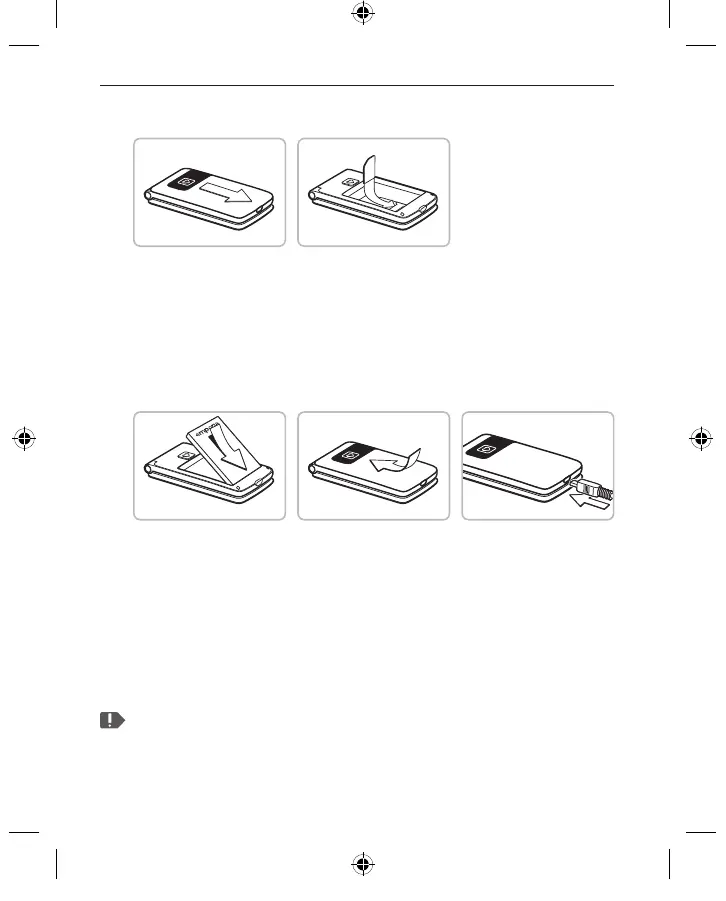
› Inserting a SIM card
• Remove the battery cover
(opening in the bottom left-hand corner).
• Slide the SIM card into the SIM card holder
with the gold contacts facing down.
› Inserting and charging the battery
• Insert the battery, making sure that
the battery contacts touch the phone's gold contacts.
• Slide the battery cover into its position over the battery.
You will know it is in the correct position
when you hear it click into place.
• Plug the charging cable into the port on the bottom of the phone.
Attention: Charge the battery for at least four hours before the rst
time you use it. Only use batteries and chargers that are permitted
for use with this speci c model.
F220j-GuidBook-V1a_GER-ENG-ITA-FRA-NED_36332-001.indb 24F220j-GuidBook-V1a_GER-ENG-ITA-FRA-NED_36332-001.indb 24 06.04.18 16:1406.04.18 16:14



 To Next Page