by the two buttons above the list – some conditions allow for treatment with
either ultrasound or stimulation but others can only be treated by one or the
other.
System Settings Menu
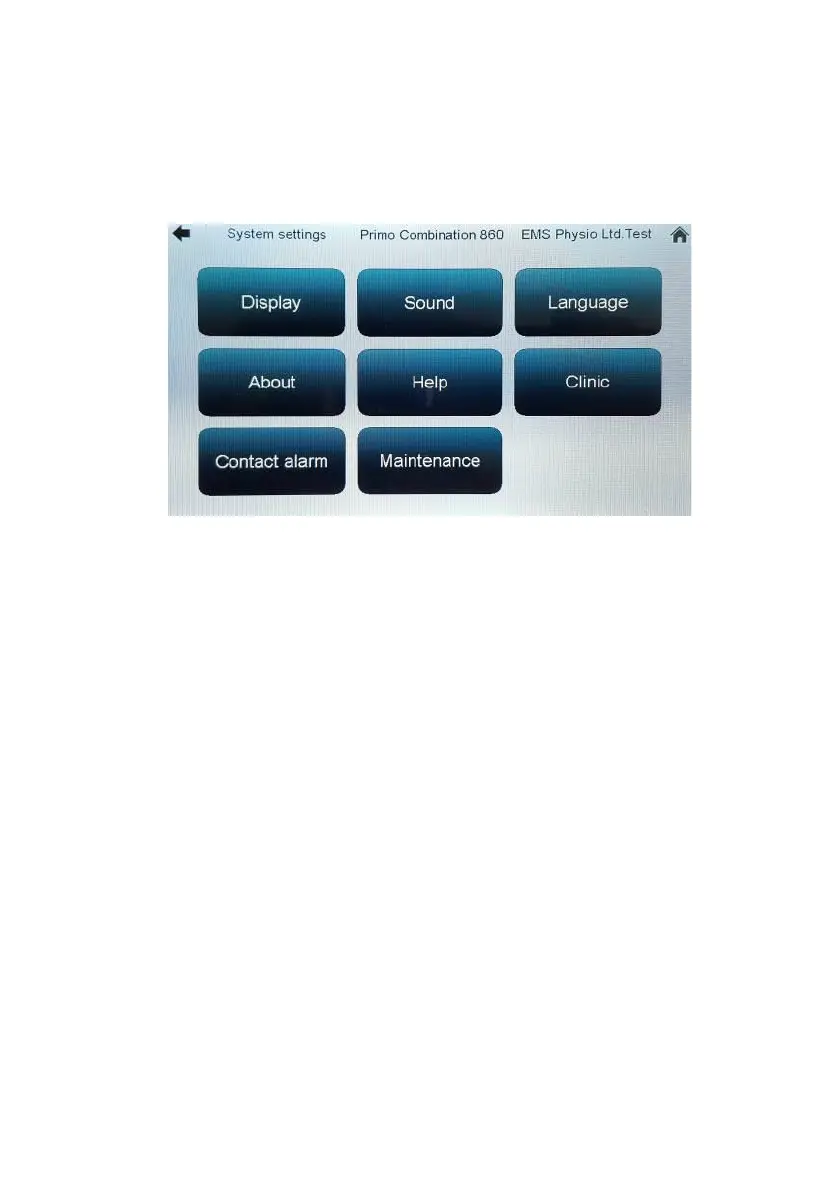
Touching the ‘System’ settings button at the bottom of the ‘Home’ screen
takes you to the system settings screen.
The ‘Display’ button takes you to a screen where you can adjust the display
brightness using up/down buttons.
The ‘Sound’ button takes you to a screen where you can adjust the pitch
and volume of the audio.
‘Language’ allows you to change the display language to any that are
installed in the unit (English, French, German, Spanish, Italian and
Vietnamese as standard).
The ‘About’ button displays info such as serial number and software version.
‘Help’ brings up an embedded text version of this user manual.
‘Clinic’ allows you to enter a name label for the machine which will be
displayed at the top of all screens.
Touching the ‘Contact alarm’ button gives you a screen with three options
for the behaviour of the contact alarm. ‘On’ is the default mode where poor
contact makes the contact light flash and stops the timer countdown. ‘Off’
causes poor contact to flash the contact light but not stop the timer
countdown. Audio gives an additional beeping warning (transducer LED
flashes, timer stops).
‘Maintenance’ is designed for service engineers and requires a pass code
to enter.


 To Next Page