E4 IN REV. A
ALARM FEATURE “B” PROGRAMMING:
1 Turn the Ignition switch ‘ON/OFF’ 3 TIMES and stay in OFF position.
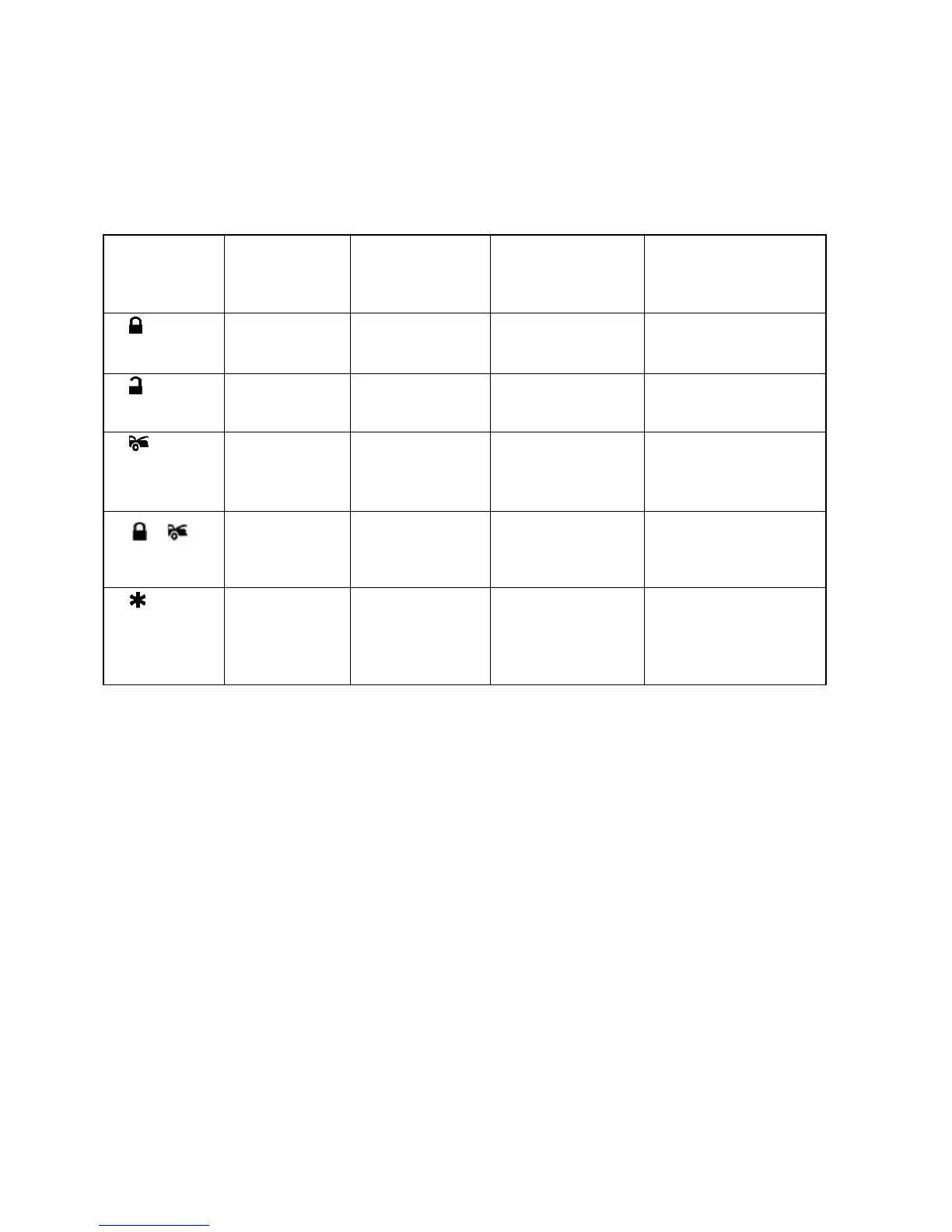
2 Push the Valet switch 4 times (holding in on the 4
th
push) until one long chirp is heard then release the valet
switch. You are now in the Alarm feature “B” programming mode.
3 Press and release the transmitter button corresponding to the feature you want to program.
One Chirp /
LED one pulse
Factory Default
Setting
Two Chirps / LED
two pulses
Three Chirps / LED
three pulses
Four Chirps / LED four
pulses
0.8-second
Door lock
pulses.
3.5-second Door
lock pulse.
Door lock with “Comfort
Feature”
Passive arming
without passive
door locking
Passive arming
with passive door
locking.
Ignition
controlled
door locks &
unlocks
Ignition controlled
door locks only
Ignition controlled
door unlocks only
Without ignition
controlled door locks &
unlocks
Horn chirp
Duration
Standard
Horn chirp
Duration
50 mS
Horn chirp Duration
30 mS
Horn chirp duration
10 mS
Pathway
illumination
feature “off”
Parking light
turns “on” for 30-
second upon an
unlock signal
Parking light turns
“on” for 30- second
upon an unlock
signal & 10-second
upon a lock signal.
Exit: Turn Ignition to 'ON' position, or leave it for 15 seconds. 3 long chirps & 3 parking light flashes will confirm exit.
Comfort Feature:
Some Vehicles have a special “COMFORT feature”. When you lock the door with the key, you can keep turning the
key in the door for about 5 to 7 seconds and the window will close directly. If your vehicle has the “COMFORT
feature” and you wish for the door to be locked and the window to be closed automatically at the same time by
remote control, you can set the alarm feature “B-3 “with comfort feature”.


 To Next Page