E4 IN REV. A
ALARM FEATURE “C” PRORAMMING:
1 Turn the Ignition 'switch ‘ON/OFF’ 3 TIMES and stay in OFF position.
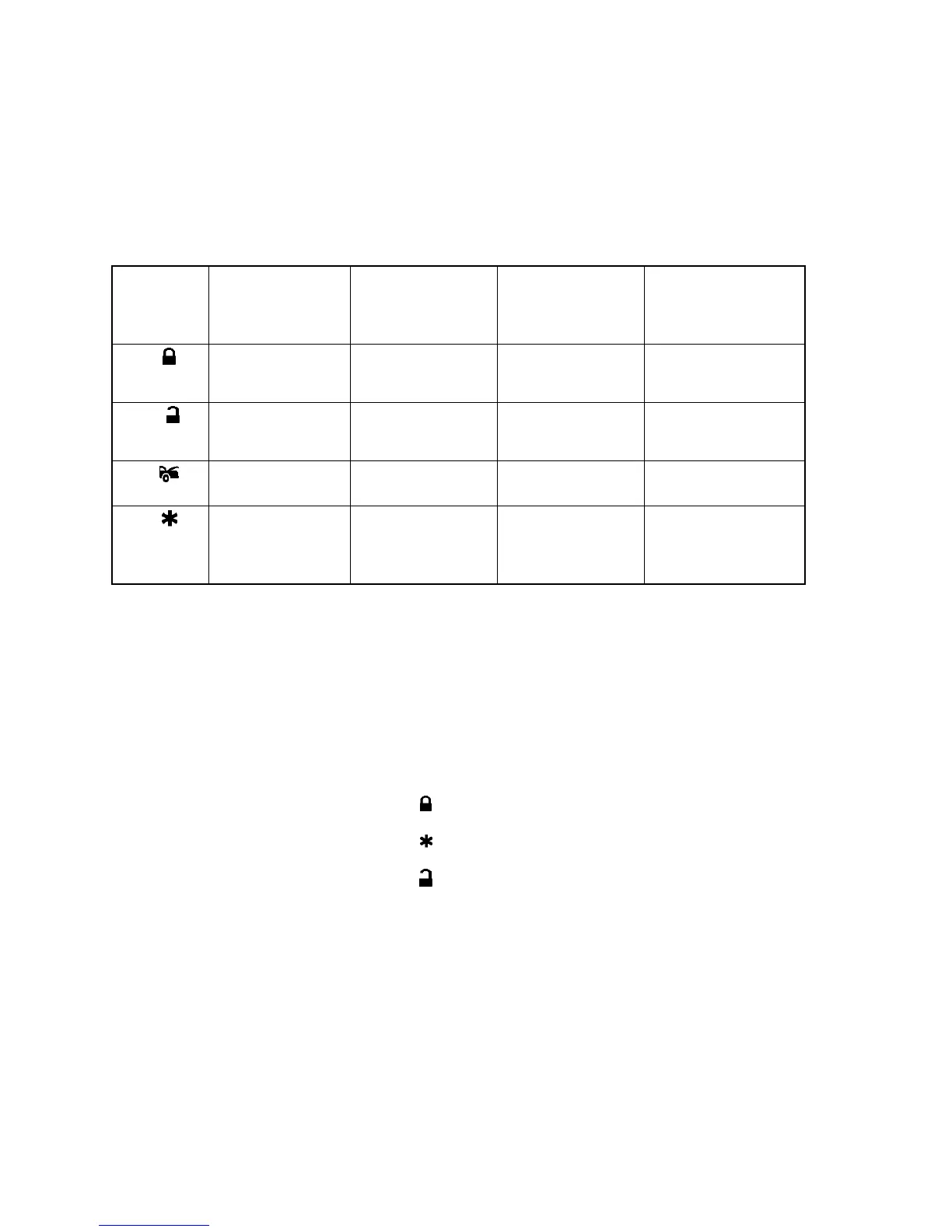
2 Push the Valet switch 5times (holding in on the 5th push) until one long chirp is heard then release the valet
switch. You are now in the Alarm feature “C” programming mode.
3 Press and release the transmitter button corresponding to the feature you want to program.
One Chirp / LED
one pulse
Factory Default
Setting
Two Chirps / LED
two pulses
Three Chirps /
LED three pulses
Four Chirps / LED
four pulses
Channel 3 Output
=
2 sec. Pulse
Channel 3 Output
=
Latched
Channel 3 Output
=
Timer control
Channel 5
Output =
2 sec. Pulse
Channel 5 Output
=
Latched
Channel 5 Output
=
Timer control
Pink Wire =
2 Step Unlock
Pink Wire =
Factory Disarm
Channel 4 Output
=
2 sec. Pulse
Channel 4
Output =
Latched
Channel 4 Output
=
Timer control
Exit: Turn Ignition to 'ON' position, or leave it for 15 seconds. 3 long chirps & 3 parking light flashes will confirm exit.
Channel 3/4/5 Timer Control Output Programming:
Enter:
1. Turn the Ignition 'switch ‘ON/OFF’ 5 TIMES and stay in OFF position.
2. Push the Valet switch 5 times and hold in on the 5
th
push, when a long chirp is heard, then release the
valet switch. You are now in the Alarm feature ‘C’ programming mode.
Timer Program Channel 3/4/5:
1-a. CH 3 Press and release the transmitter button 3 times, [3] LED flash, [3] siren/horn chirp to
indicate you are in features “Channel 3 Timer Programming mode”.
1-b. CH 4 Press and release the transmitter button 3 times, [3] LED flash, [3] siren/horn chirp to
indicate you are in features “Channel 4 Timer Programming mode”.
1-c. CH 5 Press and release the transmitter button 4 times, [3] LED flash, [3] siren/horn chirp to
indicate you are in features “Channel 5 Timer Programming mode”.
2. Press and hold the valet switch, the timer will immediately start.
3. When the desired interval has passed, release the valet switch. 1 long chirp for confirmation.
(Set to any interval between 1 second and 2 minutes)
Note 1:
If your built-in timer controls window/sunroof closure in your car DO NOT change the timer setting! This
requires installer-only programming. Changing the value will adversely affect operation and may cause
damage.
Note 2:
Latched output = The latched output selection will send a negative signal as soon as the Channel 3/4/5
button is pressed and will continue until the button is pressed again.


 To Next Page