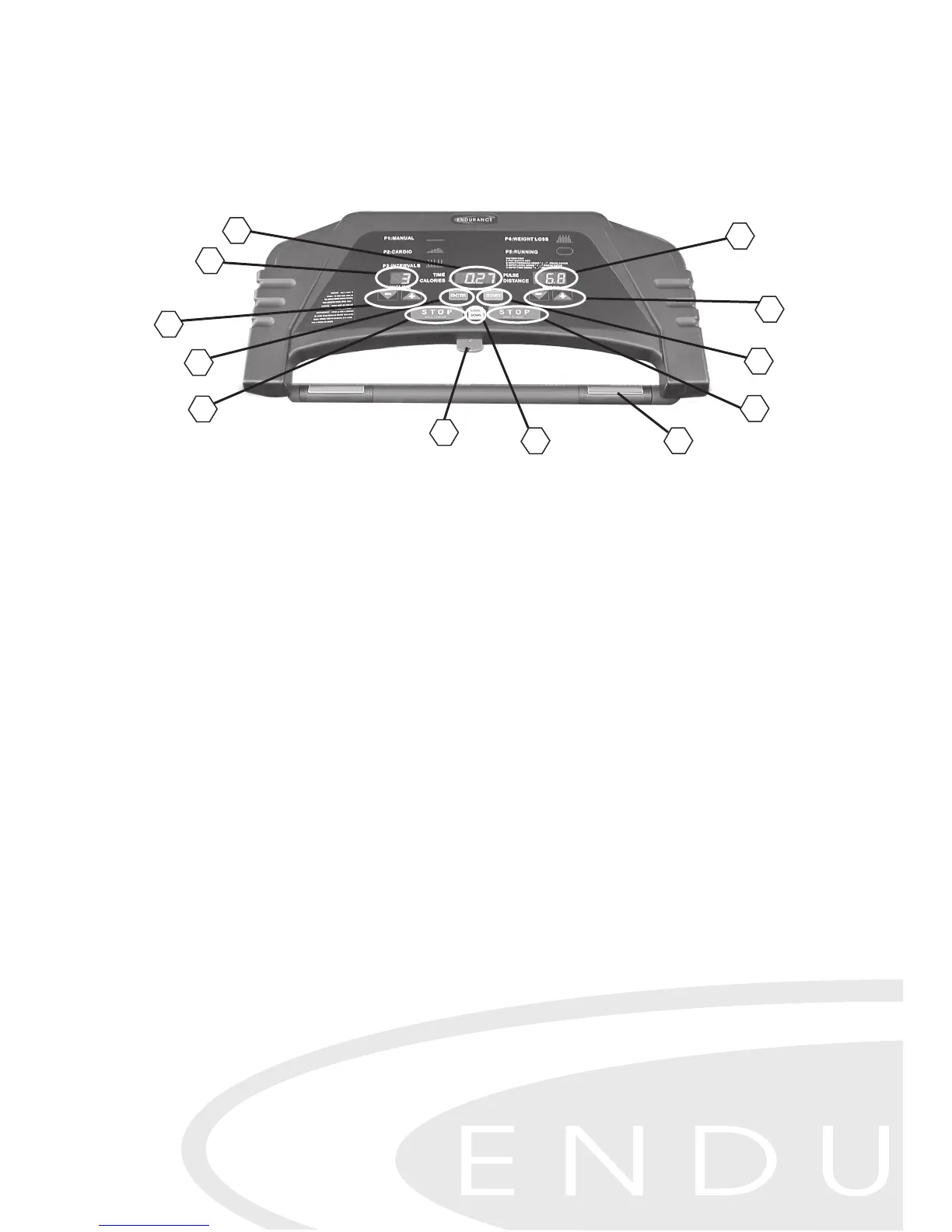
A. Elevation Display
B. Time/ Calories/HeartRate/Distance Display
C. Speed Display
D. Elevation Adjustment Buttons
E. Speed / Program Adjustment Buttons
F. Enter Button
G. Start Button
H. Stop Button
I. Cool Down Button
J. Safety Key
K. Heart Rate Sensor
Safety Key
Safety Key quickly stops the treadmill when disconnected from the control panel
in the event of an emergency. The Safety Key, when used correctly, will pull off of
the Console and stop the treadmill quickly if the user has fallen or is out of the safe
operating area. For hands-free safety, simply attach the clip end of the Safety Key
to a non-obstructive area of your clothing. The treadmill will not operate unless the
Safety Key is in position. To prevent children or unauthorized users from using your
treadmill, we recommend that you store the Safety Key off the console.
Stop Button
The over-sized Stop Button is located in the middle of the console. Press the Stop
Button and release to pause your workout. Your progress and feedback in
formation will remain on display and the tread belt will slow to a halt. To resume
your workout, press Start and the treadmill will resume where you left off after a
3-second countdown. Holding the Stop Button down for 3 seconds will completely
reset the control panel.
Control Panel Instructions
GETTING STARTED
After the treadmill is correctly installed and plugged in, it's time to start our workout.
Begin by depressing the power switch, located in the front of the treadmill near the
power cord, to the
ON position.
D
F
I
K
H
H
J
C
E
G
A
B
16


 To Next Page