22
3. Press CTRL + MENU. Set the Slave ID to 01.
MAIN MENU
1. Configuration
2. Network
3. LCD
4. Initialization
Exit(ESC)
Configuration
1. Key Beep: ON
2. Key Lock: OFF
3. Chg User PW
4. Chg Admin PW
Save and Exit
Network
1. J-BOX Set: OFF
2. Keyboard ID: 01
3. BPS: 9600
Save and Exit
LCD
1. Bright: 03
2. Backlight: ON
Save and Exit
5. Install with DVR Series
5.1 Install with Standalone DVR Series
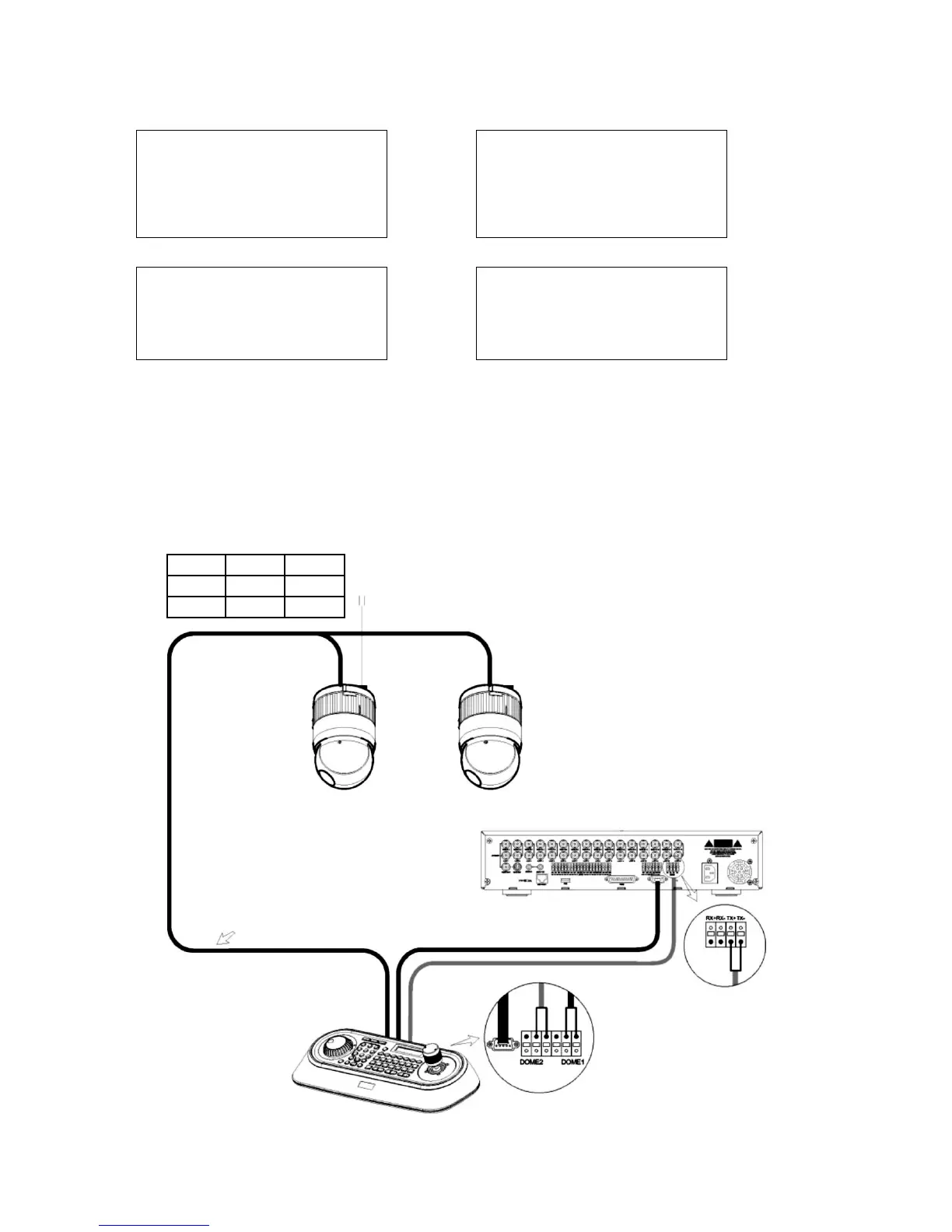
When user wants to connect with DVR, proceed as the following order.
STP AWG #22
Power 24VAC
Unshielded cable
Keyboard controller
J-Box Dome
RS-485(+) DOME 1 + RX+ (TX+)
RS-485(-) DOME 1 - RX- (RX-)
Rear
Rear
Standalone DVR series
Figure 8: DVR connection diagram



 To Next Page