Enerdrive ePRO Plus Battery Monitor Owners Manual (Rev. 1.03)Page 14
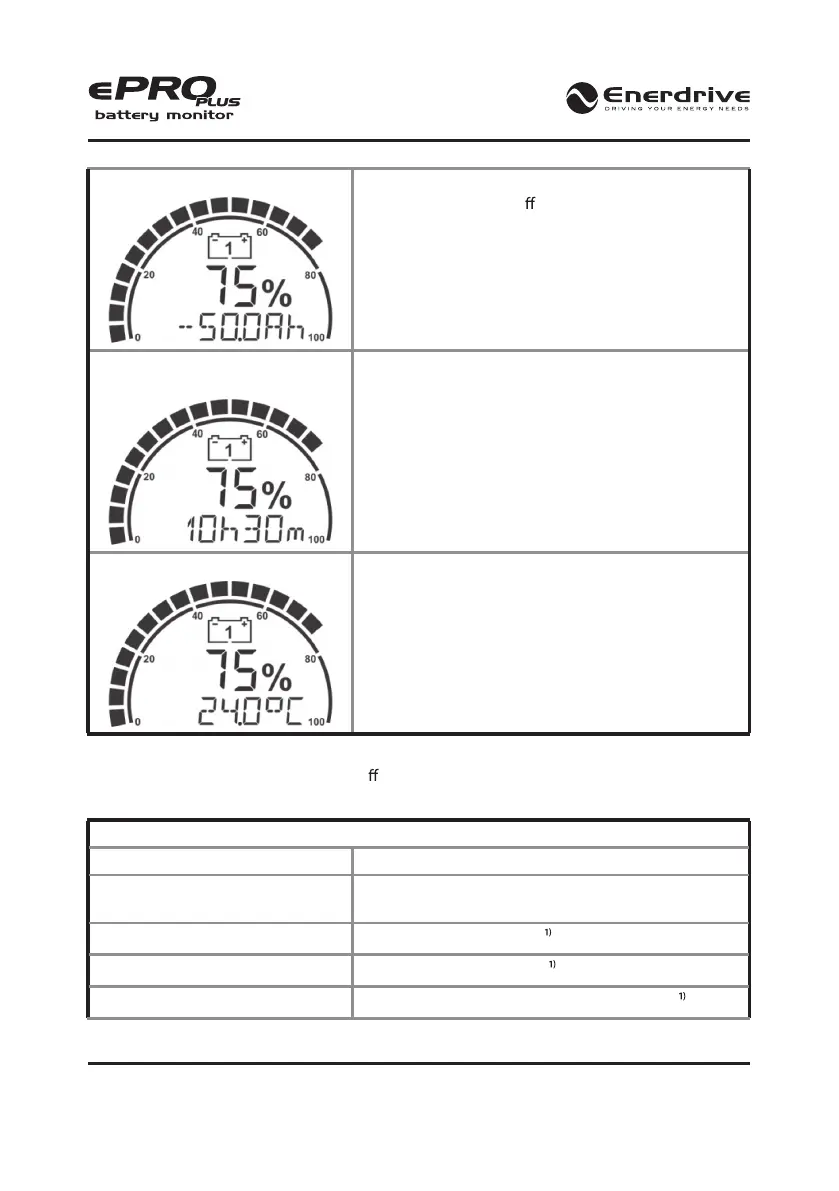
Main battery Amp-hours (Ah)
The amount of Amp-hours discharged from the battery.
This reading is turned o by default and can be turned
on in Function F9.3.
Main battery time remaining
(h:m)
Shows how much time is left under the present load,
before the battery needs to be recharged again.
Temperature (°C)
Shows the battery temperature when a temperature
sensor is connected to the ePRO Plus. The default
temperature unit is °C, but it can be set to °F as well in
Function F10.3.
3.2 Display Messages
The ePRO Plus can show a number of di erent status messages on the display. These will vary
from advisory- to error messages. Please see the table below for the available messages
Table 4
Message Explanation
‘<battery name> Battery Full’ The main battery is fully charged. ‘<battery name>’ will
be replaced by the name given in Function 1.7
‘Low Voltage’ Low battery voltage alarm
‘High Voltage’ High battery voltage alarm
‘Low Battery’ Low main battery State of Charge (SoC) alarm


 To Next Page