Page 20 of 59 Article no.: 5081200002 2022_10_17 Subject to technical change! Errors excepted.
5.2 Default display of HCA e2 after installation
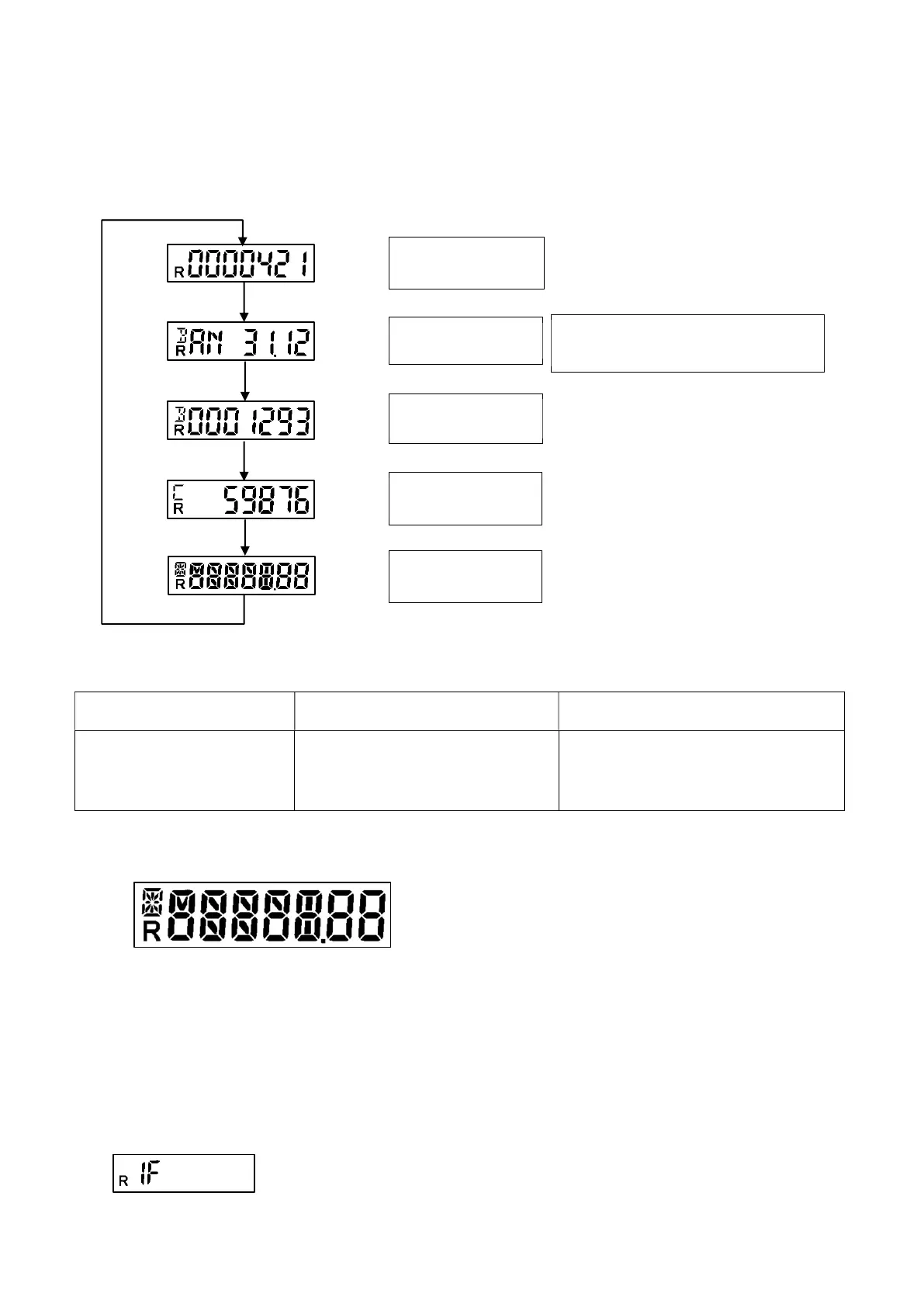
The following image shows the default display cycle of Engelmann factory setting.
Figure 2: Display cycle (factory setting)
The following status indicators are also displayed:
Appears in the lower left corner
of the display
Appears in the upper left corner of the
display
Appears in the upper left corner of the
display
R: Radio (radio is activated) B: Billing
Indicates the billing-relevant
information Billing date and Billing
value
C: Checksum
Indicates the check digit for the Billing
value (default) and / or the check digit for
the current value (optional)
It should be noted that some of the standard 7-segments elements have been expanded by including more segments
to increase the readability of the status indicators. These are visible in the segment test and are shown below:
5.3 Further status displays
The following status displays are shown for information purposes in addition to the standard display cycle, when
parameterized, or a mode change is initiated by internal algorithm.
- 1-sensor mode is selected (optional):
Figure 3: Segment test (enlarged view)
Current value
Billing date
Billing value
Checksum
Display test
=
ANNUAL
(yearly billing date)
MON
=
MONTHLY
(monthly billing date)



 To Next Page