45
¾ SiteSurvey
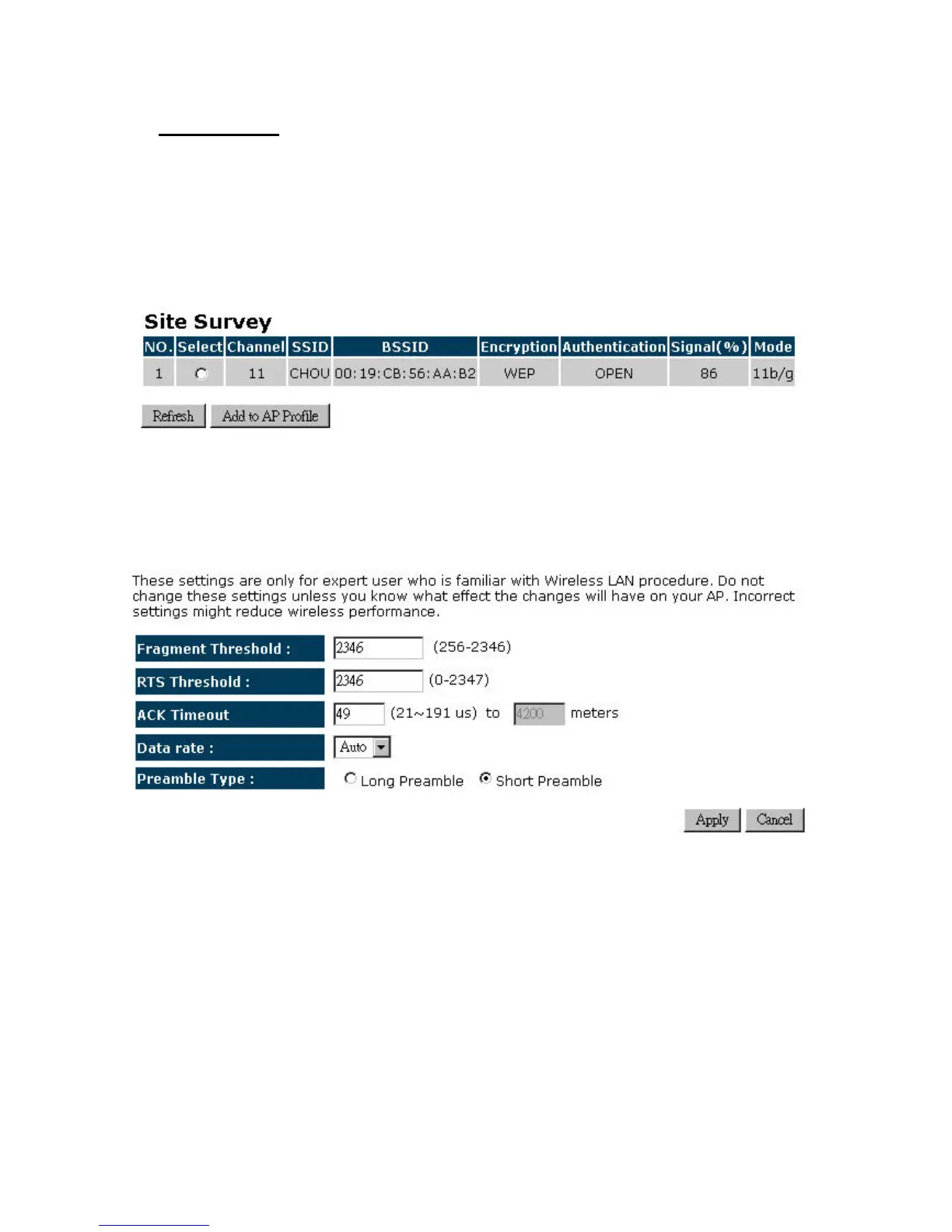
Click on the Site Survey button to view a list of Access Points in the area. The Site Survey page
displaysinformationaboutdeviceswithinthe802.11b/g/nfrequency.Informationsuchaschannel,
SSID,BSSID,encryption,authentication,signalstrength,and operatingmodearedisplayed.Select
thedesireddeviceandthenclickontheAddtoAPProfilebutton.
4.2.7.3. Advanced
¾ Fragment Threshold: Packets over the specified size will be fragmented in order to
improve performance on noisy networks. Specify a value between 256 and 2346. The
defaultvalueis2346.
¾ RTSThreshold:PacketsoverthespecifiedsizewillusetheRTS/CTSmechanismtomaintain
performance in noisy networks and preventing hidden nodes from degrading the
performance.Specifyavaluebetween0and2347.Thedefaultvalueis2347.
¾ ACKTimeout:ThewaittimeforanACKsignaltotimeout.
¾ Data rate: You may select a data rate from the drop‐down list, however, it is
recommendedtoselectauto.Thisisalsoknownasauto‐fallback.


 To Next Page