5
2. Modes
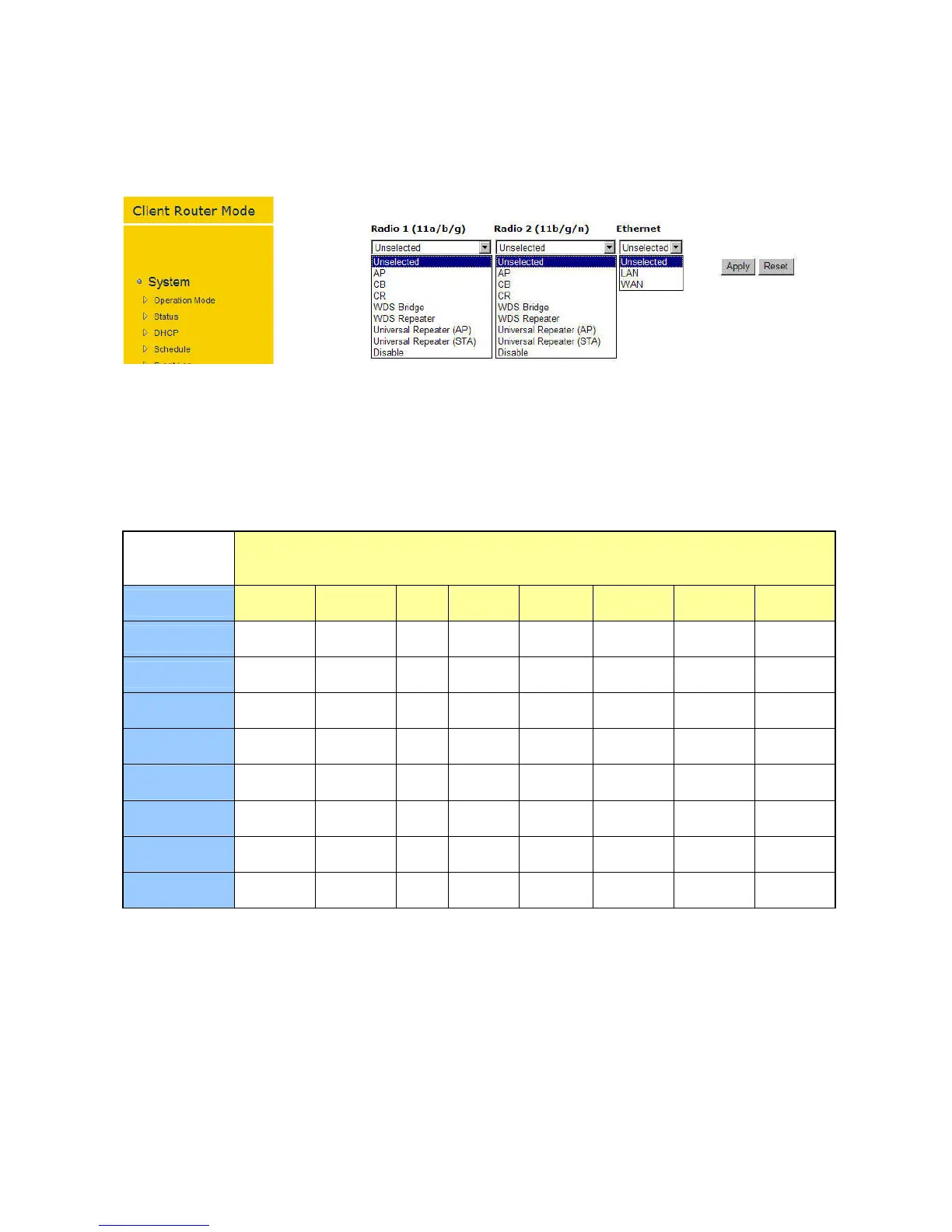
EOR7550provides2separateradiochannelsforwiderservicearea.Eachofthese2radiochannels
can be configured as differentfunction mode separately. The device allows you to configure into
different modes for different purposes in your network infrastructure. Each of these modes will
have different setting. You are allowed to configure your radio channel freely with the following
combination.
EOR7550
ConcurrentModes
Radio1(11a/b/g)
Radio2(11/b/g/n) AP CB CR WDSBridge WDSRepeater UR(AP) UR(STA) Disable
AP O(LAN/WAN) O(LAN/WAN) O(LAN) O(LAN) O(LAN/WAN) X X O(LAN/WAN)
CB O(LAN/WAN) X X X X X X O(LAN/WAN)
CR O(LAN) X X X X X X O(LAN)
WDSBridge O(LAN) X X X X X X O(LAN)
WDSRepeater O(LAN/WAN) X X X X X X O(LAN/WAN)
UR(AP) X X X X X X O(LAN/WAN) X
UR(STA) X X X X X O(LAN/WAN)
X
X
Disable
O(LAN/WAN) O(LAN/WAN) O(LAN) O(LAN) O(LAN/WAN)
X X
X
2.1. AP
InAP(AccessPoint)mode,yourdeviceactsasacommunicationhubforusersofawirelessdevice
toconnecttoawiredLAN/WAN.


 To Next Page