EasyManua.ls Logo

EnGenius EWS850-FIT - User Manual

EnGenius EWS850-FIT
11 pages
Print Icon
To Next Page IconTo Next Page
Loading...
EWS850-FIT
EWS850-FIT Quick Start Guide
Quick Start Guide
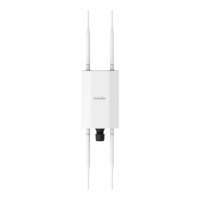
EnGenius Fit Wi-Fi 6 2×2 Outdoor Wireless
Access Point
Quick Start Guide
Introduction
This Quick Start Guide is designed to guide you through the
installation of the Fit 2x2 access point, model EWS850-FIT,
including hardware mounting and configuration.
FIT Bridge Outdoor
Access Point
Mounting
Screw Kit x2
Mounting
Bracket
Pole Mounting
Strap x2
Ground Wire &
Screw Set
Product CardDetachable Antena:
2.4GHz Antenna x2
5GHz Antenna x2
Package Contents
Wi-Fi 6 technology for high-performance Wi-Fi in high-density,
multi-device environments.
Two spatial streams support up to 1,200 Mbps (5GHz) & 574
Mbps (2.4GHz).
Multiple applications for cloud and on premises solutions.
Model: EWS850-FIT
System Requirements
Google Chrome (57.0.2987.110 and later)
Microsoft Edge (80.0.361.103 and later)
Mozilla Firefox (52.0 and later)
Web Browser
Question and Answer IconNeed help?

Do you have a question about the EnGenius EWS850-FIT and is the answer not in the manual?

Overview

The EnGenius Fit Wi-Fi 6 2x2 Outdoor Wireless Access Point (model EWS850-FIT) is a high-performance networking device designed for robust Wi-Fi connectivity in high-density, multi-device environments. It leverages Wi-Fi 6 technology to deliver fast and reliable wireless access.

Function Description:

The EWS850-FIT functions as an outdoor wireless access point, extending Wi-Fi coverage and capacity. It supports two spatial streams, offering a maximum data rate of 1,200 Mbps on the 5GHz band and 574 Mbps on the 2.4GHz band. This makes it suitable for various applications, including cloud-managed and on-premises solutions. The device can be managed through multiple methods: Cloud Management via the FitXpress platform (accessible via mobile app or web portal), On-Premises Management using a FitController, or Standalone Configuration via a local web GUI.

Important Technical Specifications:

  • Model: EWS850-FIT
  • Wi-Fi Technology: Wi-Fi 6 (802.11ax)
  • Spatial Streams: 2x2
  • Data Rates:
    • 5GHz: Up to 1,200 Mbps
    • 2.4GHz: Up to 574 Mbps
  • Ethernet Port: 2.5 Gigabit Ethernet Port (802.3at PoE)
  • Powering Options:
    • EnGenius Fit PoE switches
    • 802.3af/802.3at PoE+ compliant switches
    • EnGenius PoE Injector (EPA5006GR)
    • Caution: Do not use both power sources simultaneously.
  • Antennas: Detachable Antennas (SMA Type) – two 2.4GHz antennas and two 5GHz antennas are included.
  • Construction:
    • Bottom Cover: Aluminum Die-Casting
    • Top Cover: UL Certified Plastic
  • LED Indicators: Provide visual feedback on device status, including power, LAN connectivity, radio activity (2.4GHz and 5GHz), firmware upgrading, reset to default, and AP location mode.
  • Reset Button: Located on the PoE adaptor, used to reset the device to factory default settings by holding for over 60 seconds.
  • System Requirements (Web Browser for management):
    • Google Chrome (57.0.2987.110 and later)
    • Microsoft Edge (80.0.361.103 and later)
    • Mozilla Firefox (52.0 and later)

Usage Features:

  • Flexible Management Options:
    • Cloud Management (FitXpress): Allows remote management and monitoring via a mobile app (iOS/Android) or web portal. Devices are registered by scanning a QR code and automatically provisioned with default settings. Firmware upgrades are handled automatically.
    • On-Premises Management (FitController): For onsite management, requiring a FitController appliance connected to the same Layer 2 network. Devices are discovered, registered, and paired with the FitController for centralized control.
    • Standalone Configuration: Enables direct configuration via a local web GUI by connecting to the device's default SSID ("EnMGMTxxxx") and accessing a web browser interface (http://EnGenius.local or http://192.168.1.1). Default login credentials are "admin/admin".
  • Outdoor Deployment: Designed for outdoor use, with robust construction including an aluminum die-cast bottom cover.
  • Mounting Options: Supports both wall mount and pole mount installations.
    • Wall Mount: Involves drilling holes, inserting anchors, fastening a mounting bracket, and then hanging and securing the access point.
    • Pole Mount: Utilizes pole mounting straps threaded through the mounting bracket, which is then secured to a pole, followed by hanging and securing the access point.
  • Easy Connectivity: Connects to the network via a 2.5 Gigabit Ethernet port, supporting Power over Ethernet (PoE) for simplified installation without separate power cabling. Can be powered directly from a PoE switch or via a PoE injector.
  • Detachable Antennas: Allows for flexibility in antenna orientation and potential replacement or upgrade of antennas.

Maintenance Features:

  • LED Indicators for Troubleshooting: The various LED states (Solid On, Flashing at different rates) provide immediate visual cues for power status, network connectivity, data transmission, radio activity, firmware updates, and reset processes, aiding in quick diagnosis of operational issues.
  • Firmware Upgrades: Automatically handled in Cloud Management mode, ensuring the device runs the latest software for optimal performance and security. Manual firmware updates are also possible in other management modes.
  • Factory Reset: A dedicated reset button on the PoE adaptor allows for easy restoration of factory default settings, useful for troubleshooting or changing management modes.
  • Management Interface: Both the FitXpress app/web portal and the FitController provide comprehensive dashboards and detailed settings for monitoring device status, network statistics, client connections, and configuring wireless parameters. The standalone web GUI also offers a full suite of configuration options.
  • Management Mode Switching: The device supports changing between management modes (Cloud, On-Premises, Standalone) by performing a factory reset and then following the onboarding instructions for the desired new mode.

EnGenius EWS850-FIT Specifications

General IconGeneral
BrandEnGenius
ModelEWS850-FIT
CategoryWireless Access Point
LanguageEnglish

Related product manuals