32 /55
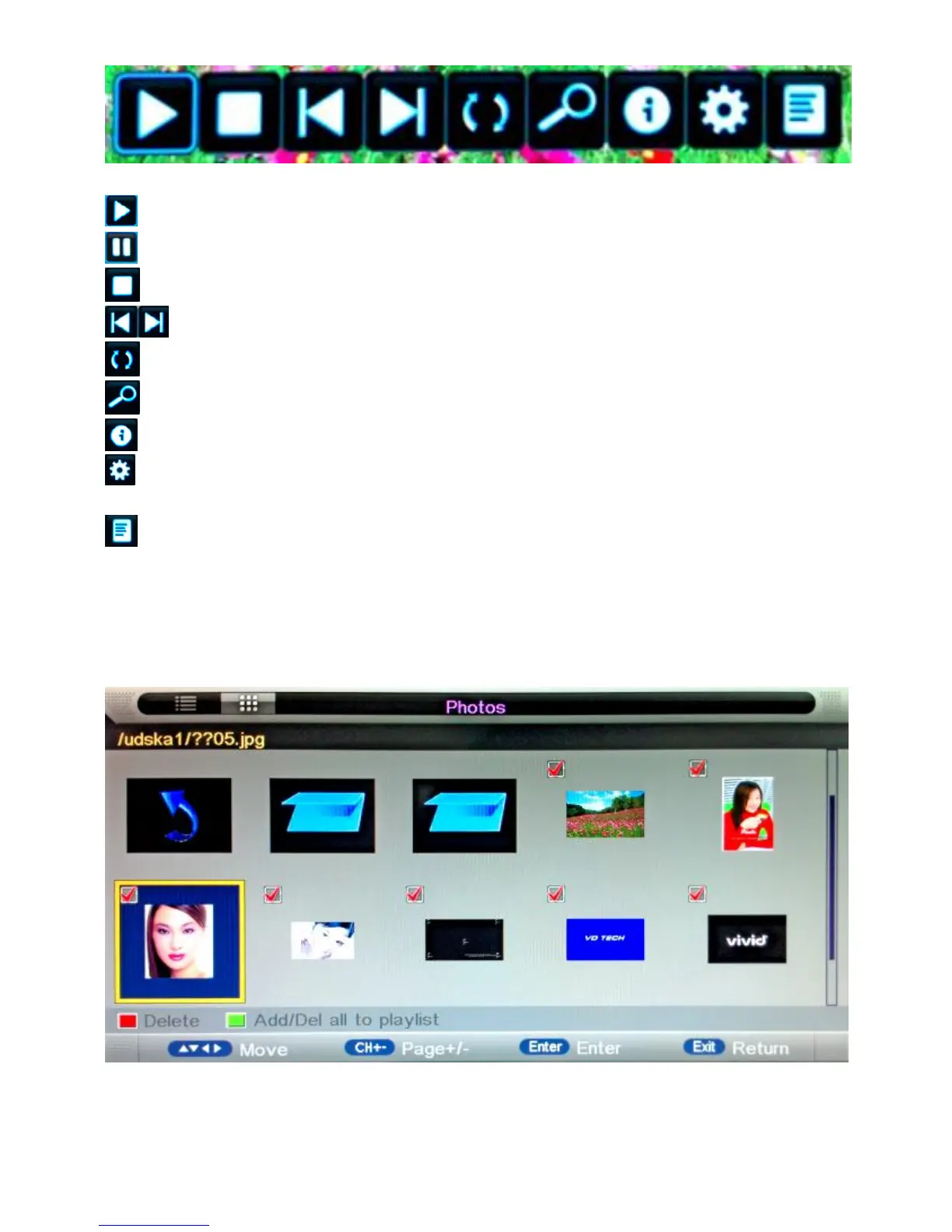
• Key Operation:
: Same as "PLAY" key on remote, to start playing pictures in slide show mode
: Same as "PAUSE" key on remote, to pause the playing file
: Same as "STOP" key on remote, to stop sliding show, and return to file browser
: Same as "|<<" / ">>|" key on remote, to play the previous or next file directly
: To rotate the playing picture (0°, 90°, 180°, 270°)
: To zoom the playing picture.
: Same as "INFO" key on remote, to display the information of the current file.
: To enter “Photo Setup” menu, including “Repeat Mode”, “Background Music”,
“Music Source”, “Slide Time”, “Effect”.
: To enter the play list menu.
1.4. Thumbnails
1). Thumbnails mode can be shown only in photo mode and highlight in file browser by
press “EXIT” “Right(►)” as follow:
2). The direction keys are to move highlight in files.
3). Press "EXIT" key, and press “LEFT” key exchange to photo list mode.


 To Next Page