45 /55
6.2.3 Preference Setup Page.
Audio, Subtitle, Disc Menu: Default is English. You can choose different languages and
if the disc has that language it will play in that language.
Parental: You will be asked for the password (0000). The default is ADULT.
Password: You can setup/change password. (Super Password is 9735).
Default: Reset to the factory settings all your personal settings in the DVD setup menu.
6.3 Disc Care
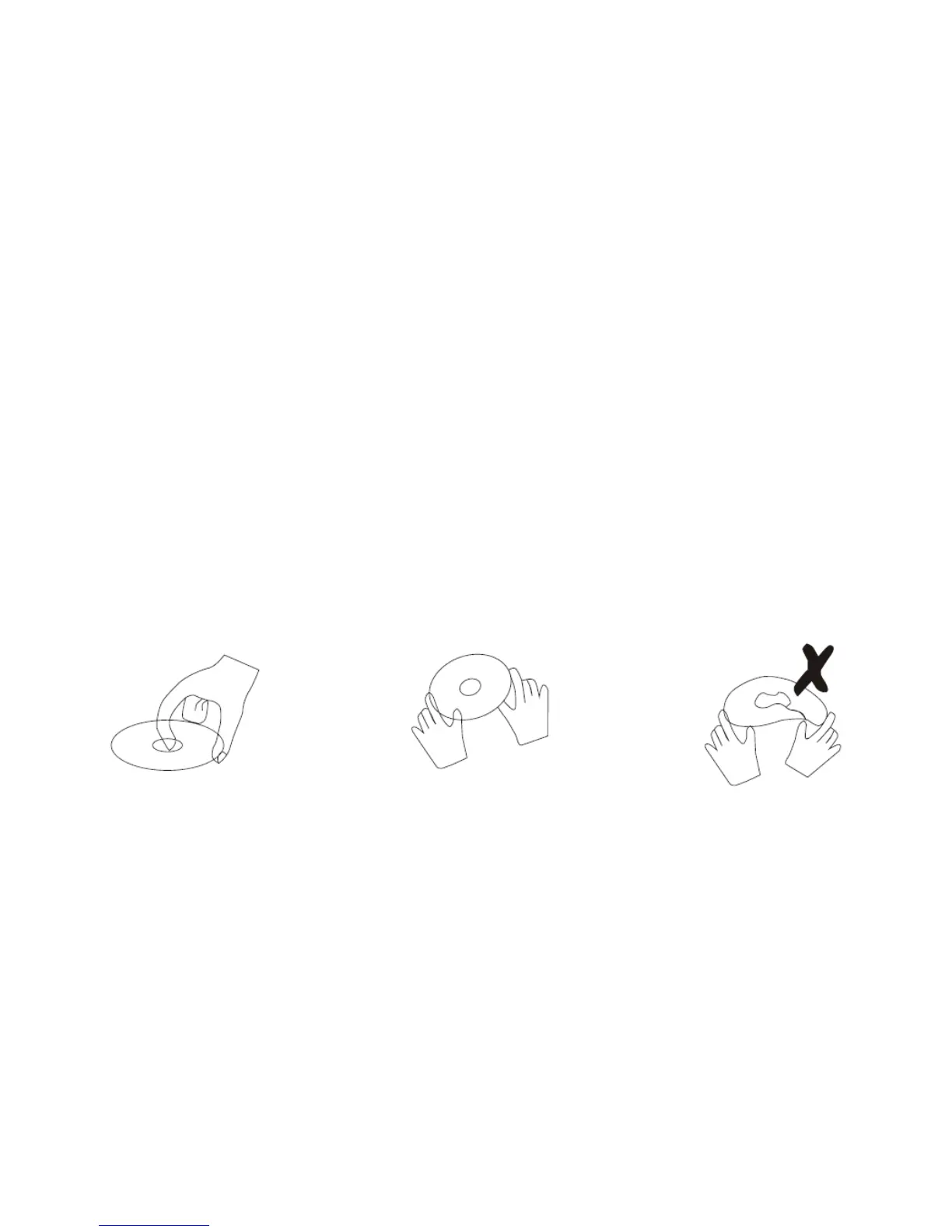
Video disc contains high-density compressed data that needs proper handling.
⚫ Hold the disc with fingers by an outer edge and/or the center spindle hole. Do not
touch the disc surface.
⚫ Do not bend or press the disc.
⚫ Do not expose the disc to direct sunlight or heating sources, store discs in cabinet
vertically, and in dry condition.
⚫ Clean the disc surface with a soft, dry cleaning cloth, wipe the disc surface gently and
wipe from the center toward the outer edge.
⚫ Do not apply thinner, alcohol, chemical solvent, or sprays when cleaning. Such
cleaning fluids will permanently damage the disc surface.
Prevent exposure to:
⚫ Direct sunlight
⚫ Heat or exhaust from a heating device
⚫ Extreme humidity


 To Next Page