13
average speed (AVG))
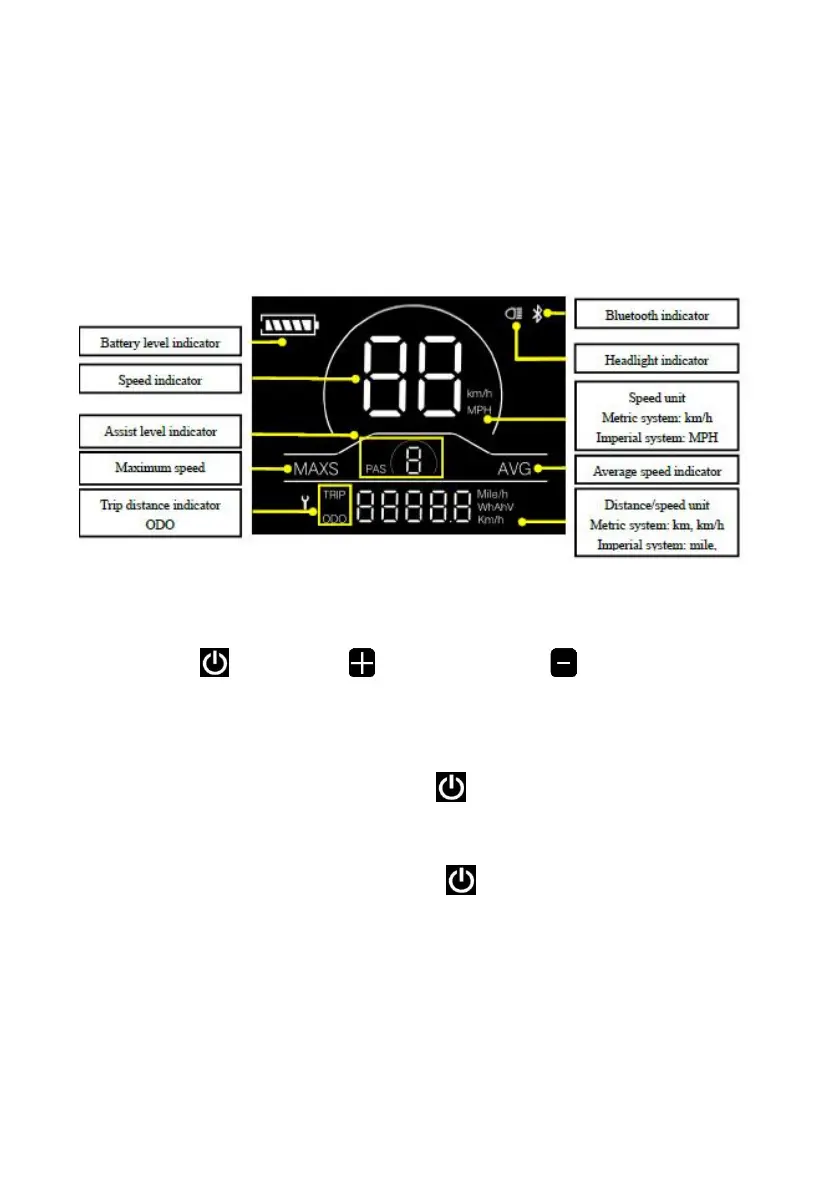
● Distance indicator (including ODO and trip distance (Trip))
● Error code indicator
● Bluetooth connection indicator (reserved)
● Parameter setting function
4.2 Functional area layout
4.3 Button definitions
There are three buttons on the operating unit of display YL81C, i.e., the
on/off button , plus button and minus button .
5. General operation
5.1 Power on/off
By pressing and holding the button , the display will start to work and
the working power supply of the controller will be turned on. In the power-on
state, by pressing and holding the button , your e-bike will be powered off.
In the power-off state, the display will no longer use the battery power, and its
leakage current will be less than 1uA.
■ If your e-bike is not used for more than 10 minutes, the display will be
automatically powered off.
5.2 Display interface
After the display is turned on, the display will show the real-time speed


 To Next Page